Uneven Stitch Quality on Tajima TFMX-C Series: Errors and Solutions


Uneven Stitch Quality on Tajima TFMX-C Series (High-Speed Single-Head): Errors and Solutions
Uneven stitch quality can be frustrating when striving for professional results with the Tajima TFMX-C Series embroidery machine. As a high-speed, single-head machine, it demands precise setup and maintenance for flawless stitching. This blog will guide you through the common causes of uneven stitch quality and provide actionable solutions to ensure your embroidery projects meet top-tier standards.
Common Causes of Uneven Stitch Quality
1. Inconsistent Thread Tension
Uneven thread tension can result in too loose or tight stitches, affecting the design’s overall appearance.

Solution:
- Adjust both upper and bobbin thread tensions, ensuring they work harmoniously.
- Perform a tension test on a sample fabric to fine-tune the settings.
- Regularly clean the tension disks to remove lint and debris.
2. Worn-Out Needle
A dull or damaged needle can lead to irregular stitch formation.
Solution:
- Replace the needle regularly, especially after 8-10 hours of operation or when switching fabric types.
- Use the appropriate needle size and type for the fabric and thread being used.
3. Incorrect Fabric Stabilization
Without adequate stabilizer, the fabric may shift, causing irregular stitching.
Solution:
- Match the stabilizer type (tear-away, cut-away, or water-soluble) to the fabric and design complexity.
- For stretchy or delicate fabrics, use additional stabilizers or adhesive sprays.
4. Misaligned Hooping
Poorly hooped fabric can result in puckered or uneven stitches.
Solution:
- Ensure the fabric is taut and properly aligned in the hoop without overstretching.
- Utilize clamps or magnetic hoops for tricky fabrics.
5. Dirty or Damaged Bobbin Case
A dirty or scratched bobbin case can disrupt the thread path, leading to inconsistent stitches.
Solution:
- Clean the bobbin case and shuttle area regularly with a soft brush.
- Replace the bobbin case if it shows signs of wear or damage.
6. Incorrect Machine Speed
High speeds may not suit all fabrics or design complexities, leading to uneven stitching.
Solution:
- Reduce the speed for intricate or dense designs.
- Gradually increase speed for simpler patterns while monitoring stitch consistency.
7. Thread Compatibility Issues
Using threads that are incompatible with your machine can cause inconsistent stitch formation or tangling.
Solution:
- Choose machine-compatible threads made for high-speed embroidery.
- Use threads with consistent thickness and smooth finishes to prevent snagging or breaks.
8. Incorrect Bobbin Thread Winding
Improperly wound bobbins can cause uneven stitches and tension issues.
Solution:
- Use the machine’s bobbin winder for uniform winding or purchase pre-wound bobbins.
- Avoid overfilling bobbins, as this can cause irregular feeding.
9. Unstable Work Surface
If the machine is placed on an unstable table or surface, vibrations may disrupt stitching.
Solution:
- Secure the machine on a sturdy, level surface to reduce vibration.
- Use anti-slip pads or a dedicated embroidery workstation.
10. Inadequate Machine Calibration
Irregular settings, especially after frequent use or maintenance, can lead to uneven stitches.
Solution:
- Reset the machine’s settings to the default and adjust them according to the fabric and design.
- Perform a calibration check on thread tension, presser foot, and hoop alignment.
11. Overlooking Design Density
Highly dense designs can strain the fabric and machine, causing inconsistent stitch quality.
Solution:
- Check design density and ensure it’s suitable for the fabric type.
- Use editing software to reduce density in overlapping areas.
12. Environmental Factors
Changes in temperature or humidity can affect thread tension and machine components.
Solution:
- Place the machine in a controlled environment, avoiding extreme heat, cold, or moisture.
- Store threads in sealed containers to prevent exposure to humidity.
Advanced Techniques to Prevent Uneven Stitch Quality
- Master Tension Balancing:
Test both upper and bobbin thread tensions until they create evenly balanced stitches. Balanced tension shows as equal loops on the top and bottom of the fabric. - Utilize Embroidery Software:
Use advanced software to preview designs and simulate stitching. This allows you to identify potential issues before production. - Periodic Deep Cleaning:
Beyond routine cleaning, periodically remove the needle plate and other components to deep-clean thread paths, bobbin cases, and tension disks. - Thread Lubrication:
For certain threads, such as metallic ones, use a thread lubricant or a thread stand to ensure smoother operation. - Thread Path Inspection:
Check that the thread path is clear of obstructions. Misthreading is a common cause of uneven stitch quality.
Practical Example of Problem Resolution
Scenario:
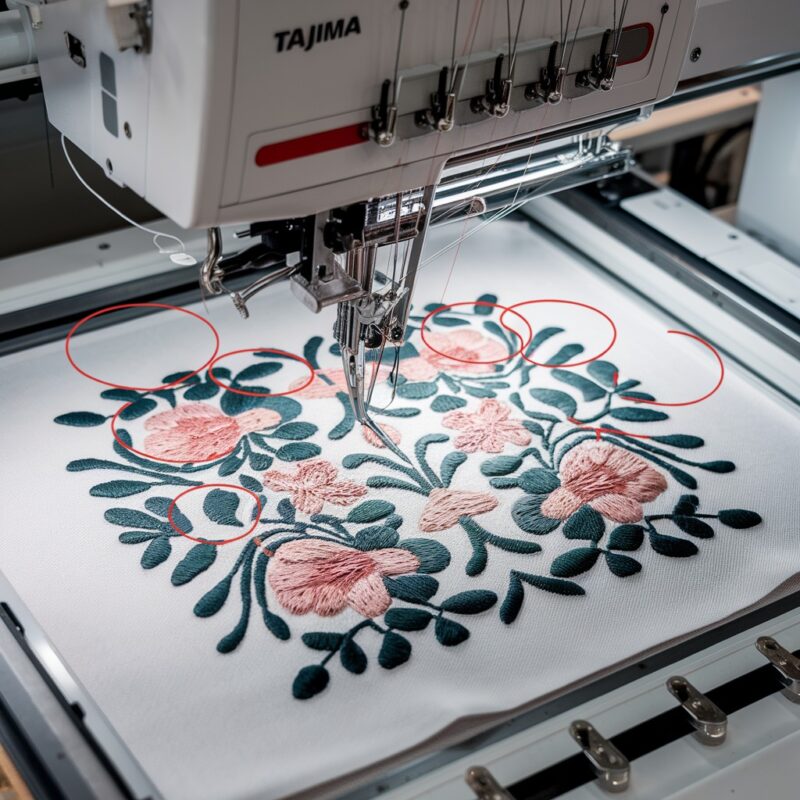
While stitching a dense floral design, the machine creates uneven stitching in the petals, with loose threads on the bottom.
Resolution:
- Pause the machine and check the tension balance.
- Add a cut-away stabilizer to support the fabric.
- Reduce the machine speed slightly to accommodate the design’s density.
- Inspect the needle for wear and replace if necessary.
- Restart the design from the nearest stopping point after adjustments.
Conclusion
Achieving consistent and professional stitch quality with the Tajima TFMX-C Series requires attention to the smallest details. By addressing these additional causes of uneven stitching, you’ll enhance your machine‘s performance and ensure your embroidery projects shine with perfection. Regular maintenance, proper setup, and smart troubleshooting techniques are the keys to harnessing this high-speed embroidery powerhouse’s full potential.