
Screen printing businesses across the Greater Houston area frequently deal with low-res customer artwork, blurry screenshots, and low-quality JPEG files that cannot be separated for film output. Attempting to print low-quality graphics leads to poor screen exposure, fuzzy edges, and wasted press time.
We provide accurate vector art conversion services tailored to print shop standards. Our remote designers manually redraw every raster image into clean paths, allowing your shop to generate crisp spot color separations and speed up pre-press production without adding overhead.
Real Work, Not Stock Photos
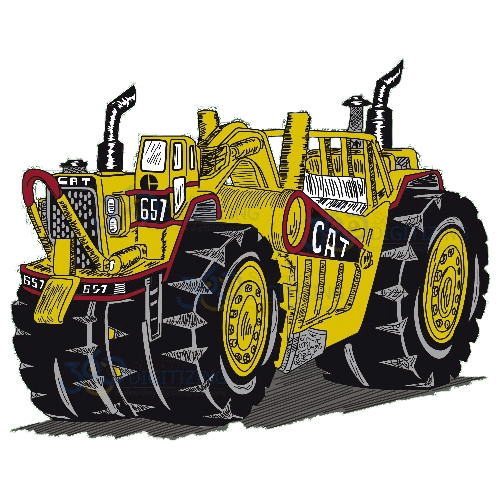
Real vector proofs from real client orders — no stock art, ever.


Why Screen Printing Companies in Houston Choose Manual Work
Clean Spot Color Separations
Every vector file is built with isolated paths and clean layers, making spot color separation straightforward for film output.
Manual Redrawing Only
We avoid auto-tracing shortcuts to eliminate jagged edges, unwanted anchor points, and inaccurate line weights.
Reliable Remote Support
Upload artwork online from anywhere in the Houston metro area and receive press-ready files directly to your inbox.
Manual Vector Conversion vs Auto-Trace
Why Screen Printing Companies clients get hand-built files, not software output.
| What Matters | Auto-Trace | 360 Digitizing — Manual Work |
|---|---|---|
| Edge Sharpness | Produces pixelated, stepped edges that distort line art on screen exposures. | Delivers perfectly smooth, mathematically precise curves for crisp print edges. |
| Anchor Point Count | Creates hundreds of redundant nodes that slow down RIP software and cutters. | Uses minimal, strategically placed nodes for clean line paths and fast rendering. |
| Color Separation | Blends adjacent colors into messy gradients and thousands of tiny vector fragments. | Groups distinct spot colors cleanly onto separate layers for fast color trapping. |
| Small Detail Retention | Smudges fine text and thin lines, forcing manual correction before printing. | Recreates small typography and intricate graphic elements accurately by hand. |
| File Usability | Requires extensive prepress cleanup and node editing before film output. | Provides press-ready EPS, AI, or PDF files ready for immediate film output. |
How It Works
Upload Your Artwork
Submit your raster image, low-res logo, or draft file through our simple online portal.
Hand-Built by a Vector Specialist
A designer manually redraws every line and curve into precise vector paths suited for screen printing.
Review Your Proof
Check the digital proof to verify color placement, line thickness, and overall vector accuracy.
Download Press-Ready Files
Once approved, receive your scalable vector files in formats ready for your RIP software and film printers.
Supporting Houston’s Apparel & Promotional Printing Market
The Greater Houston area is home to a vast network of custom apparel shops, commercial screen printers, and promotional product distributors. From high-volume event merchandise to custom corporate workwear, print shops across the Houston metro area manage demanding production schedules that depend on streamlined prepress operations. When clients submit low-resolution graphics, phone screenshots, or low-quality raster files, your printing presses cannot run until those images are completely vectorized.
Streamlining Prepress Workflows for Local Print Shops
Screen printing requires ultra-sharp line work, precise spot color layering, and controlled line weights to ensure clean screen exposures and crisp ink application on textiles. Automated vector software often fails to separate solid spot colors properly, leaving artwork technicians with messy paths and thousands of unnecessary vector nodes. By outsourcing vector conversions to dedicated remote artists, Houston screen printers can clear prepress bottlenecks and keep their local staff focused on press setup, quality control, and customer service.
Fast Digital Delivery Without Storefront Delays
Because our vector services operate completely online, screen printing businesses throughout the Greater Houston region get fast order fulfillment without needing physical visits or local storefront drop-offs. You simply upload client artwork through our online dashboard, and our team provides scalable, production-ready vector files straight to your account. This flexible remote model keeps operating costs predictable while providing on-demand vector artwork support whenever production order volume increases.
Every Format You Actually Need.
One order — delivered production-ready for print, cut or engrave.
Talk to a Real Human — Right Now
Design consultation, order help, revisions — our support team is on live chat and email 24/7. No bots, no ticket black holes: answers while you’re still thinking about the question.
OS 360 | Pro
Once your file is done, it doesn’t just land in your inbox — every order here is booked, produced and delivered on OS 360 Pro, the platform that runs our own shop.
- Guided order form — size, fabric and format captured right
- Live production status — no “did you get my file?” emails
- Proofs, revisions and downloads in one dashboard
- ISA, your built-in AI assistant, on call 24/7





Frequently Asked Questions
How much does vector art conversion cost?
Our manual vector art conversion service starts at $12 per design. Pricing depends on the complexity of the original image and the level of detail required for your screen printing process.
How fast will I receive my completed vector files?
We offer rapid delivery options to keep your screen printing jobs on schedule. Rush processing is available when you need immediate turnarounds for tight production deadlines.
What file formats do you deliver for screen printing?
We deliver fully editable vector formats including AI, EPS, PDF, and SVG. These production-ready files integrate directly with major graphic software and RIP drivers.
What if I need adjustments to the converted artwork?
We offer revisions to ensure the vector paths match your exact print specifications. Simply let us know what adjustments are needed, and our team will update the vector file.
Why is manual vector redrawing better than auto-tracing for screen printing?
Auto-tracing generates random anchor points and blended color pixels that ruin spot color separations. Manual redrawing creates clean vector paths, consistent line weights, and isolated spot colors essential for film positives.
How do I start sending artwork for vector conversion?
Create an account on our website, upload your low-resolution customer image, and specify any screen printing requirements. Our vector artists will begin redrawing your artwork right away.



