
If you run embroidery machines every day, you already know the frustration of a file that looks fine on screen but thread-breaks, bunches, or leaves gaps on the actual garment. Much of that trouble comes down to how the stitch file was created in the first place.
This page cuts through the marketing fluff to examine the exact technical differences between automated software and 100% human-drawn vector and embroidery files. We will look at underlay, pull compensation, density, and editing so you can protect your margins and your machinery.
Real Work, Not Stock Photos
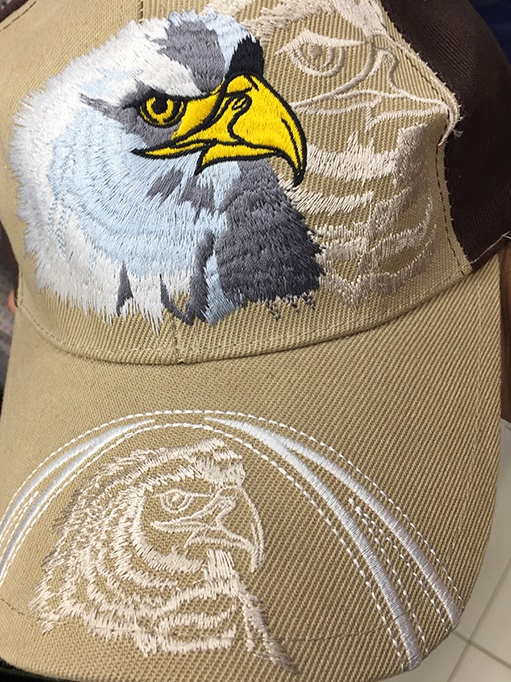
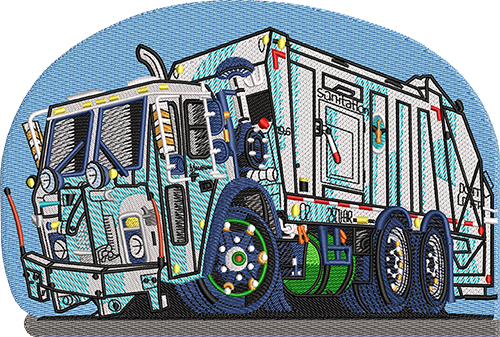
Real digitized logos from real client orders — no stock art, ever.




Files That Stitch Clean — Guaranteed
- Expert digitizers — every file mapped by specialists with real commercial-machine experience
- Quality control at every step — each file is test-checked before it reaches you
- Proof before payment — pay upon satisfaction
- Unlimited free edits until you approve
- 5-year free file backup
- 100% money-back guarantee
Every Format. Every Machine.
One order — delivered in whatever your machines speak.
Tajima • Brother • Barudan • Melco • Janome • Ricoma • Happy • ZSK • SWF — and every machine in between.
Manual Digitizing vs Auto-Digitizing Software
The real comparison, aspect by aspect — not just a claim.
| What Actually Matters | Auto-Digitizing / Auto-Trace | 360 Digitizing — Manual Work |
|---|---|---|
| Underlay Foundation | Applies one generic underlay pattern across the entire design regardless of fabric type, stitch count, or density requirements. | Human digitizers select the exact underlay type (edge walk, zigzag, or fill) per shape based on the specific fabric and stitch count. |
| Density & Pull Compensation | Uses a rigid, fixed density value that fails to account for fabric stretch, leading to gaps or fabric show-through on textured materials. | Adjusts density and pull compensation per element to match the unique physical behavior of pique, fleece, twill, or leather. |
| Stitch Direction & Sequencing | Follows vector outlines mechanically, generating messy path sequences, poor light reflection, and excess jump stitches. | Sets deliberate stitch angles per shape to catch light correctly while minimizing thread breaks and machine trims. |
| Small Text & Lettering | Traces font outlines as-is without adjustment, frequently causing small text under 5mm to close up, blur, or blob into an unreadable mess. | Rebuilds small lettering by hand with adjusted letter spacing and simplified serifs to ensure clean legibility at true embroidery scale. |
| Push-Pull Compensation | Rarely accounts for fabric pull, causing finished sewn shapes to come out visibly smaller, narrower, or distorted compared to the original art. | Oversizes shapes slightly and calculates fabric movement to ensure the final stitched design matches the original dimensions. |
| File Editability | Produces a single dense stitch block that is virtually impossible to edit without starting the entire layout over from scratch. | Creates structured files that can be easily opened and edited element-by-element by another digitizer for size or color changes. |
| Human Oversight | Zero human judgment involved; an algorithm guesses paths based on basic pixel or vector boundary rules. | 100% hand-built and hand-redrawn by an experienced professional artist and digitizer who understands industrial sewing. |
How Manual Digitizing Actually Works
Upload Artwork
Send over your vector, raster, or sketch file along with your target garment type and required dimensions.
Human Build
A real professional digitizer or vector artist manually builds or redraws your file from scratch without auto-tracing shortcuts.
Customer Review
Inspect the digital proof and request any adjustments you need through our unlimited free revision policy.
Production Ready
Approve your final file and send it straight to your embroidery machine or vector workflow with total confidence.
Why Manual Wins
Transparent Pricing
Pay just $1 USD per 1,000 stitches with a $10 minimum per design and no hidden fees.
Unlimited Revisions
We offer free unlimited revisions until you are completely satisfied with the final approved result.
24/7 Support
Our team is available around the clock to answer questions, handle updates, and keep your production running.
The Mechanics of Underlay: Manual vs Automated Approaches
Underlay is the foundation of any embroidery design. It tacks the fabric down to the backing and creates a stable base for topstitching. Auto-digitizing software applies a single, uniform underlay pattern across the entire design layout. It does not matter if the software is stitching over stretchy fleece or rigid twill; it treats every fabric the same way. This lack of customization frequently leads to shifting, puckering, and thread breaks once the machine runs at high speeds.
In contrast, a manual digitizer analyzes the garment before placing a single stitch. They select specific underlay types like edge walk for satin borders, zigzag for stretchy materials, or a light fill for large solid areas. This targeted approach anchors the fabric precisely where tension is highest, ensuring clean borders and zero distortion.
Taming Density and Pull Compensation
Fabrics pull, stretch, and compress under the needle. When an automated program generates a stitch file, it relies on rigid formulas that ignore the physical reality of textiles. Pique stretches differently than leather, and fleece behaves entirely differently than smooth cotton twill. Auto-software often leaves fixed density values that cause needle penetrations to crowd together, chewing holes in lighter fabrics or leaving gaping holes where the base material shows through.
A human digitizer adjusts density and pull compensation element by element. They widen columns slightly to counteract inward pull and lighten fill densities where fabric stacking would otherwise cause needle deflection. This level of craftsmanship ensures that your finished embroidery looks crisp, professional, and true to the original art on any garment.
Why Small Text Fails in Automated Software
Small lettering under 5mm in height is the ultimate test of a digitizer’s skill. Automated software simply traces the pixel or vector outline of a font without understanding how thread builds up in tight spaces. The result is a solid blob of stitches where loops close up, serifs overlap, and the text becomes entirely unreadable on a shirt chest or cap.
Human digitizers rebuild small text manually. They adjust letter spacing, simplify serifs, and alter stitch paths so the machine lays down thread in an intelligent order. This prevents thread accumulation in tight corners, keeping even tiny lettering sharp and legible at true production scale.
The Importance of Clean Stitch Sequencing and File Editability
Automated vector-to-stitch converters follow mechanical outlines from start to finish without considering efficiency. They often create erratic path sequencing that forces the machine to jump across the design repeatedly, creating excess trim points and wasted time. Furthermore, these auto-generated files export as dense, single-block stitch files that cannot be edited.
When you need to resize or recolor an auto-generated file, you usually have to start over from scratch. Manually built files are structured logically. Another digitizer can open the file, select specific elements, and adjust colors or sizes seamlessly without corrupting the surrounding stitch architecture.
Who This Page Is For
Getting Your First Custom Logo Digitized
If you are new to embroidery production, ordering your first file can feel intimidating. You need a partner who ensures your artwork translates cleanly to fabric without requiring a degree in machine programming.
- Every file is hand-built by a real person so your first run sews smoothly.
Moving Away From Auto-Digitizing Headaches
If you have spent hours untangling thread nests, dealing with bunched-up fabric, or trying to fix unreadable small text caused by cheap auto-trace software, you know why manual work matters.
- Zero auto-trace or auto-digitizing software used on paid orders.
Talk to a Real Human — Right Now
Design consultation, order help, revisions — our support team is on live chat and email 24/7. No bots, no ticket black holes: answers while you’re still thinking about the question.
OS 360 | Pro
Once your file is done, it doesn’t just land in your inbox — every order here is booked, produced and delivered on OS 360 Pro, the platform that runs our own shop.
- Guided order form — size, fabric and format captured right
- Live production status — no “did you get my file?” emails
- Proofs, revisions and downloads in one dashboard
- ISA, your built-in AI assistant, on call 24/7





Frequently Asked Questions
What is auto-digitizing and auto-trace software?
Auto-digitizing software is a computer program that attempts to convert raster images or vector outlines directly into embroidery stitches automatically, using basic algorithms without human judgment or adjustments for fabric behavior.
Why is auto-digitizing cheaper but riskier?
Automated tools require no labor, which makes them cheap or instant. However, because they ignore fabric stretch, pull compensation, and proper underlay, they frequently cause thread breaks, puckering, gaps, and ruined garments during production.
When, if ever, is auto-digitizing acceptable?
Auto-digitizing is rarely acceptable for commercial production where garment quality and machine uptime matter. It might occasionally be used for quick personal mockups, but it consistently fails on real production runs.
How can you tell if an embroidery file was auto-generated?
Auto-generated files usually display erratic jump stitches, lack proper edge walk underlay, show fabric gaps in solid fills, and feature messy, uneditable stitch blocks that are difficult or impossible to modify.
What does manual digitizing actually mean in production?
Manual digitizing means a real human professional draws and plots every stitch angle, underlay type, density setting, and sequence path by hand to ensure the file runs smoothly on industrial embroidery equipment.
How much does manual digitizing cost?
Our manual digitizing service costs $1 USD per 1,000 stitches, with a $10 minimum per design. There are no setup fees and no extra charges for human expertise.
What is your turnaround approach?
We maintain a fast turnaround approach with rush options available to keep your shop schedule moving without sacrificing the quality of hand-built stitch files.
What is your revision and guarantee policy?
We provide unlimited free revisions until you are completely satisfied and your design is fully approved for production.
Get It Done Right The First Time
100% manual work, unlimited revisions until you approve, 24/7 support.



