
Blog
Tajima TEJT Series: Common Problems & Fixes Guide


Quick answer: Common Tajima TEJT issues include thread breaks, design loading failures, and timing problems. Most can be resolved by checking thread path, replacing worn needles, cleaning sensors, or replacing faulty floppy drives or worn belts. Always refer to your machine's manual for specific instructions.
The Tajima TEJT series embroidery machines are workhorses in the industry, known for their reliability. However, like any complex machinery, they can encounter issues over time. This guide provides common problems reported by operators, along with clear steps to diagnose and fix them, helping you get your TEJT back to peak performance. We'll focus on practical solutions and identify the replacement parts you might need, available right here at 360 Digitizing Shop.
Two-minute checks before you open anything
- Is the machine powered on and plugged in securely?
- Are all emergency stops disengaged?
- Is the thread correctly loaded through the entire thread path and tension discs?
- Is the bobbin correctly wound and inserted?
- Is the needle inserted correctly and not bent or dull?
- Are the hoops securely attached and the fabric properly hooped?
- Are there any error messages displayed on the control panel?
1. Frequent Thread Breaks or Poor Stitch Quality high likelihood
How to tell
The machine stops frequently with a 'thread break' error, stitches appear loose, skipped, or inconsistent, or the thread frays and snaps during operation.
Fix
- Inspect the entire thread path for burrs, sharp edges, or obstructions. Clean thoroughly.
- Check thread tension. Ensure it's correctly set for your thread type and fabric. Adjust upper and bobbin tensions as needed.
- Replace the needle. A bent, dull, or incorrect needle can cause thread breaks and poor stitches.
- Verify the thread contact sensor is clean and functioning. Dust or lint can interfere with its operation.
- Check the bobbin case for lint buildup or damage. Replace if necessary.
- Ensure the machine's timing is correct. If timing is off, it can lead to skipped stitches and thread breaks. This often requires a technician or careful manual adjustment.
- Inspect the rotary hook for nicks or burrs. Smooth any minor imperfections with fine-grit sandpaper or replace the hook if damaged.
Consider replacing the Tajima TC Sensor Card & Thread Contact Set 0J2602300A22 0J2602300A23 FG7204010000 0J2602100010 if the sensor is faulty.
Parts involved: Needles & needle bars → Thread path & tension → Sensors & switches → Rotary hooks & bobbin cases →
2. Machine Not Reading Designs from Floppy Disk medium likelihood
How to tell
The machine displays a 'disk error', 'read error', or fails to load design files from the floppy drive. The floppy drive may make unusual noises or not respond.
Fix
- Try a different, known-good floppy disk to rule out a corrupted design file or faulty disk.
- Clean the floppy drive's read/write heads using a floppy drive cleaning kit.
- Check the floppy drive's power and data connections to ensure they are secure.
- If the drive is old or frequently used, consider replacing it with a modern USB floppy drive emulator for improved reliability and convenience.
Replace your old floppy drive with a Richpeace RP-SFDR-VIU-A1.44 USB Floppy Drive Emulator or a Tajima Gotek SFRM72-FU USB Floppy Emulator for TMFX, TMFD, TME, TMEF, TME-DC, Neo, TEJT-C Series.
Parts involved: Floppy, USB & memory →
Parts you may need for Tajima TEJT
In stock, tested before dispatch, Buyer Protection on every order. Part types for this problem: Needles & needle bars, Thread path & tension, Sensors & switches, Rotary hooks & bobbin cases.
 Richpeace RP-SFDR-VIU-A1.44 USB Floppy Drive Emulator for Tajima, T...$ 408.99View part →
 Tajima W20-16 Timing Belt Pulley CX0170000000 501440030000 S5M 20mm...$ 39.29View part →
 Tajima MBL S5M625 Timing Belt 25mm for TMAR, TFMX, TFGN, TMEZ, TMCR...$ 46.09View part →
 Tajima TU10 W25-170/E Timing Belt 626400260000 BPT102517000 for TMA...$ 567.29View part →
 Tajima Spindle Pulley 3.5cm 15 Axis 60T Convex for TFMX TMFX TFGN T...$ 188.49View part →
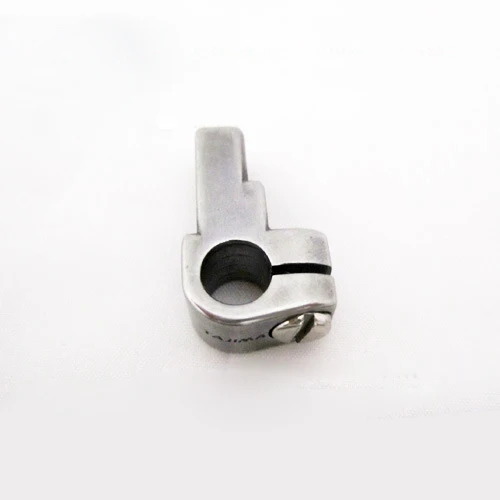 Tajima 090420060017 Stopper Lower Dead Point Needle Bar Connecting ...$ 0.00View part →
All Tajima TEJT parts → Needles & Needle Bars → Thread Path & Tension → Sensors & Switches →
3. Noisy Operation or Incorrect Machine Timing medium likelihood
How to tell
The machine produces grinding, squealing, or knocking noises during operation. Stitches may be inconsistent, or the needle bar and hook timing appear misaligned, leading to skipped stitches or thread breaks.
Fix
- Inspect all timing belts for wear, cracks, or looseness. Tighten or replace any worn belts.
- Check pulleys for damage or looseness. Ensure they are securely fastened to their shafts.
- Lubricate moving parts according to your machine's maintenance schedule. Lack of lubrication can cause excessive noise and wear.
- Verify the main shaft and hook timing. This is a critical adjustment and may require a service technician if you are unsure.
- Examine the spindle pulley for wear or damage, especially if the noise is coming from the main drive system.
Common belts that may need replacement include Tajima W20-S5M0950/G Timing Belt, MBL S5M1160 Timing Belt 30mm, MBL S5M625 Timing Belt 25mm, or Tajima TU10 W25-170/E Timing Belt. Check the Tajima W20-16 Timing Belt Pulley CX0170000000 501440030000 or Tajima Spindle Pulley 3.5cm 15 Axis 60T Convex for wear.
Parts involved: Belts, pulleys & gears → Lubrication & maintenance → Shafts, bearings & bushings →
4. Needle Bar Not Moving Correctly or Alarm for Presser Foot low likelihood
How to tell
A specific needle bar might not move up or down fully, or the machine triggers an alarm related to the presser foot or needle line, preventing operation.
Fix
- Check for any physical obstructions around the needle bar or presser foot mechanism.
- Inspect the Tajima 090420060017 Stopper Lower Dead Point Needle Bar Connecting Stud for damage or wear. A worn stopper can affect needle bar movement.
- If an alarm related to the presser foot or needle line is active, check the associated sensor or mechanism for damage or misalignment. Clean any debris.
- Ensure the needle bar connecting stud is properly seated and secured.
If you have a multi-needle machine and an alarm related to the needle line, the Tajima 9-Needle Line Pressing Alarm Head TFMX-C TMAR-K TMEZ-S TMBP-S TEJT-C might be the culprit.
Parts involved: Needles & needle bars → Head & mechanical parts → Sensors & switches →
Stop and call a technician if
- If you are unable to identify the cause of the problem after performing basic troubleshooting steps.
- If the machine's timing is severely off and you are not comfortable making precise mechanical adjustments.
- If there are persistent electronic errors or control panel malfunctions.
- If you suspect a major component failure, such as a motor, driver, or main circuit board.
- For any issue that requires specialized tools or expertise beyond your comfort level.
Prevent it coming back
- Perform daily cleaning of the thread path, bobbin area, and rotary hook to remove lint and debris.
- Follow the manufacturer's recommended lubrication schedule using the specified oil or grease.
- Regularly inspect needles and replace them proactively, especially when changing fabric types or after a certain number of hours.
- Check thread tension settings before each project and adjust as needed for optimal stitch quality.
- Keep your work area clean and free of dust and fabric scraps.
- Use high-quality threads and backings to minimize machine stress and thread breaks.
- Back up your design files regularly and consider upgrading to a USB floppy emulator to avoid disk-related issues.
Frequently asked questions
Why is my Tajima TEJT machine skipping stitches?
Skipped stitches are often caused by a dull or bent needle, incorrect thread tension, improper machine timing, or burrs on the rotary hook. Check these components first. Ensure your needle is the correct type and size for your fabric and thread.
How often should I replace the timing belts on my TEJT?
Timing belt replacement intervals vary based on usage, environment, and belt type. Generally, inspect belts every 6-12 months for signs of wear like cracking, fraying, or stretching. Replace them proactively if wear is visible or if you experience consistent timing issues that can't be resolved otherwise. Always refer to your machine's maintenance manual for specific recommendations.
Can I upgrade my TEJT's floppy drive to USB?
Yes, many Tajima TEJT series machines can be upgraded with a USB floppy drive emulator. This allows you to load designs from a USB stick instead of old, unreliable floppy disks. Products like the Richpeace RP-SFDR-VIU-A1.44 or Tajima Gotek SFRM72-FU are compatible options.
My machine is making a strange noise. What should I check first?
First, identify the general area of the noise. Check for loose screws, worn belts, or parts that require lubrication. Inspect the main shaft, pulleys, and needle bars for any obstructions or signs of excessive wear. If the noise persists or is accompanied by performance issues, it's best to consult your manual or a technician.
Did this guide fix your machine?
Rate it - it helps other operators find the right fix.
Not sure which part is failing?
Need the logo stitched too?
Get your logo digitized by the people who know this machine
Upload the artwork, see the stitch count and the exact price in 10 seconds, then order with a free sew-out preview. $1 per 1,000 stitches, $10 minimum, 24-hour delivery. Vector conversion from $12.
After the fix
Fixed it? Keep the rest of the shop moving.
OS 360 is the shop software from the team behind this parts store. Every job keeps its status, deadline and owner while a TEJT head is down, restock alerts fire for needles, hooks and bobbins before you run dry, and quotes, invoices and payment live in one place.
- Jobs with status, deadline and owner - nothing slips during downtime
- Inventory with restock alerts, this store one click away
- Instant quotes, invoices and one place to collect payment





