
Blog
Juki DDL-8700 Series Maintenance Guide


Quick answer: Regular maintenance, including cleaning, oiling, and timely replacement of wear parts like needles, rotary hooks, and presser feet, is crucial for optimal performance and longevity of your Juki DDL-8700.
The Juki DDL-8700 series is a workhorse in the industrial sewing world, known for its reliability and high performance. To ensure your machine continues to operate at its best and to extend its lifespan, regular and proper maintenance is essential. This guide provides a comprehensive schedule and troubleshooting tips for common wear parts, helping you keep your Juki DDL-8700 running smoothly.
Two-minute checks before you open anything
- Check the oil level in the reservoir.
- Inspect the needle for sharpness and straightness.
- Clear any visible lint or thread scraps from the needle plate and bobbin area.
- Listen for any unusual noises during operation.
- Check stitch quality on a scrap piece of fabric.
1. Needles high likelihood
How to tell
Skipped stitches, broken thread, damaged fabric, needle deflection, or a dull/bent needle tip visible upon inspection. Needles should be replaced regularly based on material and usage.
Fix
- Turn off the machine power.
- Loosen the needle clamp screw.
- Remove the old needle.
- Insert a new Groz-Beckert 134 DPX5 135X5 Industrial Sewing Needles or Groz-Beckert DBX1 16×257 DB*1 Industrial Sewing Needles with the scarf facing the rotary hook.
- Push the needle up as far as it will go.
- Tighten the needle clamp screw securely.
- Perform a test stitch on scrap fabric.
Always use the correct needle type and size for your fabric and thread. Replace needles frequently, often after 4-8 hours of continuous sewing or at the first sign of trouble.
Parts involved: Needles & needle bars →
2. Rotary Hook medium likelihood
How to tell
Poor stitch quality, loose stitches, thread breakage, loud knocking noises from the bobbin area, or visible burrs, nicks, or wear on the hook point or race. The hook point should be sharp and smooth.
Fix
- Turn off the machine power.
- Remove the needle plate and bobbin case.
- Inspect the hook point and the bobbin case race for any damage or wear. Use a magnifying glass if necessary.
- If damaged, loosen the screws holding the rotary hook in place (refer to your machine's manual for exact procedure).
- Carefully remove the old Rotary Hook HSH-7.94B HSH-7.94A B1830-127-OAO or Hirose HSH-7.94BTR Rotary Hook.
- Install the new rotary hook, ensuring it is correctly timed with the needle (this may require a technician or careful adherence to the service manual).
- Replace the bobbin case and needle plate.
- Perform test stitches and adjust tension as needed.
A worn or damaged rotary hook is a common cause of stitch problems. Ensure proper timing after replacement. We stock Rotary Hook HSH-7.94B HSH-7.94A B1830-127-OAO and Hirose HSH-7.94BTR Rotary Hook.
Parts involved: Rotary hooks & bobbin cases →
Parts you may need for Juki DDL-8700
In stock, tested before dispatch, Buyer Protection on every order. Part types for this problem: Needles & needle bars, Rotary hooks & bobbin cases, Presser feet & sewing parts, Head & mechanical parts.
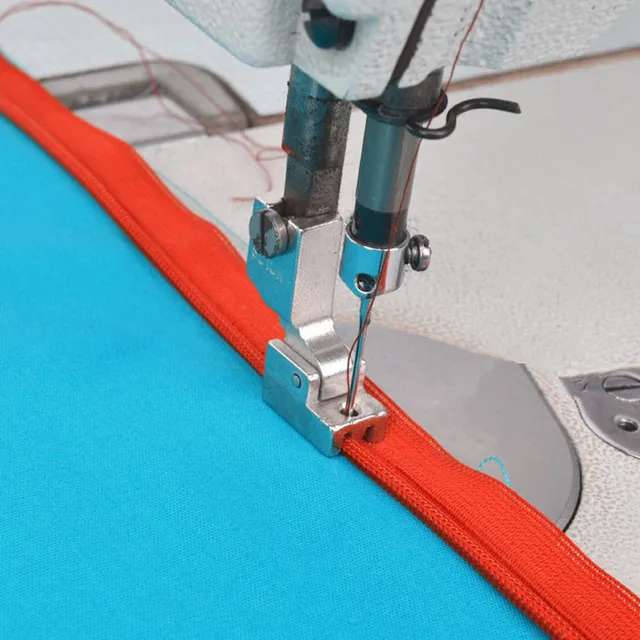 Industrial Sewing Machine Zipper Presser Foot S518N - Compatible wi...$ 8.49View part →
 Rotary Hook HSH-7.94B HSH-7.94A B1830-127-OAO for JUKI DDL-5550 DDL...$ 16.49View part →
 Industrial Curved Hemming Foot for Juki DDL-8700, Brother DB2-B755,...$ 13.29View part →HSH-7.94B Rotary Hook B1830-127-OAO for JUKI DDL-5550 DDL-8500 DDL-...$ 16.49View part →
 Groz-Beckert 134 DPX5 135X5 Industrial Sewing Needles 100-Pack for ...$ 39.29View part →
 Groz-Beckert DBX1 16x257 DB*1 Industrial Sewing Needles for JUKI DD...$ 10.49View part →
All Juki DDL-8700 parts → Needles & Needle Bars → Rotary Hooks & Bobbin Cases → Presser Feet & Sewing Parts →
3. Presser Foot medium likelihood
How to tell
Uneven feeding of fabric, marks on the fabric, difficulty sewing certain materials, or visible wear, nicks, or damage to the bottom surface of the presser foot. The foot should be smooth and flat.
Fix
- Turn off the machine power.
- Raise the presser foot.
- Loosen the presser foot screw.
- Remove the old presser foot.
- Attach a new Industrial Sewing Machine Zipper Presser Foot S518N or Industrial Curved Hemming Foot, ensuring it is seated correctly.
- Tighten the presser foot screw securely.
- Test on scrap fabric to ensure even feeding.
Different presser feet are designed for specific tasks and materials. Using the wrong foot or a worn foot can impact stitch quality and fabric handling. We stock various presser feet like the Industrial Sewing Machine Zipper Presser Foot S518N and Industrial Curved Hemming Foot.
Parts involved: Presser feet & sewing parts →
4. Feed Dog low likelihood
How to tell
Fabric not feeding correctly, uneven stitch length, or visible wear or damage to the teeth of the feed dog. Teeth should be sharp and uniform.
Fix
- Turn off the machine power.
- Remove the needle plate.
- Inspect the feed dog teeth for wear, damage, or accumulation of lint and debris.
- If worn, loosen the screws holding the feed dog (consult your manual).
- Remove the old feed dog and install a new one, ensuring it is properly aligned.
- Tighten the screws and replace the needle plate.
- Test stitch on scrap fabric.
While not listed as a specific part number, feed dogs are critical for fabric transport and can wear over time, especially with heavy materials. Clean regularly to extend life.
Parts involved: Head & mechanical parts →
5. Drive Belt low likelihood
How to tell
Machine running sluggishly, loss of power, unusual noises (squealing or grinding), or visible cracks, fraying, or stretching on the belt. The belt should be taut but not overly tight.
Fix
- Turn off the machine power and unplug it.
- Locate the Juki Belt Cover on the machine head or motor area.
- Remove the belt cover screws and carefully remove the cover.
- Inspect the drive belt for wear, cracks, or looseness.
- If replacement is needed, loosen the motor mounting bolts (if applicable) or tensioning mechanism.
- Remove the old belt and install a new one, ensuring proper tension (refer to your manual for tension specifications).
- Tighten mounting bolts/tensioner and replace the Juki Belt Cover.
- Plug in and test machine operation.
The main drive belt connects the motor to the machine head. A worn belt can cause inconsistent stitching and power loss. We stock the Juki Belt Cover, but the belt itself is a common wear item.
Parts involved: Belts, pulleys & gears →
Maintenance schedule
| When | What to do | Why |
|---|---|---|
| Daily (or every 4-8 hours of operation) | Check oil level and clarity | Ensures adequate lubrication for all moving parts, preventing premature wear. Clear oil indicates good condition. |
| Daily (or every 4-8 hours of operation) | Clean bobbin case, hook area, and feed dogs | Removes lint and thread buildup that can cause skipped stitches, thread breaks, and damage to the rotary hook. |
| Daily (or every 4-8 hours of operation) | Replace needle | A fresh needle prevents skipped stitches, fabric damage, and reduces stress on the rotary hook. Needles dull quickly with use. |
| Weekly | Clean under the needle plate and around the feed dogs thoroughly | Prevents accumulation of stubborn lint and debris that can affect fabric feeding and stitch quality. |
| Weekly | Inspect presser foot for wear or damage | Ensures even fabric feeding and prevents marking or damage to materials. Replace if worn. |
| Monthly | Inspect drive belt for wear, cracks, or proper tension | A worn or loose belt can lead to power loss and inconsistent machine operation. |
| Monthly | Inspect rotary hook for burrs, nicks, or wear | Early detection of hook damage can prevent major stitch quality issues and thread breakage. |
| Every 6-12 months (or as per manual) | Change machine oil | Old oil loses its lubricating properties and can contain contaminants, leading to increased wear on internal components. |
| Annually (or every 1000-2000 hours) | Professional service and timing check | Ensures all internal components are correctly adjusted and lubricated, extending machine life and maintaining peak performance. |
Stop and call a technician if
- If you experience persistent issues after performing basic troubleshooting and maintenance.
- For complex repairs involving internal timing adjustments or electrical components like the JUKI SC-920 Control Box PCB Assembly or Zoje Huilong Electronic Lockstitch Motor.
- If you are unsure about a repair or adjustment, especially involving the rotary hook timing.
Prevent it coming back
- Always use high-quality needles appropriate for your fabric and thread.
- Ensure proper thread tension to prevent undue stress on machine components.
- Keep your machine clean from lint and debris, especially in the bobbin area and around the feed dogs.
- Use only recommended sewing machine oil and maintain proper oil levels.
- Avoid forcing thick materials through the machine; use the correct presser foot and needle.
- Replace needles proactively, rather than waiting for them to break or cause issues.
Frequently asked questions
How often should I oil my Juki DDL-8700?
The Juki DDL-8700 has an automatic lubrication system. You should check the oil level daily and ensure the oil is clean. The oil should be changed periodically, typically every 6-12 months, or as recommended in your machine's manual, depending on usage.
What kind of oil should I use for my Juki DDL-8700?
Always use high-quality, clear, non-detergent sewing machine oil specifically designed for industrial sewing machines. Refer to your Juki DDL-8700's instruction manual for the exact oil specifications.
Why is my Juki DDL-8700 skipping stitches?
Skipped stitches are often caused by a dull or bent needle, incorrect needle insertion, incorrect needle size for the fabric/thread, improper threading, incorrect tension, or a worn/damaged rotary hook. Start by replacing the needle and re-threading the machine.
How do I clean my Juki DDL-8700?
Regular cleaning involves removing lint and debris from the bobbin area, under the needle plate, and around the feed dogs using a brush or vacuum. Wipe down the machine exterior with a soft cloth. Never use harsh chemicals.
Did this guide fix your machine?
Rate it - it helps other operators find the right fix.
Not sure which part is failing?
Need the logo stitched too?
Get your logo digitized by the people who know this machine
Upload the artwork, see the stitch count and the exact price in 10 seconds, then order with a free sew-out preview. $1 per 1,000 stitches, $10 minimum, 24-hour delivery. Vector conversion from $12.
After the fix
Fixed it? Keep the rest of the shop moving.
OS 360 is the shop software from the team behind this parts store. Every job keeps its status, deadline and owner while a DDL-8700 head is down, restock alerts fire for needles, hooks and bobbins before you run dry, and quotes, invoices and payment live in one place.
- Jobs with status, deadline and owner - nothing slips during downtime
- Inventory with restock alerts, this store one click away
- Instant quotes, invoices and one place to collect payment





