
Blog
Tajima TMEX Series: Common Problems & Fixes Guide


Quick answer: Common Tajima TMEX problems include data reading errors (often due to aging floppy drives), skipped stitches, and pantograph movement issues. Most can be resolved by checking data transfer devices, re-threading, adjusting tension, or inspecting/replacing motors and driver boards.
The Tajima TMEX series machines are workhorses in the embroidery industry, known for their durability. However, like any complex machinery, they can encounter issues over time. This guide provides common problems reported by operators, along with practical troubleshooting steps and the parts most often involved, to help you get your TMEX back up and running efficiently. We focus on solutions you can implement at the machine, using parts readily available to keep your production moving.
Two-minute checks before you open anything
- Is the machine properly powered on and plugged in?
- Are all emergency stops disengaged?
- Is the thread correctly loaded and tensioned?
- Is the bobbin correctly inserted and tensioned?
- Is the needle new, correctly inserted, and appropriate for the material?
- Are there any visible obstructions in the needle area, thread path, or pantograph movement?
- Have you restarted the machine (power cycle)?
1. Design Data Transfer or Reading Errors high likelihood
How to tell
The machine displays 'DISK READ ERROR', 'NO DATA', 'FILE NOT FOUND', or simply fails to load a design from the floppy drive or USB reader. The machine may also freeze when attempting to load a design.
Fix
- Ensure the floppy disk or USB drive is correctly inserted and formatted for the machine.
- Try a different floppy disk or USB drive with a known good design.
- Clean the floppy drive head using a specialized cleaning disk (if applicable).
- If using a floppy drive, consider upgrading to a USB floppy emulator for improved reliability.
- If using an external USB reader, ensure it is properly connected and the USB stick is compatible and formatted correctly.
Aging floppy drives are a common point of failure. Upgrading to a USB emulator is a highly recommended and reliable solution for TMEX series machines.
Parts involved: Floppy, USB & memory → Cables & wiring →
2. Skipped Stitches or Poor Stitch Quality high likelihood
How to tell
Stitches are missing from the design, loops appear on the fabric surface, thread breaks frequently, or the embroidery looks loose and uneven.
Fix
- Re-thread the entire machine, from the thread cone to the needle, ensuring thread passes through all guides and tension discs correctly.
- Check and adjust the upper thread tension. Start with a balanced tension and adjust in small increments.
- Check the bobbin tension. It should be firm but allow the bobbin to drop slowly when held by the thread.
- Replace the needle. Ensure it is the correct type and size for your fabric and thread, and that it is inserted correctly with the scarf facing the rotary hook.
- Clean the rotary hook area. Remove any lint or thread buildup from the bobbin case and the hook assembly.
- Inspect the thread path for any burrs or rough spots that might be snagging the thread.
Parts involved: Needles & needle bars → Thread path & tension → Rotary hooks & bobbin cases → Lubrication & maintenance →
Parts you may need for Tajima TMEX
In stock, tested before dispatch, Buyer Protection on every order. Part types for this problem: Rotary hooks & bobbin cases, Needles & needle bars, Thread path & tension, Presser feet & sewing parts.
 USB Emulator Converter 34-Pin to 26-Pin for Tajima TMEX TMFX Embroi...$ 25.09View part →
 Tajima 9ZJ4040A0000 USB Linker External Reader for TMEG, TMEF, TMBE...$ 257.49View part →
 SFRM72-FU USB Floppy Emulator for Tajima, Barudan, Happy, ZSK, Brot...$ 65.09View part →
 Richpeace RP-SFDR-IV U-A720 USB Emulator Reader for Tajima TMFX TME...$ 414.49View part →
 Tajima EC6102050000 XY Axis Driver Card Board MP167-1 for Single He...$ 1,153.49View part →
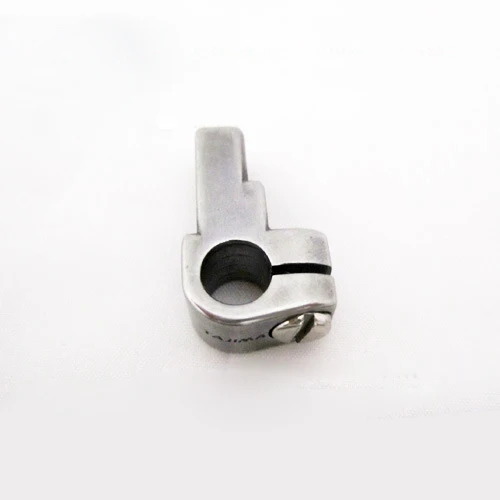 Tajima 090420060017 Stopper Lower Dead Point Needle Bar Connecting ...$ 0.00View part →
All Tajima TMEX parts → Rotary Hooks & Bobbin Cases → Needles & Needle Bars → Thread Path & Tension →
3. Pantograph Not Moving or Incorrectly Positioned medium likelihood
How to tell
The embroidery machine's pantograph (hoop frame) does not move, moves erratically, or moves to the wrong position. This can result in distorted designs or the machine stopping with an X/Y axis error.
Fix
- Check for any physical obstructions preventing the pantograph from moving freely.
- Inspect the X and Y axis drive belts for looseness, wear, or breakage. Tighten or replace as necessary.
- Check the connections to the X and Y axis motors and driver boards for looseness or corrosion.
- If the machine has specific X/Y axis error codes, consult your machine's manual for diagnostic steps.
- If one axis is completely unresponsive, the motor or its corresponding driver board may be faulty.
A faulty XY Axis Driver Card Board or a worn Pantograph Servo Motor are common culprits for persistent pantograph movement issues.
Parts involved: Motors & drivers → Circuit boards & electronics → Belts, pulleys & gears → Cables & wiring →
4. Needle Bar Not Moving or Stuck low likelihood
How to tell
A specific needle bar does not move up and down during operation, or it gets stuck in the up or down position. This often leads to thread breaks or skipped stitches on that particular needle.
Fix
- Carefully inspect the needle bar for any obstructions, bent components, or thread wrapped around it.
- Check the needle bar connecting stud for looseness or damage. Ensure it's securely fastened.
- Manually try to move the needle bar up and down (with the machine off and main shaft turned to a safe position) to feel for binding.
- Check the needle bar drive mechanism for any visible issues or lack of lubrication.
- If the issue persists, it may indicate a problem with the needle bar's mechanical linkage or the solenoid/actuator responsible for its movement.
The Stopper Lower Dead Point Needle Bar Connecting Stud is a critical component in the needle bar's movement and can wear over time.
Parts involved: Needles & needle bars → Head & mechanical parts → Screws, springs & small parts → Lubrication & maintenance →
Maintenance schedule
| When | What to do | Why |
|---|---|---|
| Daily | Clean the rotary hook area and needle plate. | Prevents lint buildup that can cause thread breaks and poor stitch quality. |
| Daily | Check and clear any thread scraps from the thread path. | Ensures smooth thread flow and prevents snags. |
| Weekly | Lubricate the rotary hook and other specified points. | Reduces friction and wear, extending the life of moving parts. |
| Weekly | Inspect needles and replace any that are bent, dull, or burred. | Prevents fabric damage, thread breaks, and skipped stitches. |
| Monthly | Clean under the needle plate and inspect the feed dog area. | Removes hidden lint and debris that can affect fabric movement. |
| Quarterly | Check drive belts for tension and wear. | Ensures accurate pantograph movement and prevents slippage. |
Stop and call a technician if
- If you encounter persistent error codes that do not clear after basic troubleshooting.
- If you suspect a major electrical component failure (e.g., main board, power supply).
- If mechanical components are seized or broken and require specialized tools or expertise for replacement.
- If you are uncomfortable performing any of the suggested repair steps.
Prevent it coming back
- Regularly clean the machine, especially the thread path, needle area, and rotary hook, to prevent lint and debris buildup.
- Perform daily and weekly lubrication as recommended in your machine's manual to ensure smooth operation of moving parts.
- Use high-quality needles and threads appropriate for your fabric to minimize stress on the machine and reduce thread breaks.
- Inspect belts and pulleys periodically for signs of wear or looseness, and adjust or replace as needed.
- Back up your design files regularly and ensure your data transfer method (floppy or USB) is reliable.
Frequently asked questions
My Tajima TMEX machine won't read my floppy disk. What should I do?
First, try a different floppy disk with a known good design. If the problem persists, the floppy drive itself is likely failing. We highly recommend upgrading to a USB floppy emulator like the SFRM72-FU USB Floppy Emulator or a dedicated USB reader for reliable design transfer.
My TMEX machine is skipping stitches. How can I fix this?
Skipped stitches are often due to incorrect threading, improper tension, a dull or bent needle, or lint buildup in the rotary hook area. Re-thread your machine completely, replace the needle, adjust tensions, and thoroughly clean the bobbin case and hook area.
The pantograph on my Tajima TMEX isn't moving. What could be wrong?
Check for physical obstructions, loose or broken drive belts, and secure connections to the X and Y axis motors. If these are fine, the issue could be with the XY Axis Driver Card Board or the Pantograph Servo Motor itself.
Can I upgrade my Tajima TMEX to use USB drives instead of floppy disks?
Yes, absolutely! We offer several USB emulator and reader options specifically compatible with the Tajima TMEX series, such as the USB Emulator Converter 34-Pin to 26-Pin, SFRM72-FU USB Floppy Emulator, or the Richpeace RP-SFDR-IV U-A720 USB Emulator Reader. These significantly improve reliability and convenience.
Did this guide fix your machine?
Rate it - it helps other operators find the right fix.
Not sure which part is failing?
Need the logo stitched too?
Get your logo digitized by the people who know this machine
Upload the artwork, see the stitch count and the exact price in 10 seconds, then order with a free sew-out preview. $1 per 1,000 stitches, $10 minimum, 24-hour delivery. Vector conversion from $12.
After the fix
Fixed it? Keep the rest of the shop moving.
OS 360 is the shop software from the team behind this parts store. Every job keeps its status, deadline and owner while a TMEX head is down, restock alerts fire for needles, hooks and bobbins before you run dry, and quotes, invoices and payment live in one place.
- Jobs with status, deadline and owner - nothing slips during downtime
- Inventory with restock alerts, this store one click away
- Instant quotes, invoices and one place to collect payment





