
Blog
Tajima TMEG Series: Common Problems & Fixes Guide


Quick answer: Most common issues on Tajima TMEG machines, such as thread breaks or poor stitch quality, are often resolved by checking thread path, tension, needle condition, or ensuring proper data transfer. Always start with basic checks before replacing parts.
The Tajima TMEG series embroidery machines are workhorses, known for their reliability. However, like all complex machinery, they can encounter issues. This guide provides common problems reported by operators, along with practical troubleshooting steps and information on the parts that often need attention. We focus on empowering you to diagnose and fix issues quickly, minimizing downtime.
Two-minute checks before you open anything
- Is the machine powered on and plugged in securely?
- Are all emergency stop buttons disengaged?
- Are all safety covers and doors closed properly?
- Is the thread path clear and free of tangles or breaks?
- Is the needle inserted correctly and not bent or dull?
- Is the bobbin wound correctly and inserted with proper tension?
- Is the fabric properly hooped and stabilized?
- Are there any visible obstructions around the needle, hook, or head movement area?
1. Frequent Thread Breakage high likelihood
How to tell
The machine stops unexpectedly, an alarm sounds, and the upper thread is visibly broken. This can happen repeatedly during a design.
Fix
- Check the thread path for any snags, burrs, or obstructions. Ensure thread guides are clean and smooth.
- Verify upper thread tension. It should be firm but not overly tight. Adjust the tension dial if necessary.
- Inspect the needle for bends, burrs, or dullness. Replace the needle if any damage is found.
- Ensure the bobbin is wound correctly and inserted with proper tension. Clean the bobbin case.
- Check the hook timing. If the hook is out of sync with the needle, it can cause thread breaks. Refer to your machine's manual for timing adjustment procedures.
- Examine the thread take-up spring for proper function and damage. Replace if broken or weak.
Consider replacing worn components like the Tajima 0C0220060060 Hook Thread Take-Up Spring, Tajima 0C0220080000 EF0910000000 Spring Hook, Tajima 516503010011 MX0521010000 Thread Guide Collar Ceramic Coil 1.8mm, or the Tajima 050320350000 Thread Block if they show signs of wear or damage.
Parts involved: Needles & needle bars → Thread path & tension → Rotary hooks & bobbin cases → Screws, springs & small parts →
2. Needle Breakage medium likelihood
How to tell
The machine stops abruptly, often with a loud 'snap' sound, and the needle is broken, bent, or missing its tip. This can damage the presser foot or needle plate.
Fix
- Replace the broken needle with the correct type and size for your fabric and thread.
- Check that the needle is inserted correctly, fully seated, and facing the right direction.
- Inspect the presser foot for damage or misalignment. Ensure it is not hitting the needle.
- Verify that the hoop is securely fastened and the fabric is properly hooped without excessive slack or puckering.
- Check the needle bar's lower dead point stopper and guide for wear or damage. Misalignment here can cause needle deflection.
- Ensure the machine's timing (needle depth and hook timing) is correct. Incorrect timing can cause the needle to strike the hook or other components.
If needle breaks are persistent, inspect the Tajima 090420060017 Stopper Lower Dead Point Needle Bar Connecting Stud and Tajima Needle Bar Guide 090450036011, 090450049011, 09045005Y011 for wear. Also check the Tajima EF0613220000 EF0613210000 090460040020 090460040031 Presser Foot Bushing Guide Collar.
Parts involved: Needles & needle bars → Presser feet & sewing parts → Hoops & frames → Shafts, bearings & bushings → Screws, springs & small parts →
Parts you may need for Tajima TMEG
In stock, tested before dispatch, Buyer Protection on every order. Part types for this problem: Needles & needle bars, Thread path & tension, Rotary hooks & bobbin cases, Screws, springs & small parts.
 TAJIMA DU-10 XY Driver Board EH5404000000 MP-117-1-A for TME-HC, TM...$ 156.49View part →
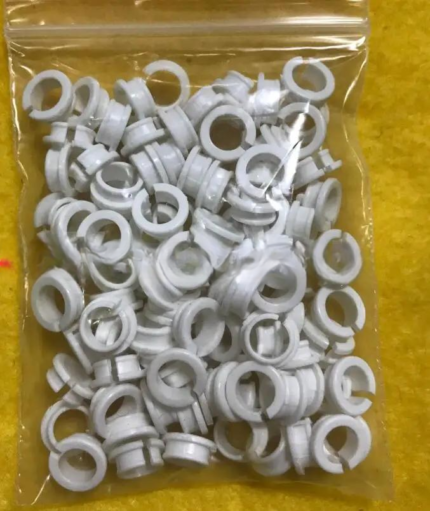 Tajima EF0613220000 EF0613210000 090460040020 090460040031 Presser ...$ 18.09View part →
 Tajima 9ZJ4040A0000 USB Linker External Reader for TMEG, TMEF, TMBE...$ 257.49View part →
 Tajima 0C0220080000 EF0910000000 Spring Hook for TMEG TMFD STNE TFK...$ 5.49View part →
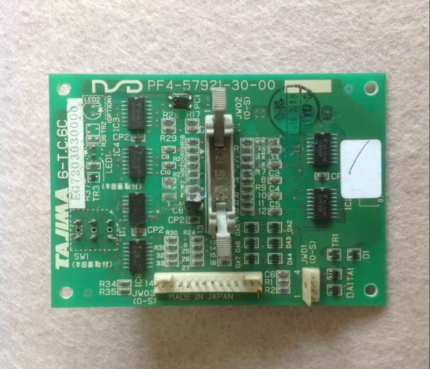 Tajima 6-T.C.6C 6-T.C.6B EG7203020000 EG7203030000 PF4-57921-30-00 ...$ 59.09View part →
 Onloyo 509179010000 EF0206000001 Oil-Bushing Bobbin Shaft Sleeve fo...$ 32.49View part →
All Tajima TMEG parts → Needles & Needle Bars → Thread Path & Tension → Rotary Hooks & Bobbin Cases →
3. Poor Stitch Quality / Skipped Stitches medium likelihood
How to tell
Embroidery appears loose, uneven, or has gaps where stitches should be. Loops may appear on the top or bottom of the fabric.
Fix
- Adjust upper and bobbin thread tension. Top loops usually mean upper tension is too loose; bottom loops mean bobbin tension is too loose.
- Change the needle. A dull, bent, or incorrect needle can cause skipped stitches.
- Clean the bobbin case and rotary hook area. Lint and debris can interfere with stitch formation.
- Ensure the presser foot is set correctly for the fabric thickness. The Tajima EF0613220000 EF0613210000 090460040020 090460040031 Presser Foot Bushing Guide Collar should be in good condition.
- Check for proper hook timing. If the hook is not catching the needle thread loop at the correct moment, stitches will be skipped.
- Verify that the fabric is properly hooped and stabilized. Movement of the fabric during stitching can cause inconsistencies.
Worn Tajima 0C0220060060 Hook Thread Take-Up Spring or Tajima 0C0220080000 EF0910000000 Spring Hook can affect tension and stitch quality. Also, ensure the Tajima 516503010011 MX0521010000 Thread Guide Collar Ceramic Coil 1.8mm is smooth.
Parts involved: Needles & needle bars → Thread path & tension → Rotary hooks & bobbin cases → Presser feet & sewing parts → Hoops & frames →
4. Machine Not Reading Designs / Data Transfer Issues low likelihood
How to tell
The machine displays an error message related to file reading, cannot find the design, or fails to load data from the floppy drive or USB.
Fix
- Ensure the design file is in the correct format (e.g., .DST) and is not corrupted.
- If using a floppy disk, try a different disk or clean the floppy drive head. Floppy drives are prone to failure.
- If using a USB device, ensure it is formatted correctly (FAT32) and the file structure is recognized by the machine's reader.
- Try a different USB stick. Some older machines are particular about USB drive brands or sizes.
- Check the connection of any external USB linker or floppy emulator. Ensure cables are secure.
- If the machine has an internal floppy drive, consider upgrading to a Gotek USB Floppy Drive Emulator Reader 720K Low Density 34-Pin for Tajima TMEG Embroidery Machines for improved reliability.
Consider replacing an old floppy drive with a Gotek USB Floppy Drive Emulator Reader 720K Low Density 34-Pin for Tajima TMEG Embroidery Machines. For USB connectivity, the Tajima 9ZJ4040A0000 USB Linker External Reader or TAJIMA KP-BS-T-113 USB Reader are common solutions. If the monitor is failing, a Used Barudan, Tajima TMEG, SWF Embroidery Machine Control Panel Monitor Operation Box or Tajima ETJ-MONITOR/TEMG Monitor with Floppy Driver might be needed.
Parts involved: Floppy, USB & memory → Control panels & displays → Circuit boards & electronics →
5. Machine Not Moving / Head Not Responding low likelihood
How to tell
The machine powers on but the embroidery head does not move, or moves erratically. Error codes related to motor drivers or axis movement may appear.
Fix
- Check for any physical obstructions preventing head movement (e.g., tangled thread, tools left on the machine).
- Verify that all emergency stops are disengaged and safety covers are closed.
- Inspect wiring connections to the motors and driver boards for looseness or damage.
- Listen for unusual noises from the motor or belt areas. A slipping or broken belt can cause movement issues.
- If specific axis movement is affected, it could indicate an issue with the corresponding driver board. Consult your manual for diagnostic steps.
- Power cycle the machine. Turn it off, wait a minute, and turn it back on.
Issues with head movement can sometimes be traced to the Tajima DU-10 XY Driver Board EH5404000000 MP-117-1-A or Tajima 6-T.C.6C 6-T.C.6B EG7203020000 EG7203030000 PF4-57921-30-00 0J2600300000 Board Card. Check for loose or damaged synchronous belts like Tajima Synchronous Belt 623500270000, 623500360000, 623500400000, 623500430000 or Tajima W35-S5M Synchronous Belt.
Parts involved: Motors & drivers → Belts, pulleys & gears → Circuit boards & electronics → Cables & wiring →
Maintenance schedule
| When | What to do | Why |
|---|---|---|
| Daily | Clean the hook area and bobbin case, wipe down the machine. | Prevents lint buildup which can cause thread breaks and poor stitch quality. |
| Weekly | Lubricate the rotary hook and other specified points (refer to manual). Inspect needles and thread guides. | Ensures smooth operation, reduces wear, and helps identify worn parts early. |
| Monthly | Thorough cleaning of the entire machine, including under the needle plate and tension assemblies. Check for loose screws. | Maintains machine performance and prevents minor issues from escalating. |
| Quarterly/Bi-Annually | Inspect belts for tension and wear, check for play in shafts and bearings, verify timing (refer to manual). | Proactive maintenance to prevent major mechanical failures and ensure stitch accuracy. |
Stop and call a technician if
- If you suspect a major electrical fault or component failure (e.g., main board, power supply).
- If the machine's timing (needle bar depth, hook timing) is severely off and you are not comfortable adjusting it yourself.
- If the machine is making grinding noises or showing signs of internal mechanical damage.
- If you have followed all troubleshooting steps and the problem persists, especially with motor or head movement issues.
- For complex error codes that are not easily resolved by basic troubleshooting.
Prevent it coming back
- Regularly clean the machine, especially the thread path, bobbin area, and under the needle plate, to prevent lint buildup.
- Use high-quality needles appropriate for your fabric and thread type, and replace them frequently (e.g., every 8-10 hours of stitching).
- Ensure proper thread tension settings for both upper and bobbin threads.
- Always hoop fabric securely and use appropriate stabilizers to prevent fabric movement.
- Perform routine lubrication as specified in your machine's manual.
- Inspect thread guides, tension discs, and springs for wear or damage regularly.
- Use clean, high-quality embroidery thread and bobbins.
Frequently asked questions
Why does my Tajima TMEG keep breaking needles?
Needle breakage on a Tajima TMEG is commonly caused by a bent or dull needle, incorrect needle insertion, improper hooping, or issues with the presser foot or needle bar timing. Always start by replacing the needle and checking hooping.
How do I fix skipped stitches on my TMEG machine?
Skipped stitches often point to incorrect thread tension (both upper and bobbin), a damaged or incorrect needle, lint buildup in the bobbin area, or improper hook timing. Adjust tension, replace the needle, and clean the hook area thoroughly.
My TMEG machine won't read my design file. What should I do?
First, ensure your design file is in the correct format (e.g., .DST) and not corrupted. If using a floppy drive, try a different disk or consider upgrading to a USB floppy emulator. If using USB, check the stick's format (FAT32) and try a different USB drive or linker.
What is the most common cause of thread breaks on a Tajima TMEG?
The most common causes of thread breaks are usually related to the thread path (snags, burrs), incorrect thread tension, a damaged needle, or issues with the bobbin or hook. A thorough inspection of the entire thread path is recommended.
Did this guide fix your machine?
Rate it - it helps other operators find the right fix.
Not sure which part is failing?
Need the logo stitched too?
Get your logo digitized by the people who know this machine
Upload the artwork, see the stitch count and the exact price in 10 seconds, then order with a free sew-out preview. $1 per 1,000 stitches, $10 minimum, 24-hour delivery. Vector conversion from $12.
After the fix
Fixed it? Keep the rest of the shop moving.
OS 360 is the shop software from the team behind this parts store. Every job keeps its status, deadline and owner while a TMEG head is down, restock alerts fire for needles, hooks and bobbins before you run dry, and quotes, invoices and payment live in one place.
- Jobs with status, deadline and owner - nothing slips during downtime
- Inventory with restock alerts, this store one click away
- Instant quotes, invoices and one place to collect payment





