
Blog
Tajima TMEF Series: Common Problems & Fixes Guide


Quick answer: Common problems with Tajima TMEF series embroidery machines often involve thread breaks due to tension or needle issues, data transfer failures from worn floppy drives, and machine movement problems caused by worn belts or driver boards. Regular cleaning, proper threading, and timely part replacement are key to maintaining performance.
The Tajima TMEF series has been a workhorse in the embroidery industry for many years, known for its robust build and reliable performance. However, like all machinery, TMEF machines can encounter issues over time, especially with continuous use. This guide is designed to help operators quickly diagnose and resolve the most common problems encountered with the Tajima TMEF series, minimizing downtime and keeping your production running smoothly. We'll cover everything from simple thread breaks to more complex data transfer and movement issues, providing practical steps and identifying the parts most often involved.
Two-minute checks before you open anything
- Is the machine properly threaded?
- Is the correct needle type and size installed and in good condition?
- Are the upper and bobbin tensions correctly set?
- Is the rotary hook area clean and free of lint or thread jams?
- Are all power cables securely connected?
- Is the design file correctly formatted and free of errors?
1. Frequent Thread Breaks or Poor Stitch Quality high likelihood
How to tell
Thread snaps repeatedly during embroidery, stitches appear loose, looped, or skipped, or the bobbin thread is visible on top. You might also notice birdnesting under the fabric.
Fix
- Re-thread the machine completely, ensuring the thread is seated correctly in all guides and tension discs.
- Check the needle for bends, burrs, or dullness. Replace the needle if any damage is found, ensuring it's the correct type and size for your fabric and thread.
- Clean the thread path, including tension discs, thread guides, and the rotary hook area, removing any lint or debris.
- Adjust upper thread tension. Start with a slightly looser tension and tighten gradually until stitches are balanced.
- Inspect the rotary hook for burrs or damage. If present, carefully polish with fine-grit sandpaper or replace the hook.
- Verify bobbin tension. The bobbin case should drop slowly when held by the thread.
Parts involved: Needles & needle bars → Thread path & tension → Rotary hooks & bobbin cases →
2. Machine Not Reading Designs / Data Transfer Errors high likelihood
How to tell
The machine displays 'Floppy Read Error', 'Disk Error', 'No Design Found', or fails to load designs from the floppy disk or USB emulator. The floppy drive may make unusual noises or not spin.
Fix
- Ensure your design file is correctly formatted for the Tajima TMEF (e.g., .DST format) and is not corrupted.
- If using a floppy disk, try a different, known-good disk. Floppy disks are prone to corruption and failure.
- Clean the floppy drive head with a specialized floppy drive cleaning kit.
- If using a USB floppy emulator, ensure the USB stick is properly formatted (FAT32) and contains the design files in the root directory or correct folder structure as required by the emulator.
- Try a different USB stick with the emulator.
- If the floppy drive is old and unreliable, consider upgrading to a USB floppy emulator for more reliable data transfer.
Consider replacing an unreliable floppy drive with a modern USB emulator like the 'SFRM72-FU USB Floppy Emulator for Tajima, Barudan, Happy, ZSK, Brother, Melco, Feiya, Ricoma Embroidery' or 'Gotek SFRM72-FU USB Floppy Emulator for TMFX, TMFD, TME, TMEF, TME-DC, Neo, TEJT-C Series'. For external USB connectivity, the 'Tajima 9ZJ4040A0000 USB Linker External Reader for TMEG, TMEF, TMBE, TMCE, TME-600, TME-DC, TMFD, TMFX Machines' or 'TAJIMA KP-BS-T-113 USB Reader for TME-C, TME-HC, TME-DC, TMEF, TMEF-H, TMEG, TMEG-XG, TMEG-VG, TMEX, TFHX, TMFX, TMFD Embroidery Machines' can be used.
Parts involved: Floppy, USB & memory → Circuit boards & electronics →
Parts you may need for Tajima TMEF
In stock, tested before dispatch, Buyer Protection on every order. Part types for this problem: Needles & needle bars, Thread path & tension, Rotary hooks & bobbin cases, Floppy, USB & memory.
 TAJIMA DU-10 XY Driver Board EH5404000000 MP-117-1-A for TME-HC, TM...$ 156.49View part →
 Tajima 9ZJ4040A0000 USB Linker External Reader for TMEG, TMEF, TMBE...$ 257.49View part →
 SFRM72-FU USB Floppy Emulator for Tajima, Barudan, Happy, ZSK, Brot...$ 65.09View part →
 Tajima ME0530000000 Take-Up Lever Drive Crank Rod Gear: TME, TME-DC...$ 16.49View part →
 Tajima MBL S5M1145 Timing Belt 15mm for TMFX, TMEF, TFMX-II, TFMX-C...$ 44.99View part →
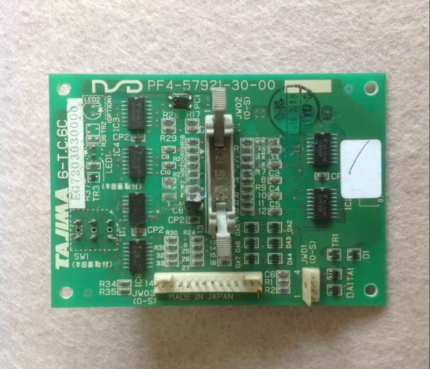 Tajima 6-T.C.6C 6-T.C.6B EG7203020000 EG7203030000 PF4-57921-30-00 ...$ 59.09View part →
All Tajima TMEF parts → Needles & Needle Bars → Thread Path & Tension → Rotary Hooks & Bobbin Cases →
3. Machine Not Moving / Incorrect X-Y Movement medium likelihood
How to tell
The embroidery frame does not move or moves erratically in the X or Y direction. Stitches may be misaligned, or the machine may stop with an X/Y error. You might hear grinding noises or notice loose belts.
Fix
- Visually inspect the X and Y axis timing belts for wear, fraying, or looseness. Tighten or replace if necessary.
- Check for any obstructions in the path of the embroidery frame or pantograph that might be preventing smooth movement.
- Ensure the frame is properly mounted and not binding.
- Inspect the X and Y drive pulleys for damage or excessive wear.
- Check the connections to the X and Y stepper motors and their respective driver boards.
- If movement is completely absent or very erratic, the XY driver board may be failing.
Key parts include 'Tajima MBL S5M1145 Timing Belt 15mm for TMFX, TMEF, TFMX-II, TFMX-C, TFGN-II Series', 'Tajima W25-S5M Synchronous Drive Belt 25mm for TMFX, TMEF, TFMX, TMEZ, TMAR, TFMX-IIC', 'Tajima W50-16[S] Synchronous Drive Wheel TFMX, TMAR, TMEZ, TMBP-SC, TFGN, TMFX, TMEF', 'Tajima W35-60 501474090000 Timing Pulley for TMEZ, TFMX, TMAR, TMARX, TMEF, TMEF-S Embroidery Machines'. If the driver board is suspected, look for 'TAJIMA DU-10 XY Driver Board EH5404000000 MP-117-1-A for TME-HC, TME-HC Series, TME-HC Models' or 'Tajima DU-10 XY Driver Board MP-117-1-A for TME-HC, TMEF-H, TMEG, TMEF, TMEG-H, TMEF-HC, TMEG-HC Series'.
Parts involved: Belts, pulleys & gears → Motors & drivers → Circuit boards & electronics →
4. Noisy Operation / Vibration medium likelihood
How to tell
The machine produces excessive grinding, squeaking, or knocking sounds during operation. There may be noticeable vibration in the machine head or frame.
Fix
- Identify the source of the noise. Carefully listen to different areas of the machine (head, X-Y drive, rotary hook).
- Perform routine lubrication as per your machine's manual. Dry or old grease can cause friction and noise.
- Check for loose screws or fasteners on the machine head, frame, and drive mechanisms. Tighten any that are loose.
- Inspect timing belts and pulleys for wear or damage. Worn belts can slip and create noise.
- Examine the take-up lever drive crank rod gear and other gears for worn teeth or excessive play.
- Check bearings and bushings for wear. Worn bearings can cause significant noise and vibration.
A common wear part is the 'Tajima ME0530000000 Take-Up Lever Drive Crank Rod Gear: TME, TME-DC, TME-HC, TMEF, TMFD'.
Parts involved: Lubrication & maintenance → Belts, pulleys & gears → Shafts, bearings & bushings → Head & mechanical parts → Screws, springs & small parts →
5. Color Change Malfunctions low likelihood
How to tell
The machine fails to change colors, changes to the wrong color, or gets stuck during a color change sequence. Error messages related to color change may appear.
Fix
- Check for any physical obstructions preventing the needle bar case from moving freely.
- Inspect the color change motor and its connections.
- Ensure the color change sensor (if applicable) is clean and functioning correctly.
- Manually cycle the color change mechanism (if your machine allows) to check for binding or stiffness.
- Consult your machine's manual for specific color change error codes and troubleshooting steps.
Parts involved: Motors & drivers → Sensors & switches → Head & mechanical parts →
Maintenance schedule
| When | What to do | Why |
|---|---|---|
| Daily | Clean rotary hook and needle plate area. | Prevents lint buildup that can cause thread breaks and poor stitch quality. |
| Daily | Oil rotary hook and other specified oiling points. | Reduces friction and wear on critical moving parts. |
| Weekly | Clean entire thread path (tension discs, guides). | Ensures smooth thread flow and consistent tension. |
| Weekly | Check and clean under the needle plate. | Removes debris that can interfere with stitch formation. |
| Monthly | Grease specified moving parts (e.g., color change mechanism, pantograph rails). | Maintains smooth operation and prevents wear in high-friction areas. |
| Quarterly | Inspect timing belts for wear and tension. | Ensures accurate machine movement and prevents slippage. |
| Annually | Professional service and calibration. | Maintains machine precision, extends lifespan, and addresses potential issues before they become critical. |
Stop and call a technician if
- If you suspect a major electrical fault or a problem with the main control board.
- If the machine is making loud grinding noises that persist after basic troubleshooting and lubrication.
- If you are unable to resolve X-Y movement issues after checking belts and driver boards.
- If you are uncomfortable performing mechanical adjustments or part replacements yourself.
- For complex timing adjustments that require specialized knowledge or tools.
Prevent it coming back
- Perform daily cleaning of the rotary hook area, needle plate, and thread path to remove lint and debris.
- Follow the manufacturer's recommended lubrication schedule diligently, using appropriate oils and greases.
- Regularly inspect needles and replace them at the first sign of wear or damage.
- Ensure proper thread tension settings for each job to prevent strain on machine components.
- Keep your workspace clean and free of dust and fabric scraps.
- Use high-quality threads and backings to reduce stress on the machine and improve stitch quality.
Frequently asked questions
Why does my Tajima TMEF keep breaking thread?
Frequent thread breaks are often due to incorrect threading, improper tension settings, a damaged or incorrect needle, burrs on the rotary hook, or lint buildup in the thread path. Always re-thread, check your needle, clean the machine, and adjust tension as a first step.
My TMEF machine won't read my design disk. What should I do?
First, ensure your design file is compatible (.DST) and not corrupted. Try a different floppy disk or USB stick if you're using an emulator. Floppy drives are prone to failure; upgrading to a USB floppy emulator is a common and effective solution for reliable data transfer.
How often should I lubricate my Tajima TMEF?
Refer to your machine's operation manual for the exact lubrication schedule. Generally, daily oiling of the rotary hook and other specified points, along with weekly or monthly greasing of moving parts, is recommended to ensure smooth operation and prevent wear.
Can I upgrade my old floppy drive on a Tajima TMEF to USB?
Yes, many Tajima TMEF models can be upgraded with a USB floppy emulator. This replaces the old floppy drive with a unit that reads designs from a USB flash drive, offering greater reliability and convenience. Ensure you purchase an emulator compatible with your TMEF model.
Did this guide fix your machine?
Rate it - it helps other operators find the right fix.
Not sure which part is failing?
Need the logo stitched too?
Get your logo digitized by the people who know this machine
Upload the artwork, see the stitch count and the exact price in 10 seconds, then order with a free sew-out preview. $1 per 1,000 stitches, $10 minimum, 24-hour delivery. Vector conversion from $12.
After the fix
Fixed it? Keep the rest of the shop moving.
OS 360 is the shop software from the team behind this parts store. Every job keeps its status, deadline and owner while a TMEF head is down, restock alerts fire for needles, hooks and bobbins before you run dry, and quotes, invoices and payment live in one place.
- Jobs with status, deadline and owner - nothing slips during downtime
- Inventory with restock alerts, this store one click away
- Instant quotes, invoices and one place to collect payment





