
Blog
Tajima TMEF Series: Essential Maintenance Schedule & Wear Parts Guide


Quick answer: Regular maintenance for your Tajima TMEF series machine involves daily cleaning and oiling, weekly checks of thread paths and tension, monthly inspection of belts and gears, and annual replacement of common wear parts like timing belts, take-up lever gears, and rotary hooks. Adhering to a schedule prevents costly breakdowns and ensures consistent stitch quality.
Maintaining your Tajima TMEF series embroidery machine is crucial for its longevity, consistent performance, and the quality of your embroidery. Regular preventative maintenance helps identify potential issues before they lead to costly downtime and repairs. This guide outlines an essential maintenance schedule and highlights common wear parts specific to the Tajima TMEF series, providing you with the knowledge to keep your machine running smoothly.
Two-minute checks before you open anything
- Check for any loose threads or fabric scraps around the needle plate and rotary hook area.
- Ensure the bobbin is correctly wound and inserted.
- Verify that the machine is properly threaded from the cone to the needle.
- Check for any visible damage to the needle (bent, dull tip).
- Listen for any unusual noises during initial operation.
1. Rotary Hook Assembly high likelihood
How to tell
Skipped stitches, thread breaks, poor stitch quality, excessive noise from the hook area, or burrs visible on the hook point. The bobbin case may also show signs of wear or damage.
Fix
- Remove the needle plate and bobbin case.
- Inspect the rotary hook for burrs, nicks, or excessive play. Check the hook point for sharpness.
- If damaged, remove the old rotary hook by loosening its retaining screws.
- Install a new rotary hook, ensuring it is correctly timed with the needle. Refer to your machine's manual for precise timing instructions.
- Reinstall the bobbin case and needle plate. Test with scrap fabric.
Parts involved: Rotary hooks & bobbin cases →
2. Timing Belts (X/Y Axis and Head Drive) medium likelihood
How to tell
Visible cracks, fraying, stretching, or missing teeth on the belt. Symptoms include inconsistent stitch registration, misaligned designs, excessive machine vibration, or the machine failing to move correctly along an axis. A snapping sound might indicate a broken belt.
Fix
- Power off and unplug the machine.
- Locate the timing belts (X-axis, Y-axis, and main head drive belts).
- Inspect each belt carefully for any signs of wear or damage.
- If a belt is worn, loosen the tensioning mechanism or motor mounts.
- Carefully remove the old belt and install the new Tajima MBL S5M1145 Timing Belt 15mm or Tajima W25-S5M Synchronous Drive Belt 25mm, ensuring it is correctly routed around pulleys.
- Adjust belt tension according to manufacturer specifications (usually firm but not overly tight).
- Test machine movement and stitch registration.
Common belts include Tajima MBL S5M1145 Timing Belt 15mm and Tajima W25-S5M Synchronous Drive Belt 25mm.
Parts involved: Belts, pulleys & gears →
Parts you may need for Tajima TMEF
In stock, tested before dispatch, Buyer Protection on every order. Part types for this problem: Rotary hooks & bobbin cases, Needles & needle bars, Thread path & tension, Cutters & trimmers.
 TAJIMA DU-10 XY Driver Board EH5404000000 MP-117-1-A for TME-HC, TM...$ 156.49View part →
 Tajima 9ZJ4040A0000 USB Linker External Reader for TMEG, TMEF, TMBE...$ 257.49View part →
 SFRM72-FU USB Floppy Emulator for Tajima, Barudan, Happy, ZSK, Brot...$ 65.09View part →
 Tajima ME0530000000 Take-Up Lever Drive Crank Rod Gear: TME, TME-DC...$ 16.49View part →
 Tajima MBL S5M1145 Timing Belt 15mm for TMFX, TMEF, TFMX-II, TFMX-C...$ 44.99View part →
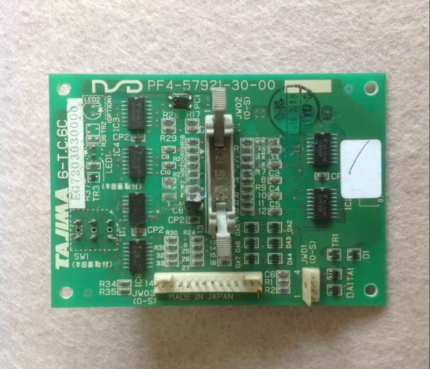 Tajima 6-T.C.6C 6-T.C.6B EG7203020000 EG7203030000 PF4-57921-30-00 ...$ 59.09View part →
All Tajima TMEF parts → Rotary Hooks & Bobbin Cases → Needles & Needle Bars → Thread Path & Tension →
3. Take-Up Lever Drive Crank Rod Gear medium likelihood
How to tell
Irregular or jerky movement of the take-up lever, excessive noise from the take-up lever mechanism, or thread breaks specifically when the take-up lever is moving. Visual inspection may reveal worn or broken teeth on the gear.
Fix
- Power off and unplug the machine.
- Access the take-up lever mechanism (often behind a cover on the machine head).
- Carefully inspect the Tajima ME0530000000 Take-Up Lever Drive Crank Rod Gear for any signs of wear, cracks, or missing teeth.
- If damaged, remove the retaining screws or clips holding the gear in place.
- Replace with a new Tajima ME0530000000 Take-Up Lever Drive Crank Rod Gear.
- Reassemble and test the machine's operation, paying attention to the take-up lever movement.
Use Tajima ME0530000000 Take-Up Lever Drive Crank Rod Gear.
Parts involved: Belts, pulleys & gears → Head & mechanical parts →
4. Floppy Disk Drive / USB Emulator low likelihood
How to tell
Machine fails to read design files from floppy disks, displays 'disk error' messages, or takes an unusually long time to load designs. For USB emulators, issues might include failure to recognize USB drives or corrupting files, though this is less common than floppy drive failure.
Fix
- Power off and unplug the machine.
- If using a floppy drive, attempt to clean the read/write head with a floppy drive cleaning kit. Try a known good floppy disk.
- If the floppy drive is failing, consider upgrading to a USB floppy emulator like Gotek SFRM72-FU or SFR1M44-DU26.
- To replace, remove the old floppy drive by unscrewing it from its bay and disconnecting the power and data cables.
- Connect the new USB emulator (or replacement floppy drive) to the existing power and data cables.
- Secure the emulator in the bay. Format a USB drive as per the emulator's instructions and test loading a design.
Common replacements include Gotek SFRM72-FU USB Floppy Emulator or Gotek SFR1M44-DU26 USB Floppy Emulator.
Parts involved: Floppy, USB & memory →
Maintenance schedule
| When | What to do | Why |
|---|---|---|
| Daily / Every 8 Hours of Operation | Clean the rotary hook area and bobbin case. | Removes lint and thread debris that can cause skipped stitches, thread breaks, and damage to the hook. |
| Daily / Every 8 Hours of Operation | Oil the rotary hook and needle bars. | Ensures smooth operation of critical moving parts, reduces friction and wear, and prevents overheating. Refer to your manual for specific oiling points. |
| Weekly / Every 40 Hours of Operation | Clean the entire thread path. | Removes lint and wax buildup from tension discs, thread guides, and take-up levers, ensuring consistent thread flow and tension. |
| Weekly / Every 40 Hours of Operation | Inspect and clean under the needle plate. | Removes accumulated lint and small thread pieces that can interfere with needle movement and stitch formation. |
| Monthly / Every 160 Hours of Operation | Inspect timing belts for wear. | Checks for cracks, fraying, or stretching in the X, Y, and main drive belts to prevent misregistration and machine downtime. Replace if any wear is visible. |
| Monthly / Every 160 Hours of Operation | Check and clean thread tension assemblies. | Ensures tension discs are free of debris and functioning correctly for balanced stitch quality. |
| Monthly / Every 160 Hours of Operation | Inspect take-up lever and associated gears. | Checks for wear or damage on the take-up lever drive crank rod gear to prevent jerky movement or thread issues. |
| Annually / Every 2000 Hours of Operation | Lubricate all major moving parts and bearings. | Provides comprehensive lubrication to internal mechanisms, extending the life of shafts, bearings, and gears. Consult your machine manual for specific points. |
| Annually / Every 2000 Hours of Operation | Inspect and potentially replace rotary hook assembly. | The rotary hook is a high-wear item; annual inspection helps catch burrs or excessive wear before it impacts stitch quality or causes damage. |
| Annually / Every 2000 Hours of Operation | Check all electrical connections and cables. | Ensures secure connections and inspects for any fraying or damage to wiring that could lead to electrical issues. |
Stop and call a technician if
- If you encounter persistent error codes that you cannot resolve with basic troubleshooting.
- If the machine exhibits unusual grinding noises or severe vibrations that indicate internal mechanical issues.
- For complex electrical problems or circuit board failures.
- If you are unsure about performing a repair that involves critical timing adjustments or complex disassembly.
Prevent it coming back
- Always use high-quality needles appropriate for your fabric and thread type, and replace them regularly.
- Use only high-quality embroidery threads to minimize lint buildup and thread breaks.
- Keep your workspace clean and free of dust and debris, which can infiltrate machine components.
- Do not force the machine if it jams; investigate the cause gently.
- Ensure proper thread tension settings for each project to reduce stress on machine parts.
- Operate the machine within its recommended speed limits.
Frequently asked questions
How often should I oil my Tajima TMEF machine?
You should oil your Tajima TMEF machine daily or every 8 hours of operation, focusing on the rotary hook, needle bars, and other specified lubrication points. Always refer to your machine's manual for exact oiling points and frequency.
What kind of oil should I use for my Tajima TMEF?
Always use high-quality, clear, non-staining sewing machine oil specifically designed for embroidery machines. Avoid multi-purpose oils or lubricants not intended for precision machinery, as they can gum up mechanisms or stain fabric.
Why are my stitches skipping on my Tajima TMEF?
Skipped stitches can be caused by several factors, including a dull or bent needle, incorrect needle size for the fabric, improper threading, incorrect tension, a worn or damaged rotary hook, or incorrect needle bar height. Check these common culprits first.
How do I know when to replace the timing belts on my Tajima TMEF?
Inspect timing belts monthly for signs of wear such as cracks, fraying, stretching, or missing teeth. If you notice inconsistent stitch registration, misaligned designs, or excessive machine vibration, it's a strong indicator that a belt may need replacement.
Did this guide fix your machine?
Rate it - it helps other operators find the right fix.
Not sure which part is failing?
Need the logo stitched too?
Get your logo digitized by the people who know this machine
Upload the artwork, see the stitch count and the exact price in 10 seconds, then order with a free sew-out preview. $1 per 1,000 stitches, $10 minimum, 24-hour delivery. Vector conversion from $12.
After the fix
Fixed it? Keep the rest of the shop moving.
OS 360 is the shop software from the team behind this parts store. Every job keeps its status, deadline and owner while a TMEF head is down, restock alerts fire for needles, hooks and bobbins before you run dry, and quotes, invoices and payment live in one place.
- Jobs with status, deadline and owner - nothing slips during downtime
- Inventory with restock alerts, this store one click away
- Instant quotes, invoices and one place to collect payment





