
Blog
Dahao BECS Series Embroidery Machine Maintenance Guide


Quick answer: Regular maintenance for Dahao BECS series machines involves daily cleaning, weekly lubrication, and periodic inspection and replacement of wear parts like keypads, touch screens, and circuit boards to ensure optimal performance and longevity.
Maintaining your Dahao BECS series embroidery machine is crucial for consistent stitch quality, minimizing downtime, and extending the lifespan of your investment. This guide provides a practical maintenance schedule and identifies common wear parts, helping you keep your machine in top working condition. Regular care prevents costly repairs and ensures your production stays on track.
Two-minute checks before you open anything
- Check for loose threads or lint around the needle bar, rotary hook, and tension discs.
- Inspect needles for bends or dullness.
- Verify that the bobbin is correctly wound and inserted.
- Listen for any unusual noises during initial operation.
- Ensure the control panel is responsive and free of errors.
1. Control Panel Keypad Membrane high likelihood
How to tell
Buttons become unresponsive, sticky, or the membrane itself shows cracks, tears, or bubbling. Frequent use causes wear.
Fix
- Power off and unplug the machine.
- Carefully remove the old keypad membrane, noting how it connects to the underlying keypad board.
- Clean the surface of the control panel and the keypad board to remove any residue or debris.
- Align and install the new keypad membrane, ensuring all buttons are properly seated and the adhesive seals correctly.
- Reconnect any cables and power on the machine to test all buttons for responsiveness.
Commonly replaced parts include Dahao 805445-1 BECS-18 Controller Keypad Membrane, Jing Dahao 805407 Keyboard Keypad Membrane, Dahao BECS 328 Control Panel Keyboard Membrane, Dahao Keypad 366 805480, Keyboard Keypad Membrane Switch for Dahao Operation Box BECS-266-7L-COM, and Dahao 805913-805914 BECS 322/328 Embroidery Machine Keyboard with Cable.
Parts involved: Control panels & displays →
2. Touch Screen LCD Panel medium likelihood
How to tell
The touch function becomes inaccurate or unresponsive, the display shows dead pixels, flickering, dimness, or lines. Physical damage like cracks can also occur.
Fix
- Power off and unplug the machine.
- Carefully open the control panel housing to access the LCD panel and its connections.
- Disconnect the ribbon cables and power cables from the old LCD panel.
- Remove the mounting screws or clips holding the old panel in place.
- Install the new LCD panel, ensuring all connections are secure and correctly oriented.
- Reassemble the control panel housing and power on the machine to test the display and touch functionality.
Look for Dahao BECS-A15 Touch Screen LCD Panel, Dahao BECS-285 285A-080L QM Touch Screen Control Panel, Dahao BECS-185 Operation Box Panel Touch Screen LCD Display, Dahao BECS-285A 285A-080L Touch Screen Control Panel, or Dahao BECS-185 LCD Touch Screen Panel.
Parts involved: Control panels & displays →
Parts you may need for Dahao BECS
In stock, tested before dispatch, Buyer Protection on every order. Part types for this problem: Rotary hooks & bobbin cases, Needles & needle bars, Thread path & tension, Presser feet & sewing parts.
 Dahao 805445-1 BECS-18 Controller Keypad Membrane for Feiya, ZGM, P...$ 27.49View part →
 Dahao BECS-A15 Touch Screen LCD Panel for Dahao A15, Tajima, Baruda...$ 127.49View part →
 Dahao BECS-285 285A-080L QM Touch Screen Control Panel for Single-H...$ 113.49View part →
 Dahao Operation Box Control Panel Model 02 for BECS-258 BECS-18 BEC...$ 507.09View part →
 Dahao BECS-185 LCD Touch Screen Panel for Dahao BECS-185 Operation ...$ 114.99View part →
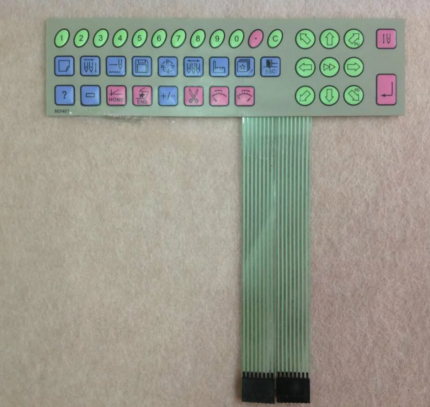 Jing Dahao 805407 Keyboard Keypad Membrane for BECS-07 Embroidery C...$ 37.09View part →
All Dahao BECS parts → Rotary Hooks & Bobbin Cases → Needles & Needle Bars → Thread Path & Tension →
3. Keypad Board (under membrane) medium likelihood
How to tell
Even after replacing the membrane, certain buttons remain unresponsive, or the panel exhibits erratic behavior. This indicates an issue with the underlying circuit board.
Fix
- Power off and unplug the machine.
- Remove the control panel housing and the keypad membrane.
- Carefully disconnect the ribbon cables and mounting screws securing the keypad board.
- Replace the old keypad board with a new one, ensuring proper alignment and secure connections.
- Reinstall the keypad membrane and control panel housing.
- Power on and test all buttons for correct operation.
Relevant parts include Keypad Board KD010A for Dahao BECS 328 Control Panel, Dahao KD010A Keypad Board, Dahao P/N KD011A Keypad Board, and ONLOYO KD011A Keypad Board.
Parts involved: Circuit boards & electronics → Control panels & displays →
4. CPU Main Board low likelihood
How to tell
The machine fails to boot, displays critical errors, experiences frequent crashes, or exhibits widespread electronic malfunctions not attributable to other components. This is a more severe failure.
Fix
- Power off and unplug the machine.
- Access the main control box where the CPU board is located.
- Carefully disconnect all cables and connectors from the old CPU board, noting their positions.
- Remove the mounting screws or standoffs.
- Install the new CPU main board, ensuring all connections are securely reattached.
- Close the control box, power on the machine, and test its functionality. You may need to re-upload machine parameters or firmware.
The Dahao E870/E870E CPU Main Board is a common replacement for various BECS-xx8 series machines.
Parts involved: Circuit boards & electronics →
5. Stepper Motor Driver Board low likelihood
How to tell
Specific stepper motors (e.g., for X/Y movement, color change, or trimming) stop functioning, move erratically, or make unusual noises. Error codes related to motor drivers may appear.
Fix
- Power off and unplug the machine.
- Locate the stepper motor driver board, often found within the main control box or near the motors.
- Identify the faulty driver (if multiple are present) by checking for visible damage or specific error codes.
- Disconnect the motor, power, and signal cables from the faulty driver.
- Remove the old driver board and install the new one, ensuring all connections are correct and secure.
- Power on the machine and test the affected motor's movement and functionality.
The DAHAO Stepper Motor Driver Board is used for various BECS-X6(X8) single-head and other Chinese embroidery machines.
Parts involved: Circuit boards & electronics → Motors & drivers →
Maintenance schedule
| When | What to do | Why |
|---|---|---|
| Daily (before operation) | Clean the needle area, rotary hook, and tension discs. | Removes lint and thread debris that can cause thread breaks and poor stitch quality. |
| Daily (before operation) | Check needles for sharpness and straightness. | Dull or bent needles cause skipped stitches, fabric damage, and can break more easily. |
| Weekly (or every 40-60 hours of operation) | Lubricate the rotary hook and other specified oiling points. | Reduces friction and wear on moving parts, preventing premature failure and ensuring smooth operation. Refer to your machine manual for specific oiling points and type of oil. |
| Weekly (or every 40-60 hours of operation) | Thoroughly clean the entire machine, including under the needle plate and around the thread path. | Prevents buildup of lint and debris that can interfere with machine function and cause wear. |
| Monthly (or every 160-200 hours of operation) | Inspect and clean the thread tension assemblies. | Ensures consistent thread tension, crucial for stitch quality, and prevents thread breaks. |
| Monthly (or every 160-200 hours of operation) | Check for loose screws, especially on the needle bar, presser foot, and head assembly. | Loose components can affect stitch quality, cause vibrations, and lead to more significant mechanical issues. |
| Quarterly (or every 500 hours of operation) | Inspect belts for wear, tension, and alignment. | Worn or loose belts can affect timing, cause inconsistent movement, and lead to motor strain. |
| Quarterly (or every 500 hours of operation) | Inspect the control panel keypad membrane and touch screen for wear or damage. | Early detection of wear allows for replacement before complete failure, preventing downtime. |
| Annually (or every 2000 hours of operation) | Inspect internal wiring and cable connections for fraying or looseness. | Prevents electrical issues, intermittent failures, and potential safety hazards. |
| Annually (or every 2000 hours of operation) | Consider professional servicing for comprehensive inspection and calibration. | A technician can identify and address issues not visible during routine maintenance, ensuring optimal machine performance and longevity. |
Stop and call a technician if
- If the machine displays persistent error codes that you cannot resolve with basic troubleshooting.
- If you notice smoke, burning smells, or unusual electrical behavior.
- If the machine experiences major mechanical failures, such as a seized shaft or motor.
- For complex electronic component replacements like CPU main boards or if you are unsure about a repair.
- If you've followed all troubleshooting steps and the problem persists.
Prevent it coming back
- Always use high-quality threads and needles appropriate for your fabric and design.
- Ensure proper thread tension to prevent snags and undue stress on machine parts.
- Keep your workspace clean and free of dust and lint, which can infiltrate machine components.
- Avoid forcing parts or making adjustments without understanding the correct procedure.
- Perform daily quick checks before starting operation to catch minor issues early.
- Use a surge protector to protect electronic components from power fluctuations.
Frequently asked questions
How often should I clean my Dahao BECS machine?
Daily cleaning is recommended, especially around the needle area, rotary hook, and tension discs, to remove lint and thread debris. A more thorough weekly cleaning should also be performed.
What kind of oil should I use for lubrication?
Always refer to your machine's specific manual for the recommended type of oil. Generally, a high-quality, light-grade sewing machine oil is used. Avoid using general-purpose oils that can gum up mechanisms.
Why is my machine making strange noises?
Unusual noises can indicate several issues, including lack of lubrication, loose parts, worn bearings, or thread tangled in the rotary hook. Stop the machine immediately, inspect for obvious problems, and lubricate according to the schedule. If the noise persists, consult a technician.
Can I replace parts myself?
Many common wear parts like keypad membranes, needles, and rotary hooks can be replaced by an operator with basic mechanical skills. For more complex electronic components like CPU boards or motor drivers, it's often best to consult a qualified technician to avoid further damage.
Did this guide fix your machine?
Rate it - it helps other operators find the right fix.
Not sure which part is failing?
Need the logo stitched too?
Get your logo digitized by the people who know this machine
Upload the artwork, see the stitch count and the exact price in 10 seconds, then order with a free sew-out preview. $1 per 1,000 stitches, $10 minimum, 24-hour delivery. Vector conversion from $12.
After the fix
Fixed it? Keep the rest of the shop moving.
OS 360 is the shop software from the team behind this parts store. Every job keeps its status, deadline and owner while a BECS head is down, restock alerts fire for needles, hooks and bobbins before you run dry, and quotes, invoices and payment live in one place.
- Jobs with status, deadline and owner - nothing slips during downtime
- Inventory with restock alerts, this store one click away
- Instant quotes, invoices and one place to collect payment





