
Blog
Tajima TFMX Series: Common Problems & Fixes Guide


Quick answer: Common Tajima TFMX issues include thread breakage, skipped stitches, design misalignment, and machine stops. Most can be resolved by checking thread path, tension, needle condition, hooping, and basic mechanical adjustments. Always start with a thorough cleaning and re-threading.
The Tajima TFMX series is a workhorse in the embroidery industry, known for its reliability. However, like any precision machinery, operators will occasionally encounter common issues. This guide provides practical, step-by-step troubleshooting and repair advice for the most frequently reported problems, helping you get your TFMX back to peak performance quickly. We'll cover how to identify the problem, what steps to take, and which parts are typically involved.
Two-minute checks before you open anything
- Is the machine plugged in and powered on?
- Is the emergency stop button disengaged?
- Is the thread path clear and correctly threaded from spool to needle?
- Is the bobbin correctly inserted and wound?
- Is the needle new, correctly inserted, and appropriate for the fabric/thread?
- Is the garment hooped tightly and securely?
- Are there any visible obstructions in the needle area or under the needle plate?
1. Thread Breakage or Skipped Stitches high likelihood
How to tell
The machine stops with a thread break error, or you notice gaps in your embroidery design. Threads may appear frayed or cut, or the machine might just keep sewing without forming stitches.
Fix
- Re-thread the machine completely, ensuring the thread passes correctly through all guides and tension discs.
- Check thread tension. Top tension should be balanced with bobbin tension. Adjust the tension knob incrementally.
- Inspect the needle for bends, burrs, or dullness. Replace the needle if any damage is found, ensuring it's inserted correctly.
- Clean the thread path, including the upper thread guides, tension discs, and the area around the rotary hook, removing any lint or thread fragments.
- Verify the thread break sensor is clean and functioning. Gently clean the sensor eye with a soft brush or compressed air.
- Check the rotary hook for nicks or burrs that could be snagging the thread. If damaged, it may need replacement.
- Ensure the bobbin is wound correctly and inserted with the thread coming off in the right direction.
Consider replacing the 'Tajima ICS131 0J2603200000 Thread Break Sensor & Bracket for TFMX' if the sensor is faulty. A worn 'Koban KHS20-RYP2 Rotary Hook Jumbo 2.0X with Trimmer for Tajima TMAR TMBP TFMX' can cause thread issues.
Parts involved: Needles & needle bars → Rotary hooks & bobbin cases → Thread path & tension → Sensors & switches →
2. Design Misalignment or Shifting medium likelihood
How to tell
The embroidery design appears off-center, distorted, or shifts position during sewing. This can manifest as outlines not matching fills, or the entire design being in the wrong place on the garment.
Fix
- Ensure the garment is hooped tightly and correctly. Loose hooping is a primary cause of shifting.
- Check that the embroidery frame is securely attached to the machine's drive arms and there is no play.
- Inspect the X and Y axis drive belts for looseness, wear, or damage. Tighten or replace if necessary.
- Verify the X and Y axis pulleys are secure and not slipping on their shafts.
- Check for any obstructions in the movement path of the pantograph (frame drive system).
- If using a cap frame, ensure it is properly seated and locked into place.
Loose or worn belts like 'Genuine Japanese MBL S5M1270 Timing Belt 20mm for Tajima TFMX' or 'Genuine Japanese MBL Timing Belt S5M930 S5M5446 30mm for Tajima TFGN TFMX TMFX TFGNII X-Axis Embroidery Machines' are common culprits. Check 'Tajima W20-16 Timing Belt Pulley CX0170000000' for wear. A faulty 'Tajima EC6102050000 XY Axis Driver Card Board MP167-1' can also cause issues.
Parts involved: Hoops & frames → Belts, pulleys & gears → Motors & drivers →
Parts you may need for Tajima TFMX
In stock, tested before dispatch, Buyer Protection on every order. Part types for this problem: Rotary hooks & bobbin cases, Needles & needle bars, Thread path & tension, Presser feet & sewing parts.
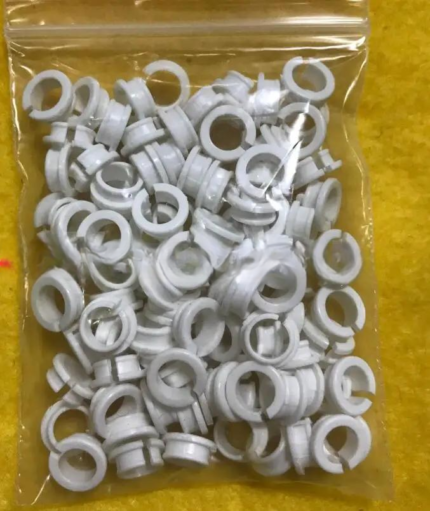 Tajima EF0613220000 EF0613210000 090460040020 090460040031 Presser ...$ 18.09View part →
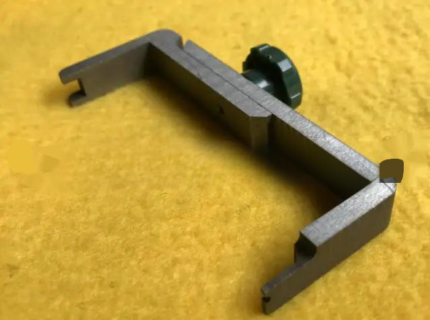 Tajima ZG0030400000 Needle Bar Connecting Stud Gauge for TMFX, TFMX...$ 39.09View part →
 Tajima Magnetic Embroidery Hoop 150x150mm 5.5x5.5 Inches Length 355...$ 83.09View part →
 EF6600000000 JHX-G8L1000 1000P/R Rotary Encoder for Chinese Tajima ...$ 92.49View part →
 Genuine Japanese MBL S5M1270 Timing Belt 20mm for Tajima TFMX, TMAR...$ 68.99View part →
 Take-Up Lever Drive Crank Rod Assembly for Tajima TMFX TFMX TFGN & ...$ 10.99View part →
All Tajima TFMX parts → Rotary Hooks & Bobbin Cases → Needles & Needle Bars → Thread Path & Tension →
3. Machine Stops or Fails to Sew (Freezing/Unresponsive) medium likelihood
How to tell
The machine suddenly stops mid-design, becomes unresponsive to controls, or fails to start a new design. Error messages may appear on the control panel, or the machine might simply lock up.
Fix
- Check the emergency stop button. Ensure it is not engaged. Reset it if it is.
- Power cycle the machine: turn it off, wait 30 seconds, then turn it back on.
- Check all cable connections, especially the main power cable and any data cables to the control panel or between machine components.
- Review the error code displayed on the control panel (if any) and consult your machine manual for specific troubleshooting steps.
- Inspect the main signal harness for any visible damage or loose connections.
- If using a floppy drive or USB emulator, ensure the design file is not corrupted and the device is properly inserted.
A faulty 'Tajima EC6102050000 XY Axis Driver Card Board MP167-1' or issues with the 'Tajima Main Signal Harness 47 Arm STSS' can cause these problems. If using a floppy drive, consider upgrading to a 'SFRM72-FU USB Floppy Emulator for Tajima' or 'Gotek SFR1M44-FU USB Floppy Emulator for Tajima'.
Parts involved: Circuit boards & electronics → Cables & wiring → Sensors & switches → Floppy, USB & memory →
4. Poor Stitch Quality (Puckering, Looping, Uneven Stitches) medium likelihood
How to tell
The fabric puckers around the embroidery, stitches form loops on the top or bottom, or the overall stitch appearance is inconsistent and messy.
Fix
- Adjust top thread tension and bobbin tension. Ensure they are balanced. A common cause of looping is incorrect tension.
- Check the bobbin case for lint buildup or damage. Clean it thoroughly and inspect the bobbin spring.
- Ensure the correct needle size and type are being used for the fabric and thread. A dull or incorrect needle can cause issues.
- Verify that the presser foot height is correctly set for the fabric thickness. Too high or too low can affect stitch formation.
- Check the rotary hook timing. If the hook is out of sync with the needle, stitches will not form correctly. This often requires a technician.
- Ensure the fabric is properly stabilized for the design density. Inadequate stabilization can lead to puckering.
A worn 'Koban KHS20-RYP2 Rotary Hook Jumbo 2.0X with Trimmer for Tajima TMAR TMBP TFMX' can cause looping. Check the 'Tajima EF0613220000 EF0613210000 090460040020 090460040031 Presser Foot Bushing Guide Collar for TFMX' for wear if presser foot movement is inconsistent.
Parts involved: Needles & needle bars → Rotary hooks & bobbin cases → Thread path & tension → Presser feet & sewing parts →
5. Needle Breakage low likelihood
How to tell
The needle snaps during sewing, often with a loud crack. This can happen repeatedly or intermittently.
Fix
- Replace the needle with a new, correct size and type needle, ensuring it is inserted all the way up and facing the correct direction.
- Check the needle bar alignment. A bent or misaligned needle bar can cause needles to hit the presser foot or rotary hook.
- Verify the rotary hook timing. If the hook is hitting the needle, it will cause breakage.
- Inspect the presser foot for any damage or misalignment that the needle might be striking.
- Ensure the fabric is not too thick or dense for the needle being used, and that it is properly stabilized.
- Check for any burrs or obstructions in the needle plate hole.
Repeated needle breakage might indicate issues with the 'Tajima Needle Bar Reciprocator Assembly for TFMX' or the 'Tajima Needle Bar Drive Assembly Iron Cam'. A bent 'Tajima ZG0030400000 Needle Bar Connecting Stud Gauge' can also contribute.
Parts involved: Needles & needle bars → Presser feet & sewing parts → Rotary hooks & bobbin cases → Head & mechanical parts →
6. Floppy Drive / USB Emulator Read Errors low likelihood
How to tell
The machine displays 'Disk Read Error', 'File Not Found', or fails to load designs from the floppy drive or USB emulator.
Fix
- Ensure the floppy disk or USB drive is correctly inserted and fully seated.
- Try a different floppy disk or USB drive to rule out media corruption.
- Clean the floppy drive head with a specialized cleaning disk if you are still using physical floppies.
- If using a USB emulator, ensure the USB stick is formatted correctly (FAT32) and the design files are in the correct directory structure.
- Power cycle the machine after inserting the USB drive or floppy disk.
- Check for any firmware updates for your USB emulator if applicable.
If you're still using a floppy drive, upgrading to a 'SFRM72-FU USB Floppy Emulator for Tajima' or 'Gotek SFR1M44-FU USB Floppy Emulator for Tajima' is highly recommended to improve reliability and storage capacity.
Parts involved: Floppy, USB & memory →
Maintenance schedule
| When | What to do | Why |
|---|---|---|
| Daily | Clean rotary hook area and needle plate. | Removes lint and thread debris that can cause thread breaks and poor stitch quality. |
| Weekly / Every 40-50 hours | Thoroughly clean under needle plate, tension discs, and thread guides. | Prevents buildup that can affect thread tension and cause skipped stitches. |
| Monthly / Every 150-200 hours | Inspect and clean X/Y axis rails and belts. | Ensures smooth pantograph movement and prevents design misalignment. Check belt tension. |
| Quarterly / Every 500 hours | Lubricate according to manufacturer's manual. | Reduces wear on moving parts, preventing mechanical failures and extending machine life. |
Stop and call a technician if
- If you suspect a major electrical fault or component failure (e.g., main board, motor).
- If you are unable to resolve persistent mechanical issues like timing problems after following basic troubleshooting.
- If the machine displays complex error codes that are not easily resolved by the manual.
- If you are uncomfortable performing internal mechanical adjustments or electrical checks.
Prevent it coming back
- Perform daily cleaning of the rotary hook area, needle plate, and thread path to prevent lint buildup.
- Regularly inspect needles and replace them at the first sign of dullness, bends, or burrs.
- Ensure proper thread tension is maintained for all colors and materials being used.
- Always use appropriate stabilizers for your fabric and design density to prevent puckering and shifting.
- Check and tighten all hooping mechanisms and frame attachments before starting a design.
- Follow the manufacturer's recommended lubrication schedule to keep moving parts operating smoothly.
Frequently asked questions
Why does my Tajima TFMX keep breaking thread?
Thread breakage is often due to incorrect tension, a damaged or dull needle, lint in the thread path, or burrs on the rotary hook. Thoroughly re-thread, replace the needle, clean the machine, and check tension settings.
My Tajima TFMX design is shifting. What should I check?
Design shifting is commonly caused by loose hooping, an insecure embroidery frame, or worn/loose X/Y axis timing belts. Ensure your garment is hooped tightly and check the condition and tension of your drive belts.
What causes my Tajima TFMX to stop mid-design?
Unexpected stops can be due to a triggered emergency stop, a thread break sensor activation, a loose electrical connection, or a corrupted design file. Check the emergency stop, clear any thread breaks, and power cycle the machine.
How often should I clean my Tajima TFMX?
Daily cleaning of the rotary hook area, needle plate, and thread path is recommended. A more thorough cleaning, including under the needle plate and around tension discs, should be done weekly or after every 40-50 hours of operation, whichever comes first.
Can I upgrade my Tajima TFMX floppy drive to USB?
Yes, many Tajima TFMX machines can be upgraded with a USB floppy emulator. We stock models like the 'SFRM72-FU USB Floppy Emulator for Tajima' and 'Gotek SFR1M44-FU USB Floppy Emulator for Tajima' that are compatible with your machine.
From the Tajima TFMX-IIC parts book
The assemblies involved in this problem, as the manufacturer lists them. Open a section to see every part number, which ones we stock, and get a price on the rest.
Did this guide fix your machine?
Rate it - it helps other operators find the right fix.
Not sure which part is failing?
Need the logo stitched too?
Get your logo digitized by the people who know this machine
Upload the artwork, see the stitch count and the exact price in 10 seconds, then order with a free sew-out preview. $1 per 1,000 stitches, $10 minimum, 24-hour delivery. Vector conversion from $12.
After the fix
Fixed it? Keep the rest of the shop moving.
OS 360 is the shop software from the team behind this parts store. Every job keeps its status, deadline and owner while a TFMX head is down, restock alerts fire for needles, hooks and bobbins before you run dry, and quotes, invoices and payment live in one place.
- Jobs with status, deadline and owner - nothing slips during downtime
- Inventory with restock alerts, this store one click away
- Instant quotes, invoices and one place to collect payment





