
Blog
Durkopp Adler 267 Series: Common Problems & Fixes


Quick answer: Common problems with the Durkopp Adler 267 series often stem from incorrect threading, worn needles, tension issues, or damage to the rotary hook or bobbin case. Most issues can be resolved with careful inspection, cleaning, and part replacement.
The Durkopp Adler 267 series is a robust and reliable industrial sewing machine, known for its walking foot mechanism and ability to handle heavy materials. However, like any precision equipment, operators may encounter common issues. This guide provides practical, step-by-step solutions to the most frequently reported problems, helping you get your machine back in optimal working order quickly. Remember to always consult your machine's official manual for detailed specifications and safety procedures.
Two-minute checks before you open anything
- Is the machine properly threaded (upper and bobbin)?
- Is the needle new, inserted correctly, and the right type/size?
- Is the bobbin wound evenly and inserted correctly?
- Are the tension settings appropriate for your thread and fabric?
- Is there any lint or debris in the bobbin area or under the needle plate?
1. Skipped Stitches or Poor Stitch Quality high likelihood
How to tell
Stitches are uneven, missing, or appear loose on the fabric. The machine may sound different during sewing.
Fix
- Ensure the needle is inserted correctly, fully seated, and facing the right direction (scarf to the back).
- Replace the needle with a new, correct type and size for your thread and material. A bent or dull needle is a common culprit.
- Completely re-thread the machine, ensuring the thread passes through all guides and tension discs correctly.
- Check the bobbin winding; it should be smooth and even. Re-wind if necessary.
- Verify the bobbin is inserted correctly into the bobbin case and the case is properly seated in the rotary hook.
- Adjust upper and lower thread tension. Start with the manufacturer's recommended settings and fine-tune.
- Inspect the rotary hook for burrs or damage that could snag thread. If damaged, consider replacing the 'Durkopp Adler 167 168 267 268 Rotary Hook Cap Bobbins & Bobbin Case Replacement'.
- Clean lint and debris from under the needle plate, around the feed dogs, and in the bobbin area.
A new needle is often the first and easiest fix. If the rotary hook or bobbin case is damaged, replace with 'Durkopp Adler 167 168 267 268 Rotary Hook Cap Bobbins & Bobbin Case Replacement'.
Parts involved: Needles & needle bars → Thread path & tension → Rotary hooks & bobbin cases → Screws, springs & small parts →
2. Thread Breakage high likelihood
How to tell
The thread snaps frequently during sewing, sometimes with a loud pop. This can happen with either the upper or bobbin thread.
Fix
- Check for burrs or sharp edges on the needle plate, rotary hook, thread guides, or the bobbin case. Smooth any rough spots with fine-grit sandpaper or replace the affected part.
- Ensure the correct needle size and type are used for your thread and fabric. A needle too small for the thread will cause breakage.
- Reduce upper thread tension slightly. Too much tension can weaken the thread.
- Inspect the entire thread path for obstructions, incorrect routing, or tangled thread.
- Check the bobbin case for damage or incorrect winding. Ensure the bobbin tension is not too tight.
- Replace the needle. A dull or bent needle can fray and break thread.
- Clean lint and debris from the thread path, tension discs, and bobbin area.
- Ensure the thread is good quality and not old or brittle.
Inspect the 'Durkopp Adler 167 168 267 268 Rotary Hook Cap Bobbins & Bobbin Case Replacement' for any nicks or burrs that could be cutting the thread.
Parts involved: Needles & needle bars → Thread path & tension → Rotary hooks & bobbin cases → Screws, springs & small parts →
Parts you may need for your machine
In stock, tested before dispatch, Buyer Protection on every order. Part types for this problem: Rotary hooks & bobbin cases, Needles & needle bars, Thread path & tension, Presser feet & sewing parts.
 Bobbin Case & 2 Metal Bobbins for Brother, Janome, Singer, Babylock...$ 5.59View part →
 Portable Mini Manual Sewing Machine - Handy Needlework Tool for Sim...$ 10.49View part →
 Adjustable Retro Sewing Thimble Finger Protection for Embroidery & ...$ 4.99View part →
 CHCH Essential Embroidery Machine Spare Part - Restore Performance$ 0.00View part →
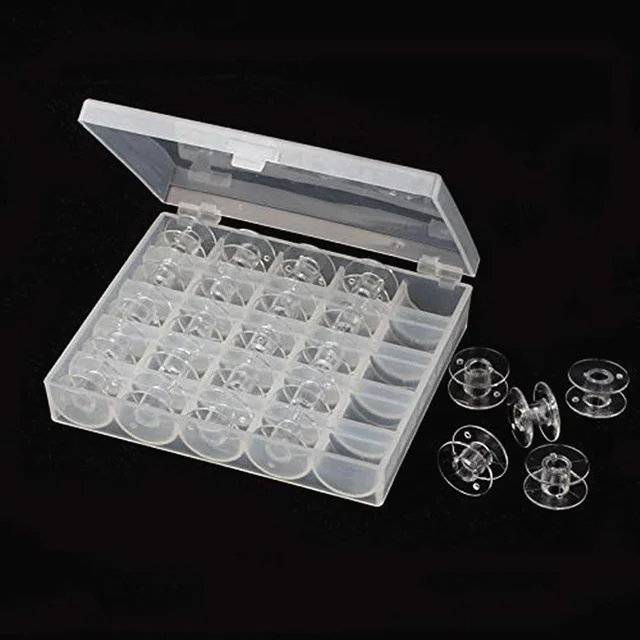 OZXHIXU AA7650 25Pcs Clear Plastic Sewing Machine Bobbins Spools & ...$ 6.49View part →
 Cartridge Tattoo Needles RL RS RM M1 Disposable Sterilized Safety T...$ 15.99View part →
All your machine parts → Rotary Hooks & Bobbin Cases → Needles & Needle Bars → Thread Path & Tension →
3. Needle Breakage medium likelihood
How to tell
The needle snaps during sewing, often hitting the bobbin case, needle plate, or feed dogs. This can be accompanied by a loud noise.
Fix
- Ensure the needle is inserted correctly, fully seated, and facing the right direction.
- Verify the correct needle system and size are being used for the machine, thread, and material thickness.
- Check that the needle is not bent before insertion. Replace if bent.
- Inspect the needle bar for looseness or incorrect height. Refer to your machine's manual for proper needle bar timing and height adjustment.
- Ensure the presser foot is appropriate for the material and is securely attached. Incorrect presser feet can cause deflection.
- Check the timing of the rotary hook relative to the needle. If the hook point hits the needle, timing is off.
- Avoid pulling or pushing the fabric too aggressively while sewing, as this can deflect the needle.
- Ensure the feed dogs are set correctly and not causing excessive resistance.
If using specialized feet, ensure they are compatible. We stock 'Binding Sewing Feet Set for Durkopp Adler 69, 267, 269 Industrial Machines' and 'Durkopp Adler Industrial Zipper Foot Set #067-22-070-0 #067-22-079-0 for 67, 167, 267, 69, 269' and 'Durkopp Adler 67, 167, 267, 69, 269 Zipper Foot Set #067-22-070-6 + #067-22-078-0'.
Parts involved: Needles & needle bars → Presser feet & sewing parts → Rotary hooks & bobbin cases → Head & mechanical parts →
4. Material Feeding Problems medium likelihood
How to tell
Fabric isn't moving smoothly, stitches are inconsistent in length, or the machine 'walks' on the material. This is particularly noticeable on thick or slippery fabrics.
Fix
- Clean lint and debris from the feed dogs and under the needle plate. Obstructions can hinder feeding.
- Check the feed dog height and motion. They should rise above the needle plate and move the fabric consistently.
- Ensure the presser foot pressure is correctly adjusted for the material thickness. Too little pressure can cause slipping, too much can impede movement.
- Verify the stitch length setting. If set too short, feeding can be difficult.
- Inspect the feed dogs and presser feet for wear. Worn teeth on feed dogs or a smooth bottom on a walking foot can reduce grip. Replace if worn.
- Ensure the walking foot mechanism (if applicable to your specific 267 model) is moving freely and correctly synchronized.
- Use the correct type of presser foot for the material. For binding or specific tasks, consider specialized feet like the 'Binding Sewing Feet Set for Durkopp Adler 69, 267, 269 Industrial Machines'.
Worn feed dogs or presser feet are common causes. We offer 'Binding Sewing Feet Set for Durkopp Adler 69, 267, 269 Industrial Machines' and various zipper foot sets like 'Durkopp Adler Industrial Zipper Foot Set #067-22-070-0 #067-22-079-0 for 67, 167, 267, 69, 269' and 'Durkopp Adler 67, 167, 267, 69, 269 Zipper Foot Set #067-22-070-6 + #067-22-078-0'.
Parts involved: Presser feet & sewing parts → Head & mechanical parts → Screws, springs & small parts →
5. Machine Jamming or Not Sewing low likelihood
How to tell
The machine stops abruptly, the handwheel is difficult to turn, or the needle is stuck in the down position. Often accompanied by a grinding or clunking sound.
Fix
- Immediately turn off the machine.
- Remove the needle plate and inspect the bobbin area for tangled thread (thread nest) or fabric scraps.
- Carefully remove any obstructions. You may need to cut tangled thread.
- Check if the rotary hook is jammed. Remove the bobbin case and inspect the hook for thread caught around its shaft.
- Inspect the needle bar and presser bar for any obstructions or signs of impact.
- If the machine is still seized after clearing visible obstructions, do not force it. There may be an internal mechanical issue requiring a technician.
A severely jammed rotary hook might require replacement of the 'Durkopp Adler 167 168 267 268 Rotary Hook Cap Bobbins & Bobbin Case Replacement' if it's bent or damaged.
Parts involved: Rotary hooks & bobbin cases → Needles & needle bars → Head & mechanical parts → Screws, springs & small parts →
Maintenance schedule
| When | What to do | Why |
|---|---|---|
| Daily/Per Shift | Clean lint from feed dogs, needle plate, and bobbin area. Check and replace needle if worn. | Prevents thread jams, skipped stitches, and ensures smooth operation. |
| Weekly | Lubricate all designated oiling points (refer to manual). Inspect presser feet and feed dogs for wear. | Reduces friction, prevents wear on moving parts, and maintains stitch quality. |
| Monthly/Quarterly | Thorough cleaning of the entire machine head. Check belts for tension and wear. Inspect rotary hook for burrs. | Identifies potential issues before they become major problems and extends machine lifespan. |
| Annually | Professional servicing by a qualified technician. | Ensures all timing, adjustments, and internal components are in optimal condition. |
Stop and call a technician if
- If the machine is completely seized and you cannot identify or clear the obstruction.
- If there are persistent timing issues (needle bar, rotary hook) that you cannot resolve with basic adjustments.
- If you suspect a major internal mechanical failure (e.g., broken gears, bent shafts).
- If electrical components are malfunctioning or showing signs of damage.
- If, after following all troubleshooting steps, the problem persists.
Prevent it coming back
- Regularly clean lint and debris from the needle plate, feed dogs, and bobbin area.
- Always use the correct needle type, size, and thread for your material.
- Change needles frequently (e.g., at the start of each shift or every 8 hours).
- Ensure proper lubrication according to the manufacturer's schedule and specifications.
- Use good quality thread and bobbins.
- Perform routine checks for loose screws or worn parts.
- Avoid forcing thick materials through the machine; adjust presser foot pressure and stitch length as needed.
Frequently asked questions
How often should I change the needle on my Durkopp Adler 267?
For industrial machines like the Durkopp Adler 267, it's recommended to change the needle at the start of each shift or after every 8 hours of continuous sewing, especially when working with tough materials. A fresh needle prevents many common issues.
My machine is making a strange noise. What should I check first?
First, turn off the machine. Check for any loose screws, especially around the needle plate and presser feet. Inspect the bobbin area for tangled thread or debris. Ensure the rotary hook is clean and lubricated. If the noise persists after these checks, it may indicate a mechanical issue requiring further inspection or a technician.
What kind of oil should I use for my Durkopp Adler 267?
Always refer to your machine's official instruction manual for the specific oil type and lubrication points. Using the wrong type of oil can damage the machine. Generally, industrial sewing machines require a specific grade of clear, non-staining sewing machine oil.
Did this guide fix your machine?
Rate it - it helps other operators find the right fix.
Not sure which part is failing?
Need the logo stitched too?
Get your logo digitized by the people who know this machine
Upload the artwork, see the stitch count and the exact price in 10 seconds, then order with a free sew-out preview. $1 per 1,000 stitches, $10 minimum, 24-hour delivery. Vector conversion from $12.
After the fix
Fixed it? Keep the rest of the shop moving.
OS 360 is the shop software from the team behind this parts store. Every job keeps its status, deadline and owner while a embroidery head is down, restock alerts fire for needles, hooks and bobbins before you run dry, and quotes, invoices and payment live in one place.
- Jobs with status, deadline and owner - nothing slips during downtime
- Inventory with restock alerts, this store one click away
- Instant quotes, invoices and one place to collect payment





