
Blog
Dahao C18 Series Embroidery Machine Maintenance Guide

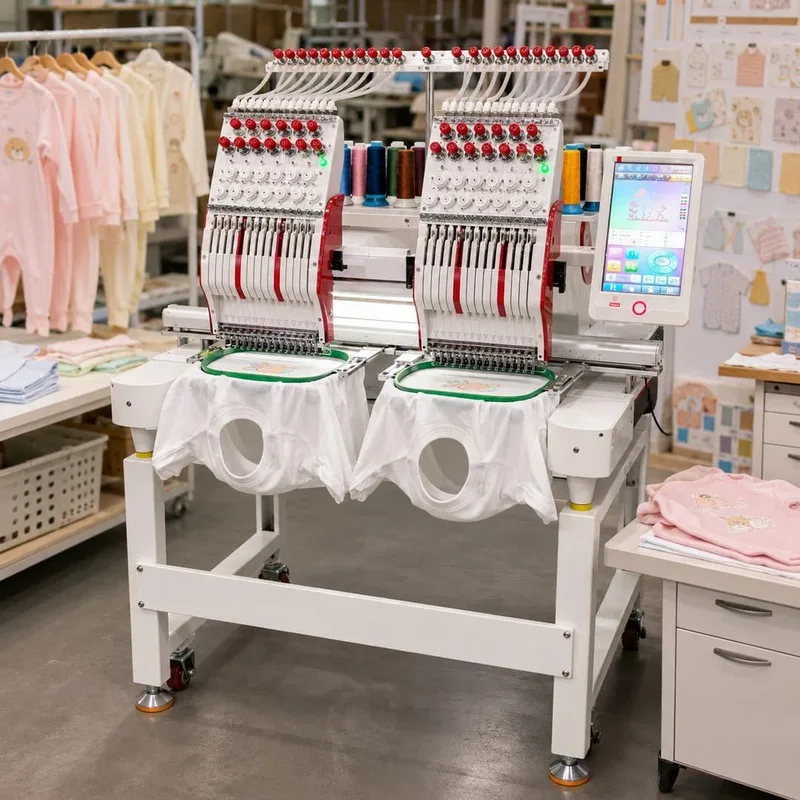
Quick answer: Regular maintenance for your Dahao C18 series embroidery machine involves daily cleaning and lubrication, weekly inspections of critical components like needles and hooks, and periodic replacement of wear parts such as needles, rotary hooks, trimmer blades, and belts. Following a consistent schedule prevents breakdowns and ensures optimal stitch quality.
Maintaining your Dahao C18 series embroidery machine is crucial for ensuring its longevity, optimal performance, and consistent stitch quality. Regular preventative maintenance helps identify potential issues before they lead to costly downtime and repairs. This guide provides a comprehensive schedule and highlights key wear parts to keep your C18 running smoothly.
Two-minute checks before you open anything
- Check for any loose threads or lint buildup around the needle area, rotary hook, and thread guides.
- Inspect needles for any signs of bending, burrs, or dullness.
- Verify that the bobbin is correctly inserted and the bobbin case tension is appropriate.
- Listen for any unusual noises during machine operation.
- Check that all thread paths are clear and free of obstructions.
1. Needles high likelihood
How to tell
Skipped stitches, thread breaks, burrs on the needle eye, bent or broken needles, or dull points. Inspect needles frequently for any signs of damage or wear.
Fix
- Visually inspect each needle for straightness, sharpness, and burrs.
- If any damage is found, loosen the needle clamp screw for the affected needle.
- Remove the old needle and insert a new, correct size and type needle, ensuring the scarf is facing the hook.
- Tighten the needle clamp screw securely.
- Perform a test sew to confirm proper function.
Parts involved: Needles & needle bars →
2. Rotary Hook high likelihood
How to tell
Frequent thread breaks, poor bobbin thread tension, noise from the hook area, or damaged embroidery. Inspect the hook tip for burrs, nicks, or excessive wear.
Fix
- Turn off the machine and remove the needle plate.
- Carefully remove the bobbin case and bobbin.
- Inspect the hook tip and race for any nicks, burrs, or rough spots. Use a magnifying glass if necessary.
- If minor burrs are present, they can sometimes be polished with very fine emery cloth (use caution).
- If the hook is significantly damaged or worn, it needs replacement. Consult your machine manual for specific hook removal and installation procedures, which typically involve removing retaining screws and carefully aligning the new hook.
- Lubricate the new hook as per manufacturer recommendations.
- Reinstall the bobbin case and needle plate, then test the machine.
Parts involved: Rotary hooks & bobbin cases →
Parts you may need for Dahao
In stock, tested before dispatch, Buyer Protection on every order. Part types for this problem: Rotary hooks & bobbin cases, Needles & needle bars, Thread path & tension, Cutters & trimmers.
 Dahao EF122 EF122F EF176 EF176B 12-Pin Alarm Board Thread Break Det...$ 23.29View part →
 Chinese Embroidery Machine Spare Parts - Dahao Thread Break Detecti...$ 29.49View part →
 DAHAO EF176 EF117 EF1219 Alarm Plate & Bottom Line Detection Board ...$ 19.49View part →
 Dahao D-30AGDYZ Switch Power Supply for Computerized Embroidery Mac...$ 50.49View part →
 D-30AGD Switching Power Supply 5V-4A / 12V-1A for China Dahao Embro...$ 28.49View part →
 Dahao EF164D Frame Limit Sensor with Cable (2 Pcs) for Feiya, ZGM, ...$ 34.99View part →
All Dahao parts → Rotary Hooks & Bobbin Cases → Needles & Needle Bars → Thread Path & Tension →
3. Trimmer Blades (Moving and Fixed) medium likelihood
How to tell
Inconsistent thread trims, partial trims, or threads left hanging after a trim. Listen for unusual noises during trimming. Visually inspect the blades for nicks, dullness, or misalignment.
Fix
- Turn off the machine and access the trimmer mechanism (often under the needle plate or behind the hook assembly).
- Carefully inspect both the moving and fixed blades for damage, dullness, or debris buildup.
- Clean any lint or thread buildup from around the blades.
- If blades are dull or nicked, they require replacement. Refer to your machine's service manual for the exact procedure, which usually involves removing small screws to detach the old blades and install new ones, ensuring correct alignment and gap.
- Test the trimming function after replacement.
Parts involved: Cutters & trimmers →
4. Belts (X, Y, Main Shaft, Head Drive) medium likelihood
How to tell
Skipped stitches, misaligned designs, unusual noises (squealing, flapping), visible cracks, fraying, or looseness in the belts. Check for excessive play or slippage.
Fix
- With the machine off, visually inspect all accessible belts for wear, cracks, fraying, or signs of slippage.
- Gently check belt tension. Belts should be taut but not overly tight. Refer to your machine manual for specific tensioning guidelines.
- If a belt is worn or damaged, it needs replacement. This often involves loosening motor mounts or idler pulleys, removing the old belt, installing the new one, and then re-tensioning it correctly.
- Ensure pulleys are clean and free of debris.
- Test machine movement and stitching after replacement.
Parts involved: Belts, pulleys & gears →
5. Needle Bar Bushings/Bearings low likelihood
How to tell
Excessive play or wobble in the needle bars, unusual noise (clunking, grinding) from the head, or poor stitch quality. This wear is usually gradual.
Fix
- With the machine off, gently try to wiggle each needle bar side-to-side and front-to-back. There should be minimal play.
- If excessive play is detected, the needle bar bushings or bearings are likely worn.
- Replacement is an advanced procedure often requiring disassembly of the head unit. It's recommended to consult a qualified technician or refer to a detailed service manual for precise steps, as incorrect installation can cause further damage.
- Ensure proper lubrication after replacement.
Parts involved: Shafts, bearings & bushings →
6. Dahao E8860B Cable low likelihood
How to tell
Intermittent errors, communication failures between components, specific functions not responding, or visible fraying, cuts, or damage to the cable insulation. Check connections for looseness.
Fix
- Turn off the machine and disconnect from power.
- Visually inspect the entire length of the Dahao E8860B Cable for any physical damage, kinks, or frayed insulation.
- Check both ends of the cable to ensure connectors are seated firmly and pins are not bent or corroded.
- If damage is found or suspected, carefully disconnect the old cable from both ends, noting its routing.
- Install a new Dahao E8860B Cable, ensuring it is routed correctly and securely connected at both ends.
- Power on the machine and test all functions related to the cable's connection.
Parts involved: Cables & wiring →
7. Dahao MD202G XY Pantograph Driver Board low likelihood
How to tell
Pantograph not moving or moving erratically, 'X-axis error' or 'Y-axis error' messages, motor not responding, or burning smell from the control box. Often accompanied by error codes on the control panel.
Fix
- Turn off the machine and disconnect from power.
- Access the control cabinet where the driver boards are located.
- Visually inspect the Dahao MD202G XY Pantograph Driver Board for any signs of burnt components, bulging capacitors, or discoloration.
- Check all cable connections to the board for looseness or corrosion.
- If the board is suspected to be faulty, carefully disconnect all cables and mounting screws.
- Replace with a new Dahao MD202G XY Pantograph Driver Board, ensuring all connections are correctly re-established.
- Power on the machine and test pantograph movement. If the issue persists, further diagnostics may be needed for motors or encoders.
Parts involved: Circuit boards & electronics →
8. DAHAO EF119 12-Needle Decoding Plate low likelihood
How to tell
Incorrect needle selection, machine not recognizing needle positions, or specific needles not engaging. This can manifest as the machine trying to sew with the wrong needle or stopping with a needle position error.
Fix
- Turn off the machine and disconnect from power.
- Locate the DAHAO EF119 12-Needle Decoding Plate (often near the needle bar case or within the head assembly).
- Inspect the plate and its connections for any visible damage, loose wires, or debris.
- If the plate is suspected to be faulty, carefully disconnect its wiring harness and mounting screws.
- Install a new DAHAO EF119 12-Needle Decoding Plate, ensuring all connections are secure and correctly oriented.
- Power on the machine and perform a needle change test to verify correct needle selection and positioning.
Parts involved: Circuit boards & electronics →
Maintenance schedule
| When | What to do | Why |
|---|---|---|
| Daily (or every 8-10 operating hours) | Clean the rotary hook area | Removes lint and thread debris that can cause thread breaks, poor stitching, and hook damage. |
| Daily (or every 8-10 operating hours) | Lubricate the rotary hook | Reduces friction and wear, ensuring smooth operation and extending hook life. Refer to your manual for oil type. |
| Daily (or every 8-10 operating hours) | Wipe down machine surfaces | Prevents dust and lint accumulation, especially around moving parts and electronics. |
| Weekly (or every 40-50 operating hours) | Inspect and clean under the needle plate | Removes hidden lint and debris that can interfere with trimmer function and thread path. |
| Weekly (or every 40-50 operating hours) | Inspect needles and replace as needed | Dull or damaged needles cause skipped stitches, thread breaks, and fabric damage. |
| Weekly (or every 40-50 operating hours) | Check thread tensioners and thread guides | Ensures smooth thread flow and consistent stitch quality. Clean any lint buildup. |
| Monthly (or every 160-200 operating hours) | Lubricate needle bars and main shaft points | Reduces friction and wear on critical moving parts in the head. Consult your manual for specific points and oil. |
| Monthly (or every 160-200 operating hours) | Inspect trimmer blades | Checks for dullness or damage that leads to poor thread cuts. Clean thoroughly. |
| Monthly (or every 160-200 operating hours) | Check all drive belts for tension and wear | Ensures proper timing and movement, preventing skipped stitches or misaligned designs. Adjust tension if necessary. |
| Quarterly (or every 500 operating hours) | Clean and inspect pantograph rails and wheels | Ensures smooth and accurate movement of the embroidery frame. Lubricate if recommended by the manufacturer. |
| Quarterly (or every 500 operating hours) | Check all electrical connections | Ensures secure connections, preventing intermittent errors or power issues. Do this with the machine powered off. |
| Annually (or every 2000 operating hours) | Professional service/comprehensive inspection | Allows for in-depth inspection, timing adjustments, and replacement of less frequently worn parts by a qualified technician. |
Stop and call a technician if
- If you encounter persistent error codes that do not clear after basic troubleshooting.
- When you suspect a major electrical component failure (e.g., motor driver, main board) and are not comfortable performing advanced diagnostics or replacements.
- If you observe significant mechanical damage or misalignment that requires specialized tools or expertise to correct.
- For complex issues involving timing adjustments that you are unsure how to perform safely and accurately.
Prevent it coming back
- Always use high-quality needles, threads, and backing materials to reduce stress on machine components.
- Ensure proper thread tension settings for each job to prevent unnecessary strain on the thread path and hook.
- Operate the machine within its recommended speed limits.
- Keep your workspace clean and free of excessive dust and lint, which can clog moving parts and electronics.
- Perform daily visual inspections of critical areas like the needle plate, hook, and thread path for any signs of wear or damage.
- Address minor issues promptly; don't wait for them to escalate into major problems.
Frequently asked questions
How often should I lubricate my Dahao C18 embroidery machine?
General lubrication points, such as the rotary hook, should be oiled daily or every 8-10 hours of operation. Other points, like needle bars and main shaft bearings, may require weekly or monthly lubrication. Always refer to your Dahao C18 machine's specific manual for precise lubrication points, types of oil, and frequency.
What are the most common wear parts on a Dahao C18 series machine?
The most common wear parts on a Dahao C18 series machine are needles, rotary hooks, trimmer blades, and various drive belts. These components experience friction and stress during normal operation and require regular inspection and timely replacement to maintain machine performance and stitch quality.
Did this guide fix your machine?
Rate it - it helps other operators find the right fix.
Not sure which part is failing?
Need the logo stitched too?
Get your logo digitized by the people who know this machine
Upload the artwork, see the stitch count and the exact price in 10 seconds, then order with a free sew-out preview. $1 per 1,000 stitches, $10 minimum, 24-hour delivery. Vector conversion from $12.
After the fix
Fixed it? Keep the rest of the shop moving.
OS 360 is the shop software from the team behind this parts store. Every job keeps its status, deadline and owner while a Dahao head is down, restock alerts fire for needles, hooks and bobbins before you run dry, and quotes, invoices and payment live in one place.
- Jobs with status, deadline and owner - nothing slips during downtime
- Inventory with restock alerts, this store one click away
- Instant quotes, invoices and one place to collect payment





