
Blog
Juki DDL-8300 Series: Common Problems & Fixes


Quick answer: The most common issues with the Juki DDL-8300 series are skipped stitches or poor stitch quality, often caused by a bent needle, incorrect threading, or improper tension. Check your needle first, then rethread the machine, and finally adjust tension settings.
The Juki DDL-8300 series is a workhorse in many sewing operations, known for its reliability and consistent stitch quality. However, like all industrial machinery, it can encounter issues. This guide provides practical, step-by-step solutions for the most common problems operators face, helping you get your machine back up and running quickly. We focus on issues you can often diagnose and fix yourself, along with identifying when it's time to call a professional.
Two-minute checks before you open anything
- Is the machine plugged in and turned on?
- Is the needle inserted correctly and not bent or dull?
- Is the machine threaded correctly, both upper and lower threads?
- Is the bobbin wound correctly and inserted properly?
- Are the tension settings appropriate for your thread and fabric?
- Are there any visible obstructions (lint, thread) in the needle plate or bobbin area?
1. Skipped Stitches or Poor Stitch Quality high likelihood
How to tell
Stitches appear irregular, loops on the top or bottom of the fabric, or gaps in the seam. The machine may make an unusual knocking sound.
Fix
- Replace the needle with a new, correct size and type for your fabric. Ensure it's inserted correctly and fully seated.
- Completely rethread the machine, ensuring the thread passes through all guides and tension discs correctly.
- Clean the bobbin case and rotary hook area. Remove any lint or thread scraps that could interfere with stitch formation.
- Adjust the upper and lower thread tension. Start with the manufacturer's recommended settings and fine-tune as needed.
- Ensure the presser foot is appropriate for the material and is securely attached. For specialized tasks, ensure you are using the correct foot, such as an Industrial Sewing Machine Zipper Presser Foot S518N for zippers or an Industrial Curved Hemming Foot for delicate hems.
A worn or incorrect needle is the most frequent culprit. Ensure your bobbin case is clean and free of burrs.
Parts involved: Needles & needle bars → Thread path & tension → Rotary hooks & bobbin cases → Presser feet & sewing parts →
2. Thread Breaking Frequently medium likelihood
How to tell
The upper or lower thread snaps repeatedly during sewing, sometimes with a loud pop.
Fix
- Inspect the entire thread path for burrs, sharp edges, or obstructions. Pay close attention to thread guides, tension discs, and the needle eye.
- Replace the needle. A bent, dull, or incorrect needle can cause thread breakage.
- Check the thread tension. Too much tension can cause the thread to snap.
- Ensure you are using good quality thread appropriate for your machine and fabric type.
- Clean the bobbin case and check for any nicks or burrs that could snag the thread.
Smooth thread guides and a pristine needle are crucial for preventing thread breaks. Consider replacing worn tension springs.
Parts involved: Thread path & tension → Needles & needle bars → Rotary hooks & bobbin cases →
Parts you may need for Juki DDL-8300
In stock, tested before dispatch, Buyer Protection on every order. Part types for this problem: Needles & needle bars, Thread path & tension, Rotary hooks & bobbin cases, Presser feet & sewing parts.
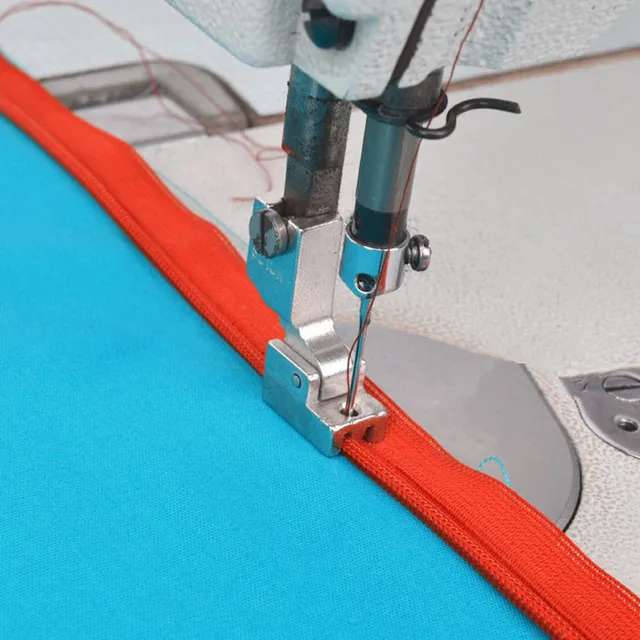 Industrial Sewing Machine Zipper Presser Foot S518N - Compatible wi...$ 8.49View part →
 Industrial Curved Hemming Foot for Juki DDL-8700, Brother DB2-B755,...$ 13.29View part →
 Juki Belt Cover: DDL-8500, DDL-5550, DDL-8300, DDL-8700, DLM-5200, ...$ 45.09View part →
 Flying Tiger DBx1 Industrial Lockstitch Needles, 100 pcs/box, Sizes...$ 12.09View part →
 Flying Tiger HAX1 15x1 Sewing Machine Needles 100-Pack for Brother ...$ 13.99View part →
 Industrial BC-DBZ(1)-NBL6 Bobbin Case for Barudan TZ1 LE2, Brother ...$ 8.49View part →
All Juki DDL-8300 parts → Needles & Needle Bars → Thread Path & Tension → Rotary Hooks & Bobbin Cases →
3. Machine Jamming or Fabric Not Feeding Properly medium likelihood
How to tell
The machine stops abruptly, fabric bunches up, or the needle gets stuck. Fabric may not move smoothly under the presser foot.
Fix
- Carefully clear any jammed fabric or thread from the needle plate and bobbin area. Turn the handwheel manually to free the needle if stuck.
- Check the feed dogs. Ensure they are clean, not clogged with lint, and are set to the correct height for your fabric. Adjust feed dog height if necessary (refer to manual).
- Verify the presser foot pressure. Too little pressure can cause fabric to slip, while too much can impede feeding. Adjust the presser foot pressure dial.
- Ensure the correct presser foot is being used for the material. For example, a standard foot might struggle with very thick or very thin materials where a specialized foot like an Industrial Sewing Machine Zipper Presser Foot S518N or an Industrial Curved Hemming Foot might be better suited.
- Inspect the needle for damage. A bent needle can hit the needle plate and cause jams.
The feed dogs and presser foot are critical for fabric transport. Ensure they are clean and correctly adjusted.
Parts involved: Presser feet & sewing parts → Head & mechanical parts → Needles & needle bars →
4. Unusual Noises or Vibrations low likelihood
How to tell
The machine makes grinding, knocking, squeaking, or excessive vibrating sounds that are not typical during operation.
Fix
- Stop the machine immediately. Inspect for any loose screws, nuts, or components, especially around the needle bar, presser foot, and handwheel.
- Check the oil level and ensure proper lubrication. Refer to your machine's manual for specific oiling points and frequency. Lack of lubrication can cause friction and noise.
- Inspect the motor belt (e.g., under the Juki Belt Cover). Ensure it's not worn, cracked, or slipping. Adjust belt tension if it's too loose.
- Clean the machine thoroughly, removing any lint or debris that might be interfering with moving parts.
- If the noise persists, it may indicate wear in shafts, bearings, or other internal mechanical components. This often requires professional attention.
A worn belt or lack of lubrication are common causes. Internal bearing wear can also lead to significant noise.
Parts involved: Lubrication & maintenance → Belts, pulleys & gears → Shafts, bearings & bushings → Head & mechanical parts → Screws, springs & small parts →
5. Motor Issues / Machine Not Starting low likelihood
How to tell
The machine does not turn on, the motor hums but doesn't run, or it runs intermittently.
Fix
- Check the power supply. Ensure the machine is plugged into a working outlet and that the power switch is on.
- Inspect the power cord for any visible damage or frayed wires.
- Check the motor belt. If it's too tight or too loose, it can prevent the motor from starting or running smoothly. Adjust tension or replace if worn.
- If the motor hums but doesn't turn, it could indicate a seized mechanism. Try turning the handwheel manually to see if anything is jammed.
- If basic checks don't resolve the issue, it may point to an electrical problem with the motor or control box, which typically requires a qualified technician.
Power issues or a faulty motor are less common but can halt operation completely. The Juki Belt Cover protects the motor belt, which is crucial for power transfer.
Parts involved: Motors & drivers → Cables & wiring → Belts, pulleys & gears →
Maintenance schedule
| When | What to do | Why |
|---|---|---|
| Daily / Every 8 hours of operation | Clean the needle plate, feed dogs, and bobbin area. | Prevents lint buildup that can cause skipped stitches, thread breaks, and poor feeding. |
| Daily / Every 8 hours of operation | Oil the machine at designated points. | Ensures smooth operation, reduces friction and wear, and prevents overheating and unusual noises. |
| Weekly / Every 40 hours of operation | Inspect and clean the entire thread path. | Identifies burrs or obstructions that can damage thread or affect tension. |
| Monthly / Every 160 hours of operation | Check motor belt tension and condition. | A properly tensioned and unworn belt ensures consistent power transfer and prevents slippage or breakage. |
| Annually / Every 2000 hours of operation | Professional servicing. | Allows for thorough inspection, cleaning, and adjustment of internal components, extending machine life and maintaining performance. |
Stop and call a technician if
- If you've followed all troubleshooting steps and the problem persists.
- If you suspect internal mechanical damage (e.g., bent shafts, broken gears).
- If there are electrical issues beyond simple power cord checks.
- If you are uncomfortable performing a specific repair or adjustment.
Prevent it coming back
- Perform daily cleaning, especially around the needle plate, feed dogs, and bobbin area, to remove lint and thread scraps.
- Regularly oil your machine according to the manufacturer's manual to ensure all moving parts are properly lubricated.
- Use only high-quality needles of the correct type and size for your machine and fabric, replacing them frequently (e.g., every 8 hours of heavy use).
- Use good quality thread appropriate for your machine and application.
- Periodically inspect the motor belt and other visible components for wear and tear, replacing them before they fail.
- Ensure the machine is on a stable, level surface to minimize vibrations.
Frequently asked questions
Why is my Juki DDL-8300 skipping stitches?
Skipped stitches are most often caused by a bent or dull needle, incorrect threading, or improper thread tension. Always check your needle first, then rethread the machine carefully, and finally adjust tension settings.
How often should I oil my Juki DDL-8300?
For industrial machines like the DDL-8300, it's generally recommended to oil daily or every 8 hours of operation, especially if used heavily. Always refer to your specific machine's manual for precise lubrication points and intervals.
Can I use any needle in my Juki DDL-8300?
No, you must use the correct needle system and size specified for the Juki DDL-8300 (typically DBx1 or 16x231). Using the wrong needle can cause skipped stitches, thread breakage, and damage to your machine.
My Juki DDL-8300 is making a strange noise. What should I do?
Stop the machine immediately. Check for loose parts, ensure it's properly lubricated, and inspect the motor belt. If the noise persists after these checks, it's best to consult a technician to diagnose potential internal mechanical issues.
Did this guide fix your machine?
Rate it - it helps other operators find the right fix.
Not sure which part is failing?
Need the logo stitched too?
Get your logo digitized by the people who know this machine
Upload the artwork, see the stitch count and the exact price in 10 seconds, then order with a free sew-out preview. $1 per 1,000 stitches, $10 minimum, 24-hour delivery. Vector conversion from $12.
After the fix
Fixed it? Keep the rest of the shop moving.
OS 360 is the shop software from the team behind this parts store. Every job keeps its status, deadline and owner while a DDL-8300 head is down, restock alerts fire for needles, hooks and bobbins before you run dry, and quotes, invoices and payment live in one place.
- Jobs with status, deadline and owner - nothing slips during downtime
- Inventory with restock alerts, this store one click away
- Instant quotes, invoices and one place to collect payment





