
Blog
Tajima TME-DC Series: Essential Maintenance Schedule & Wear Parts Guide

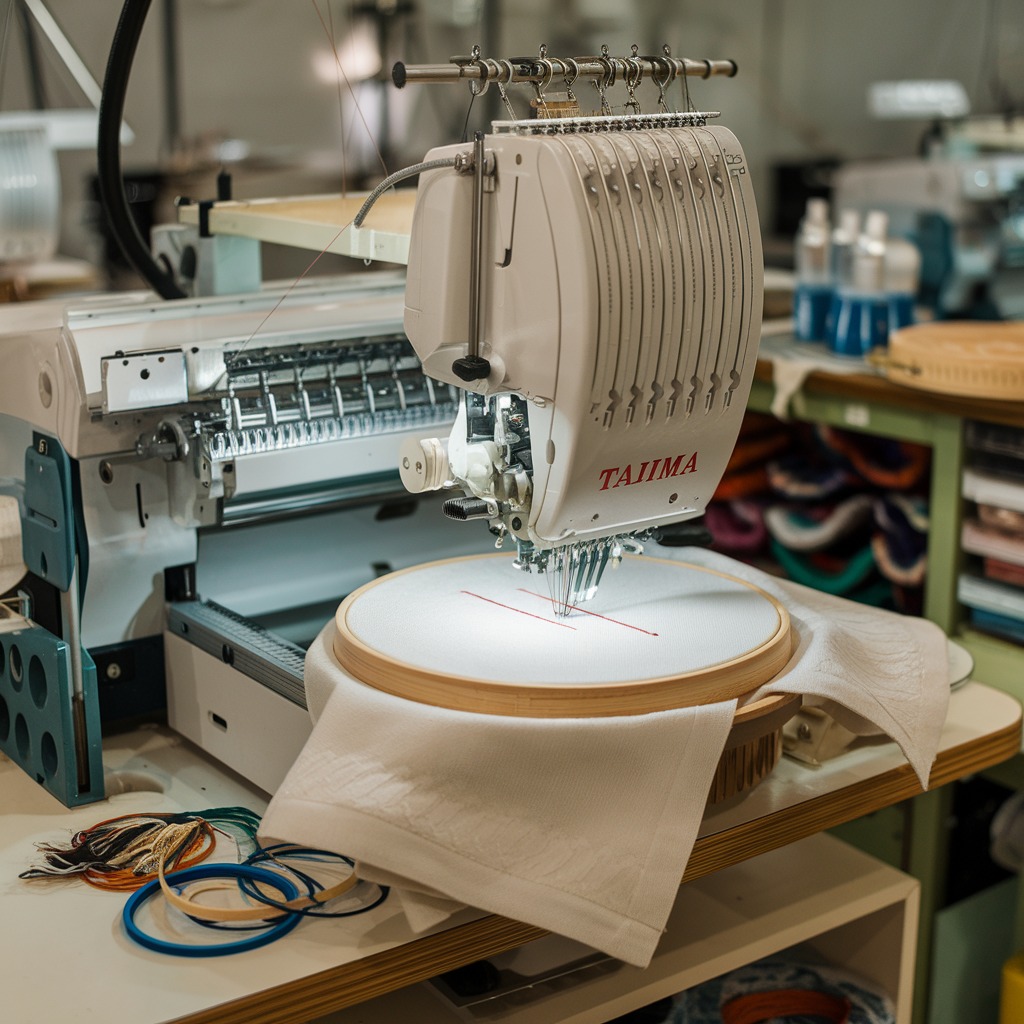
Quick answer: Regular maintenance for your Tajima TME-DC series machine involves daily cleaning and lubrication, weekly inspections of critical components like the rotary hook and thread path, and periodic replacement of wear parts such as rotary hooks, take-up lever gears, and data input devices to ensure optimal performance and longevity.
Maintaining your Tajima TME-DC series embroidery machine is crucial for its longevity, stitch quality, and consistent performance. As a workhorse in many embroidery shops, regular care prevents costly downtime and extends the life of your investment. This guide outlines an essential maintenance schedule and highlights common wear parts you should monitor and replace to keep your TME-DC running like new.
Two-minute checks before you open anything
- Check for any unusual noises during operation.
- Inspect the needle for bends, burrs, or dullness.
- Wipe down the machine exterior and clear any visible lint.
- Verify thread paths are clear and free of obstructions.
- Check bobbin level and ensure it's winding correctly.
- Confirm all safety guards are in place.
1. KHS20-R Jumbo Rotary Hook for TAJIMA TME-DC, TMFX, TMB, TMAR, TMEZ & BROTHER BAS-415, BAS-416, BAS-423 Embroidery Machines high likelihood
How to tell
Skipped stitches, thread breaks, poor tension, noise from the hook area, or visible burrs, nicks, or excessive wear on the hook point or race. Bobbin cases may also show wear.
Fix
- Inspect the hook point for damage or dullness.
- Check the hook race for lint buildup or scoring.
- Ensure the bobbin case spring tension is correct.
- If damaged or excessively worn, remove the old rotary hook by loosening its retaining screws.
- Install the new KHS20-R Jumbo Rotary Hook, ensuring proper timing and gap settings according to your machine's manual.
- Test with scrap fabric to verify stitch quality and timing.
Always keep a spare rotary hook on hand, as this is a high-wear item.
Parts involved: Rotary hooks & bobbin cases →
2. Tajima ME0530000000 Take-Up Lever Drive Crank Rod Gear medium likelihood
How to tell
Unusual noise from the take-up lever mechanism, erratic take-up lever movement, poor stitch formation, or the machine seizing. Visual inspection may reveal stripped or worn gear teeth.
Fix
- Carefully remove the machine covers to access the take-up lever drive mechanism.
- Inspect the gear teeth on the ME0530000000 Take-Up Lever Drive Crank Rod Gear for any signs of wear, chipping, or stripping.
- If damage is found, carefully remove the old gear, noting its orientation and any shims.
- Install the new gear, ensuring proper alignment and lubrication.
- Reassemble covers and test machine operation.
Proper lubrication of associated components can extend the life of this gear.
Parts involved: Belts, pulleys & gears → Head & mechanical parts →
Parts you may need for Tajima
In stock, tested before dispatch, Buyer Protection on every order. Part types for this problem: Rotary hooks & bobbin cases, Needles & needle bars, Thread path & tension, Presser feet & sewing parts.
 TAJIMA DU-10 XY Driver Board EH5404000000 MP-117-1-A for TME-HC, TM...$ 156.49View part →
 Hirose HSH-7.94ATR(MTQ) KHS12-RYP Rotary Hook for Tajima, Barudan, ...$ 18.09View part →
 Tajima EF0613220000 EF0613210000 090460040020 090460040031 Presser ...$ 18.09View part →
 Koban KHS12-RYP Rotary Hook with Trimmer for Tajima, Barudan, SWF, ...$ 37.29View part →
 Gotek SFRM72-FU Floppy Drive Emulator USB Reader for Tajima, Baruda...$ 59.29View part →
 Groz-Beckert DBXK5 FG/SUK Embroidery Needles (100 Pcs) for Tajima, ...$ 33.99View part →
All Tajima parts → Rotary Hooks & Bobbin Cases → Needles & Needle Bars → Thread Path & Tension →
3. SFRM72-FU USB Floppy Emulator for Tajima, Barudan, Happy, ZSK, Brother, Melco, Feiya, Ricoma Embroidery low likelihood
How to tell
Inability to read design files from USB, error messages related to floppy drive, intermittent data transfer issues, or the machine failing to recognize the emulator. This is more of an upgrade/failure than wear.
Fix
- Power off the machine and disconnect from power.
- Locate the existing floppy drive or USB emulator.
- Carefully disconnect the data and power cables.
- Remove the old unit from its mounting bracket.
- Install the new SFRM72-FU USB Floppy Emulator, ensuring proper connection of data and power cables.
- Secure the emulator in place.
- Power on the machine and test by loading a design from a USB stick.
Consider upgrading to a USB emulator if still using an old floppy drive for improved reliability and convenience.
Parts involved: Floppy, USB & memory →
4. Tajima 9ZJ4040A0000 USB Linker External Reader for TMEG, TMEF, TMBE, TMCE, TME-600, TME-DC, TMFD, TMFX Machines low likelihood
How to tell
Machine fails to read designs from USB, 'No Design' errors when USB is connected, or intermittent connection issues. This is more of an upgrade/failure than wear.
Fix
- Power off the machine and disconnect from power.
- Locate the existing external reader or the port where it connects.
- Disconnect the old reader (if present) or simply plug in the new 9ZJ4040A0000 USB Linker.
- Ensure the connection is secure.
- Power on the machine and test by attempting to load a design from a USB stick.
Ensure the USB stick is properly formatted and contains compatible design files.
Parts involved: Floppy, USB & memory →
5. Tajima DU-10 XY Driver Board MP-117-6 for TME-HC, TME-DC, TME-DC-I, TME-DC-II, TME-DC-III Series low likelihood
How to tell
Erratic or no movement of the pantograph (X or Y axis), grinding noises from the XY motors, machine stopping with XY motor errors, or visible damage (e.g., burnt components) on the board. This is a critical electronic component.
Fix
- WARNING: This is an advanced repair. Consult a qualified technician if unsure.
- Power off the machine and disconnect from power. Wait several minutes for capacitors to discharge.
- Access the control cabinet where the driver boards are located.
- Carefully identify the DU-10 XY Driver Board.
- Document all cable connections with photos before disconnecting them.
- Unmount the faulty board.
- Install the new DU-10 XY Driver Board, reconnecting all cables precisely as they were.
- Secure the board and close the cabinet.
- Power on and test machine movement. Calibration may be required.
Incorrect installation can damage the board or other components. Professional installation is recommended.
Parts involved: Circuit boards & electronics → Motors & drivers →
Maintenance schedule
| When | What to do | Why |
|---|---|---|
| Daily (or before each shift) | Clean the rotary hook area and bobbin case. | Removes lint and thread debris that can cause skipped stitches, thread breaks, and damage to the hook. |
| Daily (or before each shift) | Lubricate the rotary hook and other specified oiling points. | Reduces friction and wear on moving parts, ensuring smooth operation and preventing premature failure. |
| Daily (or before each shift) | Clean the thread path (tension discs, thread guides). | Prevents lint buildup that can affect thread tension and lead to thread breaks or poor stitch quality. |
| Weekly | Inspect needles and replace if bent, dull, or burred. | Sharp, undamaged needles are essential for clean perforations and preventing fabric damage or thread breaks. |
| Weekly | Clean under the needle plate and around the feed dog area. | Removes lint and debris that can interfere with fabric movement and stitch formation. |
| Weekly | Check thread tension for all needles. | Ensures balanced stitches and prevents stress on the thread and machine components. |
| Monthly (or every 200-300 operating hours) | Inspect the rotary hook for nicks, burrs, or excessive wear. | Early detection of hook damage can prevent major stitch quality issues and further machine damage. |
| Monthly (or every 200-300 operating hours) | Clean and lubricate the take-up lever mechanism. | Ensures smooth operation of the take-up lever, critical for proper stitch formation. |
| Monthly (or every 200-300 operating hours) | Check for loose screws on critical components (e.g., needle bar clamps, presser feet). | Prevents parts from vibrating loose during operation, which can cause damage or misalignment. |
| Quarterly (or every 500-750 operating hours) | Inspect drive belts and gears for wear or damage. | Worn belts or gears can lead to timing issues, noise, and eventual machine failure. |
| Annually (or every 1000-1500 operating hours) | Perform a thorough cleaning of the entire machine, including hard-to-reach areas. | Removes accumulated lint and debris that can affect performance and machine lifespan. |
| Annually (or every 1000-1500 operating hours) | Inspect all electrical connections and cables for wear or damage. | Ensures safe operation and prevents intermittent electrical issues. |
Stop and call a technician if
- If you encounter persistent error codes that you cannot resolve with basic troubleshooting.
- For any issues involving the main circuit boards or motor drivers (e.g., DU-10 XY Driver Board), as these require specialized knowledge.
- If you suspect internal mechanical damage that requires extensive disassembly beyond routine maintenance.
- When you are unsure about proper timing adjustments after replacing critical components like the rotary hook or needle bar.
Prevent it coming back
- Always use high-quality needles appropriate for your fabric and thread type.
- Use only recommended sewing machine oil and lubricate regularly, but do not over-lubricate.
- Keep your work area clean to prevent dust and lint from entering the machine.
- Use good quality thread to minimize lint buildup and thread breaks.
- Perform regular tension checks and adjustments to prevent undue stress on machine components.
- Never force the machine if it jams; investigate the cause gently.
Frequently asked questions
How often should I lubricate my Tajima TME-DC machine?
You should lubricate your Tajima TME-DC daily for high-use machines, or before each shift. Refer to your machine's manual for specific lubrication points and recommended oil types. Over-lubrication can be as detrimental as under-lubrication.
What kind of oil should I use for my Tajima TME-DC?
Always use high-quality, non-staining sewing machine oil specifically designed for embroidery machines. Consult your Tajima TME-DC operator's manual for the exact oil specifications and recommendations from the manufacturer.
Why do I keep getting thread breaks on my Tajima TME-DC?
Frequent thread breaks can be caused by many factors, including a worn or damaged rotary hook, incorrect thread tension, burrs in the thread path, a dull needle, incorrect needle size for the fabric/thread, or lint buildup. Start by inspecting the thread path, needle, and rotary hook.
How often should I replace the rotary hook on my Tajima TME-DC?
The lifespan of a rotary hook varies greatly depending on usage, thread type, and maintenance. For high-volume production, it's common to replace them every 6-12 months, or sooner if you notice consistent stitch quality issues, noise, or visible wear. Always keep a spare on hand.
Can I use a USB floppy emulator on my older Tajima TME-DC?
Yes, many older Tajima TME-DC machines that originally used floppy drives can be upgraded with a USB floppy emulator like the SFRM72-FU. This allows you to load designs from a USB stick, offering greater convenience and reliability than floppy disks. Check compatibility with your specific machine model.
Did this guide fix your machine?
Rate it - it helps other operators find the right fix.
Not sure which part is failing?
Need the logo stitched too?
Get your logo digitized by the people who know this machine
Upload the artwork, see the stitch count and the exact price in 10 seconds, then order with a free sew-out preview. $1 per 1,000 stitches, $10 minimum, 24-hour delivery. Vector conversion from $12.
After the fix
Fixed it? Keep the rest of the shop moving.
OS 360 is the shop software from the team behind this parts store. Every job keeps its status, deadline and owner while a Tajima head is down, restock alerts fire for needles, hooks and bobbins before you run dry, and quotes, invoices and payment live in one place.
- Jobs with status, deadline and owner - nothing slips during downtime
- Inventory with restock alerts, this store one click away
- Instant quotes, invoices and one place to collect payment





