
Blog
Brother PR series Embroidery Machine Troubleshooting: Common Problems and Fixes


Quick answer: Most Brother PR series issues like thread breaks, skipped stitches, or machine stopping can be resolved by re-threading, cleaning the machine, checking needle condition, or adjusting tension. For persistent problems, inspect specific components like the bobbin case, hoops, or motors.
The Brother PR series embroidery machines are workhorses for both hobbyists and small businesses, known for their multi-needle capabilities and robust performance. However, like any complex machinery, they can encounter issues. This guide covers the most common problems reported by operators, offering practical troubleshooting steps and identifying the parts most often involved to help you get back to embroidering quickly.
Two-minute checks before you open anything
- Is the machine properly threaded from spool to needle?
- Is the bobbin wound correctly and inserted properly?
- Is the needle new, correctly inserted, and appropriate for the fabric/thread?
- Is the fabric hooped tautly with sufficient stabilizer?
- Are all machine covers closed and the embroidery unit securely attached?
- Is the machine clean, especially the bobbin area and thread path?
1. Frequent Thread Breakage or Bird's Nesting high likelihood
How to tell
The machine stops frequently with a 'thread break' error, or you see a tangled mess of thread under the hoop (bird's nest). Stitches may appear loose or incomplete.
Fix
- Re-thread the entire machine, from the spool to the needle, ensuring thread is seated correctly in all guides and tension discs.
- Check the needle for bends, burrs, or dullness. Replace the needle if any damage is found. Ensure the needle is inserted correctly with the scarf facing the back.
- Clean the thread path, including the tension discs, thread guides, and the area around the bobbin case, removing any lint or debris.
- Verify bobbin is wound evenly and inserted correctly. Check the bobbin case for nicks or damage. Replace if necessary.
- Adjust upper thread tension slightly. Too much tension can cause breaks, too little can cause nesting. Refer to your machine's manual for recommended settings.
- Ensure you are using the correct needle size and type for your thread and fabric.
A damaged bobbin case can cause thread issues. Consider replacing with XC7206001 Bobbin Case (2-Pack) or XC7206001 Bobbin Case.
Parts involved: Needles & needle bars → Thread path & tension → Rotary hooks & bobbin cases →
2. Skipped Stitches or Uneven Stitch Quality high likelihood
How to tell
Embroidery has gaps, stitches are inconsistent, loops appear on the fabric surface, or the design looks sparse.
Fix
- Replace the needle. A bent, dull, or incorrect needle is a common cause of skipped stitches. Ensure it's the correct type and size for your fabric and thread.
- Check upper and bobbin thread tension. Adjust as needed to achieve balanced stitches. Test on a scrap piece of fabric.
- Ensure the fabric is hooped correctly and taut, without puckering. Use appropriate stabilizer for your fabric type.
- Clean the bobbin area thoroughly, removing any lint or thread snippets that might interfere with hook rotation.
- Verify the bobbin is inserted correctly and spinning freely in the bobbin case.
Proper hooping is critical. Check your existing hoops for damage or consider a Sewtalent Magnetic Mighty Hoop Frame Kit for Brother PR1X, PRS100, VR, PR600-PR680W, PR1000-PR1055X for better fabric stability.
Parts involved: Needles & needle bars → Thread path & tension → Rotary hooks & bobbin cases → Hoops & frames →
Parts you may need for Brother
In stock, tested before dispatch, Buyer Protection on every order. Part types for this problem: Needles & needle bars, Thread path & tension, Rotary hooks & bobbin cases, Hoops & frames.
 Bobbin Case & 2 Metal Bobbins for Brother, Janome, Singer, Babylock...$ 5.59View part →
 11PCS Low Shank Presser Foot Kit Set for Singer Brother Janome Kenm...$ 25.09View part →
 Flying Tiger DBx1 Industrial Lockstitch Needles, 100 pcs/box, Sizes...$ 12.09View part →
 AA7032 Open Toe Quilting & Embroidery Presser Foot for Brother, Jan...$ 5.49View part →
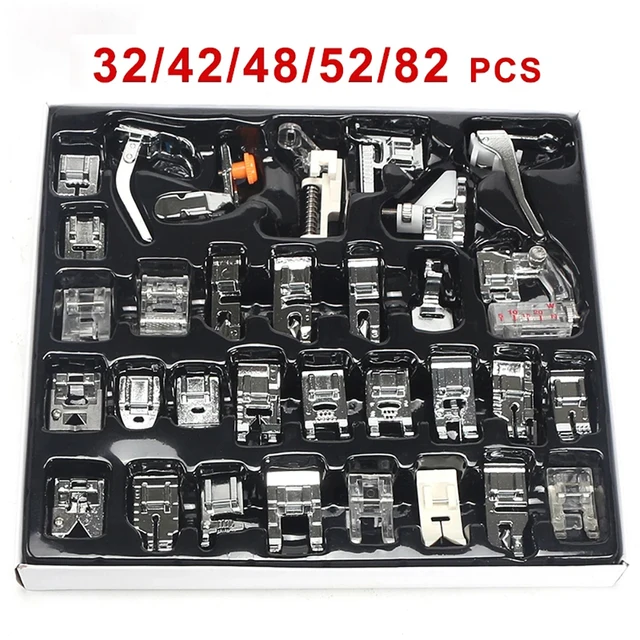 32-Piece Universal Presser Foot Kit for Brother CS6000i, Singer 442...$ 34.99View part →
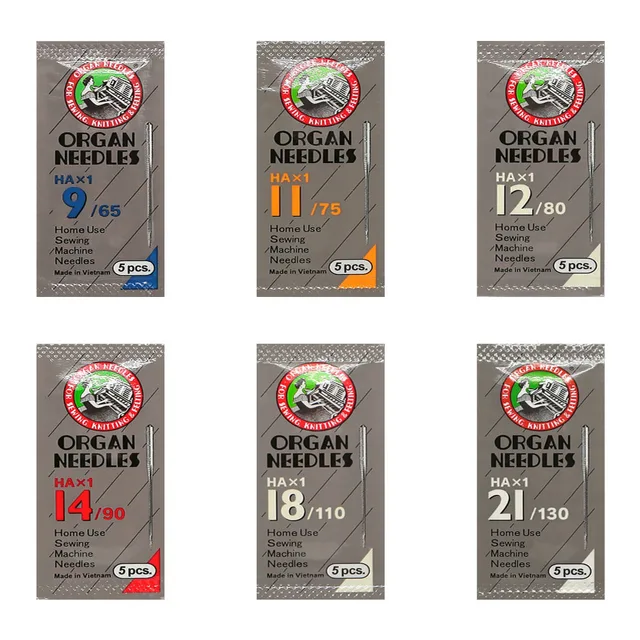 ORGAN HAX1 Household Sewing Machine Needles for SINGER & BROTHER, S...$ 6.49View part →
All Brother parts → Needles & Needle Bars → Thread Path & Tension → Rotary Hooks & Bobbin Cases →
3. Machine Stops or Won't Sew / Freezing medium likelihood
How to tell
The machine stops mid-design, displays an error message (e.g., 'motor error', 'needle position error'), or becomes unresponsive. It might also freeze during operation.
Fix
- Turn the machine off, wait 30 seconds, and turn it back on. This can clear temporary software glitches.
- Check for any physical obstructions: thread jams in the bobbin area, fabric caught, or a needle striking the hoop.
- Ensure all cables are securely connected, especially the embroidery unit cable if applicable.
- If a specific motor error appears, check the corresponding area for resistance or damage. Manually turn the handwheel to see if the needle bar moves freely.
- Clean and lubricate the machine according to your manual's recommendations. Dry or sticky parts can cause motors to strain.
- If the machine freezes, try a hard reset (unplugging for a few minutes). If it persists, it might indicate an electronic issue.
Motor issues can cause stopping. Check for issues with Nema 17 Stepper Motor 17HS08-1004S 4-Lead 1A 13Ncm for Brother PR Series or Nema17 17HM8401C 0.9° Stepper Motor for Tajima, Barudan, Ricoma, Brother PR if motor-related errors persist. For display issues, consider Dahao BECS-A15 Touch Screen LCD Panel for Dahao A15, Tajima, Barudan, ZSK, Happy, Ricoma, Brother PR or E833 Display Board Computer Control Replacement for Tajima, Barudan, Ricoma, Happy, Brother PR Series.
Parts involved: Motors & drivers → Circuit boards & electronics → Sensors & switches → Lubrication & maintenance → Cables & wiring →
4. Design Misalignment or Shifting medium likelihood
How to tell
The embroidered design is not where it should be on the fabric, or parts of the design are misaligned relative to each other.
Fix
- Ensure the fabric is hooped correctly and very taut. Any looseness or movement of the fabric within the hoop will cause shifting.
- Use appropriate stabilizer for your fabric and design density. Insufficient stabilization can lead to fabric shifting and puckering.
- Check that the hoop is securely attached to the embroidery unit and that the unit itself is firmly seated in the machine.
- Inspect the hoop for any damage or warping that might prevent it from holding the fabric flat.
- Verify that the design data is not corrupted. Try a different design to see if the problem persists.
- Check for any play or looseness in the embroidery arm or drive mechanisms. This might require a technician.
A worn or damaged hoop can cause misalignment. Consider replacing with a CKPSMS KP-19405 Embroidery Hoop Babylock BMP8, BMP9, Brother PR600, PR1000 or a Brother Magnetic Hoop for PR680W, PRS100, PR1X, PR1055X, PR1000E Embroidery Machines.
Parts involved: Hoops & frames → Belts, pulleys & gears → Motors & drivers →
5. Needle Breaking low likelihood
How to tell
The needle snaps during embroidery, often with a loud 'crack'.
Fix
- Ensure the correct needle size and type are being used for the fabric and thread. Using too small a needle for thick fabric or thread can cause breaks.
- Check that the needle is inserted correctly and fully seated in the needle bar, with the flat side facing the correct direction (usually away from the operator).
- Verify the fabric is hooped tautly and not shifting or catching. A loose fabric can cause the needle to hit the hoop or presser foot.
- Inspect the bobbin case and rotary hook area for any obstructions or burrs that the needle might be hitting.
- Check the needle plate opening for damage or burrs. If the needle hits the plate, it can break.
- Ensure the presser foot is correctly attached and not bent, which could cause the needle to strike it.
- If using a cap hoop, ensure the cap is properly seated and not too thick for the needle to penetrate cleanly.
Ensure your hoops are in good condition. Consider Brother Flat Metal Hat Cap Hoop for PRS100 VR PR680W PR1050X PR1X PR600 PR620 PR650 PR655 PR670 PR1000 PR1055X if frequently embroidering caps.
Parts involved: Needles & needle bars → Hoops & frames → Rotary hooks & bobbin cases → Presser feet & sewing parts →
Maintenance schedule
| When | What to do | Why |
|---|---|---|
| Daily/Every 8-10 hours of use | Clean bobbin case area and under needle plate | Removes lint and thread bits that can cause jams, skipped stitches, and thread breaks. |
| Weekly/Every 40-50 hours of use | Clean entire thread path and tension discs | Ensures smooth thread flow and consistent tension, preventing thread breaks and poor stitch quality. |
| Monthly/Every 100 hours of use | Lubricate moving parts as per manual | Reduces friction and wear, prolonging machine life and ensuring smooth operation. Refer to your manual for specific points and lubricant types. |
| As needed | Replace needle | A dull or bent needle causes skipped stitches, thread breaks, and fabric damage. Replace after significant use or if any damage is suspected. |
Stop and call a technician if
- If the machine displays persistent motor errors after basic troubleshooting and cleaning.
- If the machine consistently freezes or fails to power on, indicating a potential circuit board or power supply issue.
- If you hear unusual grinding noises or notice significant play in moving parts that you cannot identify or fix.
- If the touch screen is unresponsive or displaying garbled information and a simple reset doesn't resolve it.
- For any internal mechanical issues that require disassembly beyond basic user maintenance, especially involving timing adjustments or complex part replacements.
Prevent it coming back
- Always use high-quality embroidery thread and needles appropriate for your fabric and design.
- Regularly clean the bobbin area, thread path, and under the needle plate to remove lint and debris.
- Ensure fabric is always hooped tautly and securely with appropriate stabilizer.
- Perform routine lubrication as recommended in your machine's user manual.
- Inspect needles frequently for damage and replace them proactively, especially after many hours of use or if they strike something hard.
- Keep your work area clean and free of dust and loose threads.
Frequently asked questions
Why does my Brother PR machine keep breaking thread?
Frequent thread breaks are often due to incorrect threading, a damaged or dull needle, improper thread tension, lint buildup in the thread path, or a damaged bobbin case. Re-thread, change the needle, clean thoroughly, and adjust tension.
What causes skipped stitches on my Brother PR series machine?
Skipped stitches are typically caused by a bent or dull needle, incorrect needle insertion, improper thread tension, or fabric that isn't hooped tautly enough. Replace the needle first, then check tension and hooping.
My Brother PR machine is freezing or not responding. What should I do?
First, try turning the machine off and on. Check for any physical obstructions like thread jams. Ensure all cables are secure. If it persists, it could indicate a software glitch or an electronic component issue. A hard reset (unplugging) might help.
How often should I clean my Brother PR embroidery machine?
It's recommended to clean the bobbin area and thread path after every 8-10 hours of use, or more frequently if you're using linty threads. Regular cleaning prevents many common issues.
Can I use any brand of thread in my Brother PR machine?
While Brother PR machines are robust, using high-quality embroidery thread designed for machine embroidery is recommended. Poor quality or improperly wound thread can lead to frequent breaks and poor stitch quality.
Did this guide fix your machine?
Rate it - it helps other operators find the right fix.
Not sure which part is failing?
Need the logo stitched too?
Get your logo digitized by the people who know this machine
Upload the artwork, see the stitch count and the exact price in 10 seconds, then order with a free sew-out preview. $1 per 1,000 stitches, $10 minimum, 24-hour delivery. Vector conversion from $12.
After the fix
Fixed it? Keep the rest of the shop moving.
OS 360 is the shop software from the team behind this parts store. Every job keeps its status, deadline and owner while a Brother head is down, restock alerts fire for needles, hooks and bobbins before you run dry, and quotes, invoices and payment live in one place.
- Jobs with status, deadline and owner - nothing slips during downtime
- Inventory with restock alerts, this store one click away
- Instant quotes, invoices and one place to collect payment