
Blog
Ricoma MT-1501 Series: Common Problems and Fixes Guide

Quick answer: Most common issues on the Ricoma MT-1501 series, such as thread breaks, skipped stitches, and poor trimming, can often be resolved by checking thread path, tension, needle condition, bobbin case, and the trimming system. Regular cleaning and proper hooping are key to preventing many problems.
The Ricoma MT-1501 series is a robust single-head embroidery machine, but like all precision equipment, it can encounter issues. This guide covers the most common problems reported by operators, offering practical steps to diagnose and fix them. Addressing these issues promptly can save time, reduce material waste, and extend the life of your machine.
Two-minute checks before you open anything
- Is the machine threaded correctly from spool to needle?
- Is the bobbin inserted correctly and wound evenly?
- Is the needle new, sharp, and inserted with the scarf facing the correct direction?
- Is the fabric hooped tautly and securely?
- Are there any visible obstructions (lint, thread scraps) in the thread path or rotary hook area?
1. Frequent Thread Breaks high likelihood
How to tell
The machine stops mid-stitch, often with a 'Thread Break' error message. You'll see the top thread snapped or tangled, or the bobbin thread may be pulled up excessively.
Fix
- Re-thread the machine completely, ensuring the thread passes through all guides and tension discs correctly.
- Check the needle for burrs, bends, or dullness. Replace the needle if any damage is found.
- Inspect the thread path for any obstructions or rough spots, including the thread guides, tension discs, and take-up lever.
- Clean the bobbin case area, removing any lint or thread fragments. Check the bobbin case for nicks or damage, especially the pigtail or tension spring. Replace the BC-DBZ(3)-NBL Small L Pigtail Embroidery Bobbin Case if damaged.
- Adjust top thread tension and bobbin tension. Start with a balanced tension and adjust incrementally.
- Ensure the correct needle size and type are used for the thread and fabric.
A worn or damaged BC-DBZ(3)-NBL Small L Pigtail Embroidery Bobbin Case is a common culprit for bobbin-related thread breaks or poor tension.
Parts involved: Needles & needle bars → Thread path & tension → Rotary hooks & bobbin cases →
2. Skipped Stitches or Poor Stitch Quality medium likelihood
How to tell
Embroidery appears uneven, loose loops are visible on the top or bottom, or there are noticeable gaps in the stitch pattern. Stitches may not be forming correctly.
Fix
- Replace the needle with a new, appropriate size and type for your fabric and thread. A dull or bent needle is a primary cause.
- Check and adjust both top and bobbin thread tension. Imbalanced tension leads to poor stitch formation.
- Ensure the fabric is hooped correctly and tautly in the hoop. Loose hooping can cause fabric movement and skipped stitches. If using Ricoma Magnetic Mighty Hoops, ensure they are securely clamped.
- Clean the rotary hook area thoroughly. Lint and debris can interfere with loop formation.
- Verify that the thread is properly seated in all tension discs and guides.
Properly functioning hoops, such as Ricoma Magnetic Mighty Hoops, are crucial for stable fabric tension and preventing skipped stitches.
Parts involved: Needles & needle bars → Thread path & tension → Rotary hooks & bobbin cases → Hoops & frames →
Parts you may need for Ricoma MT-1501
In stock, tested before dispatch, Buyer Protection on every order. Part types for this problem: Needles & needle bars, Thread path & tension, Rotary hooks & bobbin cases, Hoops & frames.
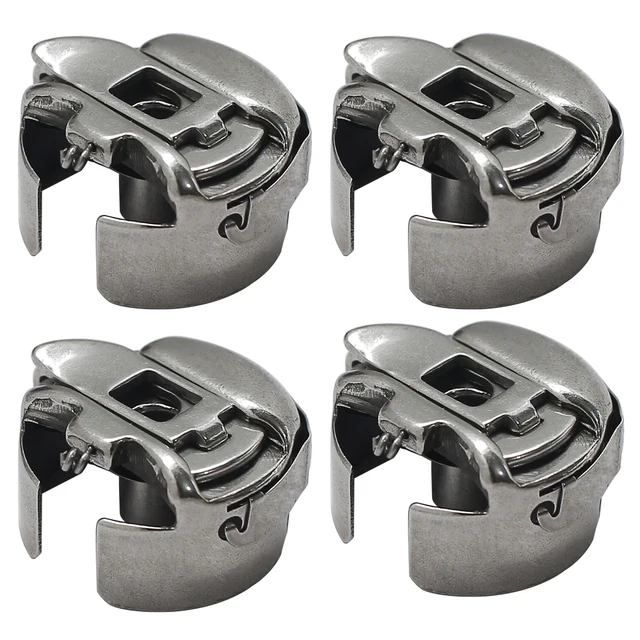 BC-DBZ(3)-NBL Small L Pigtail Embroidery Bobbin Case for Barudan, M...$ 16.09View part →
 Ricoma Magnetic Mighty Hoops for MT-1501, TC-1501, EM-1010 Embroide...$ 76.29View part →
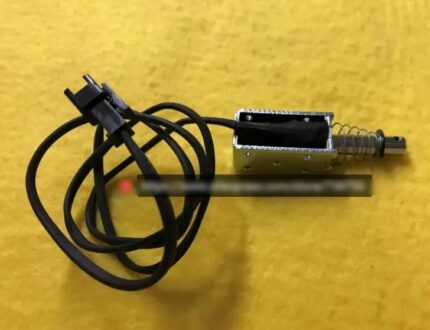 Ricoma 80320221 Picker Solenoid for MT-1501, MT-1502, MT-2001, MT-2...$ 32.99View part →
 Groz-Beckert DBxK5 RG Embroidery Needles (500 Pcs) for Tajima Barud...$ 85.99View part →
 GATYZTORY 60x75cm Colorful Cat Paint by Numbers Kit with Frame for ...$ 15.99View part →
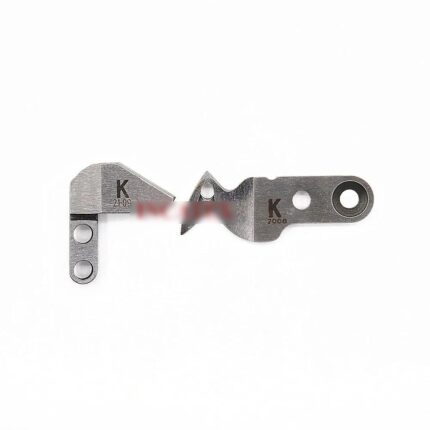 Movable & Fixed Knife Set for Prodigi AEMco Feiya ZGM Haina Ricoma ...$ 34.49View part →
All Ricoma MT-1501 parts → Needles & Needle Bars → Thread Path & Tension → Rotary Hooks & Bobbin Cases →
3. Trimming Issues (Thread Not Cutting or Inconsistent Cuts) medium likelihood
How to tell
Threads are left long after a trim, the machine jams during a trim cycle, or you hear unusual noises during trimming. Sometimes an error code related to the trimmer may appear.
Fix
- Clean the trimmer area thoroughly. Remove any lint, thread scraps, or debris that might be obstructing the blades.
- Inspect the trimmer blades for dullness, nicks, or damage. While we don't stock blades, ensure they are sharp and properly aligned (consult your manual for alignment procedures).
- Check the function of the Ricoma 80320221 Picker Solenoid. Listen for its activation during a trim cycle. If it's not engaging or sounds weak, it may need replacement.
- Ensure the thread is properly tensioned; very loose or very tight thread can sometimes interfere with the trimming mechanism.
- Verify that the machine's software settings for trimming are correct (e.g., trim length, trim speed, if adjustable).
The Ricoma 80320221 Picker Solenoid is a key component of the automatic thread trimming system. If it fails, trimming will be affected.
Parts involved: Cutters & trimmers → Solenoids & magnets → Lubrication & maintenance →
4. Bobbin Thread Issues (Nesting, Looping, Breaking) medium likelihood
How to tell
Excessive bobbin thread appearing on top of the fabric (nesting), bobbin thread breaking frequently, or inconsistent bobbin tension leading to poor stitch quality.
Fix
- Ensure the bobbin is wound evenly and correctly. An improperly wound bobbin can cause tension issues.
- Clean the bobbin case (BC-DBZ(3)-NBL Small L Pigtail Embroidery Bobbin Case) thoroughly, removing any lint or debris from under the tension spring.
- Check the bobbin case for any nicks, burrs, or damage, especially around the pigtail and where the thread exits. Replace the BC-DBZ(3)-NBL Small L Pigtail Embroidery Bobbin Case if damaged.
- Adjust the bobbin tension. Use a bobbin tension gauge or the 'drop test' method to set it correctly (consult your machine manual for specifics).
- Ensure the bobbin is inserted correctly into the bobbin case and that the thread is routed properly through the tension spring.
The BC-DBZ(3)-NBL Small L Pigtail Embroidery Bobbin Case is critical for consistent bobbin thread delivery. A faulty one will cause numerous bobbin-related problems.
Parts involved: Rotary hooks & bobbin cases → Thread path & tension →
Maintenance schedule
| When | What to do | Why |
|---|---|---|
| Daily / Every 4-8 hours of operation | Clean rotary hook area, bobbin case, and under the needle plate. | Removes lint and debris that can cause thread breaks, skipped stitches, and poor tension. |
| Weekly | Clean entire thread path, including tension discs and thread guides. Inspect trimmer blades. | Ensures smooth thread flow and efficient trimming, preventing wear and tear. |
| Monthly / Every 100-150 hours of operation | Lubricate specified points according to your machine's manual. Check for loose screws. | Reduces friction and wear on moving parts, ensuring smooth operation and preventing premature failure. |
Stop and call a technician if
- If the machine displays persistent error codes that cannot be cleared by basic troubleshooting.
- If you suspect a major mechanical issue, such as timing being off, unusual grinding noises from inside the machine head, or motor problems.
- If you've replaced common parts and performed all troubleshooting steps without resolving the issue.
- For complex electrical issues or circuit board failures.
Prevent it coming back
- Use high-quality needles, threads, and bobbins appropriate for your project.
- Perform daily cleaning of the rotary hook area and thread path to prevent lint buildup.
- Regularly check and adjust thread tensions (top and bobbin) to maintain stitch quality.
- Ensure fabric is properly hooped and taut to prevent movement and needle strikes.
- Follow the manufacturer's lubrication schedule to keep moving parts operating smoothly.
- Inspect needles frequently and replace them at the first sign of wear or damage.
Frequently asked questions
Why does my Ricoma MT-1501 keep breaking needles?
Needle breaks are often caused by a bent or dull needle, incorrect needle size for the fabric, hitting the hoop, incorrect timing, or excessive fabric movement due to poor hooping. Check your needle, ensure your fabric is taut in the hoop, and verify the needle plate opening is clear.
How often should I clean my Ricoma MT-1501?
It's recommended to clean the rotary hook area daily or after every 4-8 hours of operation. A more thorough cleaning, including under the needle plate and around the trimmer, should be done weekly. Regular cleaning prevents lint buildup that causes many common issues.
What is the correct bobbin tension for my Ricoma MT-1501?
While specific values can vary, a common method is the 'drop test': hold the bobbin case by the thread, and it should slowly drop a few inches then stop. If it drops too fast, it's too loose; if it doesn't drop, it's too tight. Always refer to your Ricoma MT-1501 manual for precise tension settings and methods.
From the Ricoma MT-1501 parts book
The assemblies involved in this problem, as the manufacturer lists them. Open a section to see every part number, which ones we stock, and get a price on the rest.
Did this guide fix your machine?
Rate it - it helps other operators find the right fix.
Not sure which part is failing?
Need the logo stitched too?
Get your logo digitized by the people who know this machine
Upload the artwork, see the stitch count and the exact price in 10 seconds, then order with a free sew-out preview. $1 per 1,000 stitches, $10 minimum, 24-hour delivery. Vector conversion from $12.
After the fix
Fixed it? Keep the rest of the shop moving.
OS 360 is the shop software from the team behind this parts store. Every job keeps its status, deadline and owner while a MT-1501 head is down, restock alerts fire for needles, hooks and bobbins before you run dry, and quotes, invoices and payment live in one place.
- Jobs with status, deadline and owner - nothing slips during downtime
- Inventory with restock alerts, this store one click away
- Instant quotes, invoices and one place to collect payment