
Blog
Janome MC300E Maintenance Guide: Keep Your Embroidery Machine Running Smoothly

Quick answer: Regular maintenance, including daily cleaning of the bobbin area and thread path, weekly lubrication, and periodic inspection of wear parts like needles and bobbin cases, is crucial for the Janome MC300E to ensure optimal performance and prevent costly repairs.
The Janome MC300E is a robust embroidery machine, but like any precision equipment, it requires regular maintenance to perform its best and extend its lifespan. This guide provides practical steps for operators to keep their machine in top condition, identify common wear parts, and know when to seek professional help. Consistent care prevents costly repairs and ensures beautiful embroidery.
Two-minute checks before you open anything
- Check the needle for bends or dullness before each project.
- Ensure the machine is threaded correctly from spool to needle.
- Verify the bobbin is wound evenly and inserted correctly into the bobbin case.
- Check that the bobbin case is free of lint and debris.
- Confirm the hoop is securely attached and the fabric is taut.
1. Needles high likelihood
How to tell
Skipped stitches, frayed thread, needle breaks, dull or bent needle point, burrs on the needle eye. A needle that's been used for a long time or on dense materials can become dull.
Fix
- Inspect the needle for bends, burrs, or a dull point. Run a finger gently over the point to feel for roughness.
- Always replace the needle with a new, appropriate size and type for your fabric and thread.
- Ensure the needle is inserted correctly and fully seated in the needle bar with the flat side facing the back.
2. Bobbin Case medium likelihood
How to tell
Frequent thread jams, poor bobbin tension, loose or uneven stitches on the underside of the fabric, unusual noise from the bobbin area. Scratches or burrs on the bobbin case can snag thread.
Fix
- Remove the bobbin and bobbin case. Inspect the bobbin case for any nicks, burrs, or damage, especially around the tension spring and thread exit points.
- Clean out any lint or debris from inside and around the bobbin case.
- Test the bobbin tension by holding the bobbin case by the thread and giving it a slight tug; the bobbin should slowly unwind. Adjust if necessary (refer to your machine manual).
- If damaged, replace with a new Janome New Home Bobbin Case for MC10000, MC10001, MC300E, MC350E, MC5000, MC9000 Embroidery Machines.
A damaged bobbin case can cause significant stitching issues and damage the rotary hook.
Parts involved: Rotary hooks & bobbin cases →
Parts you may need for Janome MC300E
In stock, tested before dispatch, Buyer Protection on every order. Part types for this problem: Rotary hooks & bobbin cases, Needles & needle bars, Thread path & tension, Hoops & frames.
 Sew Tech Embroidery Hat Hoop for Janome Memory Craft MC500E, MC300E...$ 112.49View part →
 Sew Tech Embroidery Hat Hoop for Janome Memory Craft MC500E, MC300E...$ 22.99View part →
 Janome New Home Bobbin Case for MC10000, MC10001, MC300E, MC350E, M...$ 42.09View part →
 Bobbin Case & 2 Metal Bobbins for Brother, Janome, Singer, Babylock...$ 5.59View part →
 Flying Tiger DBx1 Industrial Lockstitch Needles, 100 pcs/box, Sizes...$ 12.09View part →
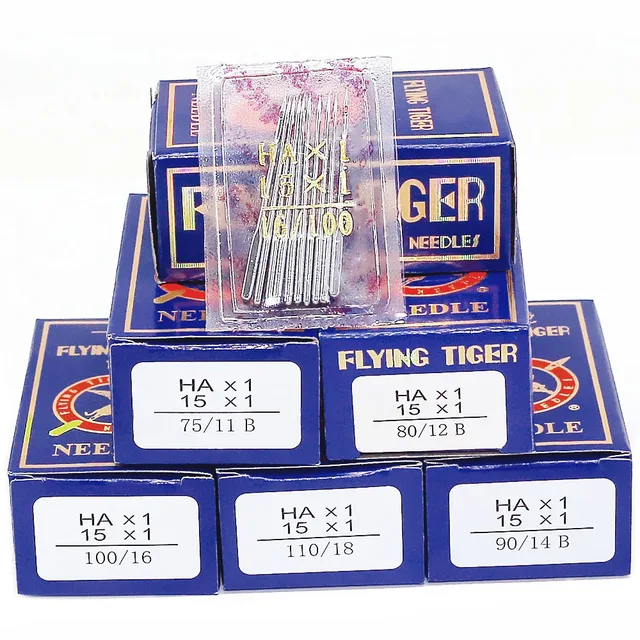 Flying Tiger HAX1 15x1 Sewing Machine Needles 100-Pack for Brother ...$ 13.99View part →
All Janome MC300E parts → Rotary Hooks & Bobbin Cases → Needles & Needle Bars → Thread Path & Tension →
3. Rotary Hook Assembly medium likelihood
How to tell
Loud knocking or grinding noises from the bobbin area, frequent thread breaks, skipped stitches, shredded thread, or difficulty forming stitches. Burrs or damage on the hook can snag thread.
Fix
- Remove the needle plate, bobbin case, and bobbin. Carefully inspect the rotary hook for any nicks, burrs, or accumulated lint and thread.
- Use a soft brush or tweezers to remove all debris from the hook race.
- Apply a small drop of machine oil to the hook race as specified in your Janome manual.
- If the hook is visibly damaged or has deep grooves, it may need replacement. This often requires a technician, but the part itself can be replaced.
Regular cleaning and oiling are critical to prolong the life of the rotary hook. Damage to the bobbin case can often lead to damage to the rotary hook.
Parts involved: Rotary hooks & bobbin cases →
4. Thread Path Components (Tension Discs, Thread Guides) medium likelihood
How to tell
Inconsistent thread tension, shredded thread, thread breaks, or poor stitch quality. Grooves or burrs can form on thread guides or tension discs from abrasive threads.
Fix
- Thread the machine and gently pull the thread through each guide and tension disc. Feel for any resistance or snagging.
- Use a piece of dental floss or a thin, stiff brush to clean out any lint or wax buildup from between the tension discs and in the thread guides.
- Inspect guides for wear or sharp edges. If a guide is severely grooved, it may need replacement to prevent thread damage.
Parts involved: Thread path & tension →
5. Automatic Thread Cutter Blade low likelihood
How to tell
Thread not cutting cleanly, thread jams after cutting, or the machine making a grinding noise during the cutting cycle. A dull blade struggles to cut thread cleanly.
Fix
- Observe the thread cutting action. If it's leaving frayed ends or failing to cut, the blade may be dull or misaligned.
- Accessing and replacing the thread cutter blade typically requires removing covers and is often best left to a qualified technician. However, the blade itself is a wear item.
Parts involved: Cutters & trimmers →
6. Hoops and Frames low likelihood
How to tell
Fabric not holding tension, difficulty hooping, fabric slipping during embroidery, or visible cracks/warping in the hoop. Hoops can warp or crack over time, especially if overtightened or dropped.
Fix
- Inspect the inner and outer hoops for cracks, warps, or damage.
- Check the tension screw mechanism for smooth operation and ensure it holds tension effectively.
- If a hoop is damaged and cannot hold fabric securely, replace it. We stock options like the Sewtalent Hat Hoop 100x60mm for Janome MC500E, MC400E, MC350E, MC300E & Elna eXpressive 820, 830 or the Sew Tech Embroidery Hat Hoop for Janome Memory Craft MC500E, MC300E, MC350E, MC9500, and Elna 820, 830 – Perfect Sewing Machine JA335 Insert Frame.
Using damaged hoops can lead to poor stitch quality and even needle breaks.
Parts involved: Hoops & frames →
Maintenance schedule
| When | What to do | Why |
|---|---|---|
| Daily (or after every 4-6 hours of use) | Clean under the needle plate and around the bobbin area. | Removes lint and thread bits that can accumulate and cause tension issues, skipped stitches, or thread jams. Lint buildup is the most common cause of embroidery machine problems. |
| Daily (or before each project) | Inspect and replace the needle. | A dull or bent needle is a primary cause of skipped stitches, thread breaks, and fabric damage. Replacing it regularly ensures clean stitches and protects your machine. |
| Weekly (or every 10-20 hours of use) | Clean the bobbin case and rotary hook assembly thoroughly. | Prevents lint and debris from interfering with stitch formation and reduces wear on the hook. This is also the time to inspect for burrs on the bobbin case or hook. |
| Weekly (or every 10-20 hours of use) | Lubricate the rotary hook area. | Reduces friction and wear on moving metal parts, ensuring smooth operation and preventing premature failure. Refer to your Janome manual for specific oiling points and type of oil. |
| Monthly (or every 40-60 hours of use) | Clean the entire thread path. | Removes wax and lint buildup from thread guides and tension discs, ensuring consistent thread tension and preventing thread shredding. |
| Monthly (or every 40-60 hours of use) | Inspect hoops for damage. | Ensures hoops are holding fabric securely and not contributing to poor stitch quality or fabric slippage. |
| Every 6-12 months (or every 200-500 hours of use) | Professional servicing. | A technician can perform deeper cleaning, inspect internal components like belts and gears, check timing, and lubricate hard-to-reach areas, extending the machine's life and maintaining peak performance. |
Stop and call a technician if
- If you hear grinding or clunking noises that don't resolve with cleaning and oiling.
- If the machine consistently jams or produces error codes after basic troubleshooting.
- If the machine's timing seems off (e.g., needle hitting the hook).
- If you suspect damage to internal components like motors, circuit boards, or main shafts.
- For any repairs that require significant disassembly beyond routine cleaning, especially if it involves adjusting internal mechanisms or electronics.
Prevent it coming back
- Always use high-quality needles appropriate for your fabric and thread.
- Use good quality embroidery thread to minimize lint and thread breaks.
- Avoid pulling fabric forcefully while embroidering, as this can bend needles or damage the hoop.
- Never force the machine if it jams; stop immediately and investigate the cause.
- Keep your work area clean and free of dust and debris.
- Store your machine with a dust cover when not in use.
- Do not overtighten hoops, as this can warp or crack them over time.
Frequently asked questions
How often should I oil my Janome MC300E?
The Janome MC300E typically requires oiling in the rotary hook area weekly or every 10-20 hours of use, but always refer to your specific machine's instruction manual for the exact lubrication points and frequency. Use only high-quality sewing machine oil.
Why is my Janome MC300E skipping stitches?
Skipped stitches are often caused by a dull or bent needle, incorrect needle insertion, improper threading, or lint buildup in the bobbin area. Check your needle first, rethread the machine, and clean the bobbin case and rotary hook.
Can I use any bobbin in my Janome MC300E?
No, it's crucial to use the correct class of bobbins specified for your Janome MC300E. Using the wrong size or type can lead to tension issues, thread jams, and potential damage to your bobbin case or rotary hook. Always use Janome-approved bobbins.
How do I know when to replace my bobbin case?
You should consider replacing your bobbin case if you notice visible scratches, nicks, or burrs, especially around the thread exit points or tension spring. These imperfections can snag thread, cause tension problems, and lead to frequent thread breaks or poor stitch quality. If cleaning and tension adjustment don't resolve issues, replacement is often the next step.
Did this guide fix your machine?
Rate it - it helps other operators find the right fix.
Not sure which part is failing?
Need the logo stitched too?
Get your logo digitized by the people who know this machine
Upload the artwork, see the stitch count and the exact price in 10 seconds, then order with a free sew-out preview. $1 per 1,000 stitches, $10 minimum, 24-hour delivery. Vector conversion from $12.
After the fix
Fixed it? Keep the rest of the shop moving.
OS 360 is the shop software from the team behind this parts store. Every job keeps its status, deadline and owner while a MC300E head is down, restock alerts fire for needles, hooks and bobbins before you run dry, and quotes, invoices and payment live in one place.
- Jobs with status, deadline and owner - nothing slips during downtime
- Inventory with restock alerts, this store one click away
- Instant quotes, invoices and one place to collect payment