
Blog
Juki DDL-8500 Series: Common Problems & Fixes


Quick answer: The most common issues on Juki DDL-8500 series machines are skipped stitches, thread breakage, and inconsistent stitch quality, often stemming from incorrect threading, a dull or bent needle, or issues with the rotary hook. Always start by re-threading and replacing the needle.
The Juki DDL-8500 series is a workhorse in many sewing operations, known for its reliability. However, like any precision machinery, it can encounter issues. This guide covers the most common problems operators report, offering practical steps to diagnose and fix them, helping you get back to sewing quickly. Always ensure the machine is powered off and unplugged before performing any internal adjustments or part replacements.
Two-minute checks before you open anything
- Is the machine properly threaded (upper and lower)?
- Is the needle new, correctly inserted, and the right type/size for your material?
- Are the bobbin and bobbin case inserted correctly?
- Is there any lint or thread jammed in the bobbin area or under the needle plate?
- Are the tension settings appropriate for your thread and fabric?
- Is the presser foot lowered?
1. Skipped Stitches high likelihood
How to tell
The machine sews, but stitches are missing at regular or irregular intervals, leaving gaps in the seam. This is often more noticeable on certain fabric types or when changing sewing direction.
Fix
- Replace the needle with a new, correct size and type for your fabric. Ensure it's inserted correctly, fully seated, and facing the right direction.
- Re-thread the entire machine, from the spool to the needle, ensuring thread passes through all guides and tension discs correctly.
- Check the needle bar height. If it's too high or too low, it can affect the hook's ability to catch the thread loop. Adjust according to your machine's manual.
- Inspect the rotary hook for nicks, burrs, or damage. Even small imperfections can snag thread and cause skips. If damaged, replace the rotary hook.
- Verify the needle-to-hook timing. The hook point should meet the needle just as the needle begins to rise, forming a loop.
A worn or damaged Rotary Hook HSH-7.94B HSH-7.94A B1830-127-OAO is a frequent culprit. Always use a fresh, sharp needle.
Parts involved: Needles & needle bars → Rotary hooks & bobbin cases → Thread path & tension →
2. Upper Thread Breakage high likelihood
How to tell
The top thread repeatedly snaps during sewing, causing the machine to stop or leave an unsewn gap. This can be accompanied by a 'popping' sound.
Fix
- Check the needle: Replace with a new, correct size and type. Ensure it's not bent, dull, or inserted backward. A burr on the needle eye can also cut thread.
- Re-thread the upper thread path completely, making sure the thread is seated properly in all guides and tension discs. Check for any obstructions.
- Inspect the thread spool for nicks or rough spots that might snag the thread. Ensure the thread unwinds smoothly.
- Adjust upper thread tension. If it's too tight, the thread will break. Loosen it slightly and test.
- Examine the thread guides and take-up lever for burrs or sharp edges that could abrade the thread. Smooth them if possible, or replace damaged parts.
- Check the rotary hook for burrs or sharp points that could be cutting the thread as it passes around. Replace if damaged.
A new needle is often the first step. A damaged Rotary Hook HSH-7.94B HSH-7.94A B1830-127-OAO can also cause this.
Parts involved: Needles & needle bars → Thread path & tension → Rotary hooks & bobbin cases →
Parts you may need for Juki DDL-8500
In stock, tested before dispatch, Buyer Protection on every order. Part types for this problem: Needles & needle bars, Rotary hooks & bobbin cases, Thread path & tension, Presser feet & sewing parts.
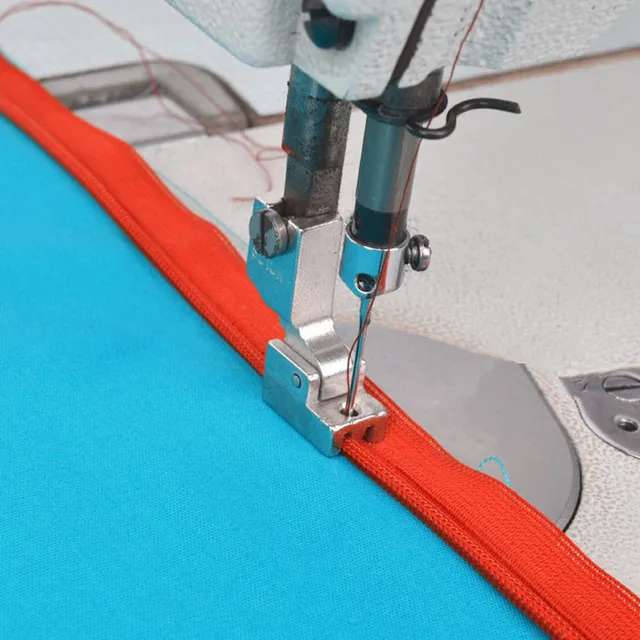 Industrial Sewing Machine Zipper Presser Foot S518N - Compatible wi...$ 8.49View part →
 Rotary Hook HSH-7.94B HSH-7.94A B1830-127-OAO for JUKI DDL-5550 DDL...$ 16.49View part →HSH-7.94B Rotary Hook B1830-127-OAO for JUKI DDL-5550 DDL-8500 DDL-...$ 16.49View part →
 HSH-7.94B Rotary Hook (B1830-127-OAO) for JUKI DDL-5550, DDL-8500, ...$ 15.29View part →
 Juki Belt Cover: DDL-8500, DDL-5550, DDL-8300, DDL-8700, DLM-5200, ...$ 45.09View part →
 Juki Lower Gear & Pinion Set for DDL-8500, DDL-8700, DLM-5200, DSC-...$ 25.49View part →
All Juki DDL-8500 parts → Needles & Needle Bars → Rotary Hooks & Bobbin Cases → Thread Path & Tension →
3. Lower (Bobbin) Thread Breakage medium likelihood
How to tell
The bobbin thread repeatedly snaps, often leaving a tangled mess underneath the fabric or causing the machine to stop.
Fix
- Check the bobbin: Ensure it's wound evenly and not too full. Use bobbins specifically designed for your Juki DDL-8500.
- Re-insert the bobbin into the bobbin case, ensuring the thread unwinds in the correct direction (usually counter-clockwise when viewed from the top).
- Inspect the bobbin case for nicks, burrs, or damage, especially around the tension spring and thread exit hole. Replace if damaged.
- Adjust bobbin tension. If it's too tight, the thread will break. Use a small screwdriver to slightly loosen the screw on the bobbin case tension spring.
- Clean out any lint or debris from the bobbin case area and under the needle plate. This can obstruct thread movement.
- Check the rotary hook for any damage or rough spots that might be catching the bobbin thread.
A faulty bobbin case or a damaged Rotary Hook HSH-7.94B HSH-7.94A B1830-127-OAO can be the cause.
Parts involved: Rotary hooks & bobbin cases → Thread path & tension →
4. Poor Stitch Quality (Loose, Tight, Uneven Stitches) high likelihood
How to tell
Stitches appear loopy on the top or bottom, too tight causing puckering, or inconsistent in length and formation.
Fix
- Check and adjust thread tension: Ensure both upper and lower tensions are balanced. Start with the bobbin tension set correctly, then adjust the upper tension until stitches are even on both sides of the fabric.
- Re-thread the machine completely, ensuring the thread is correctly seated in all guides and tension discs. A common mistake is not seating the thread fully into the tension discs.
- Replace the needle: A bent, dull, or incorrect needle can cause poor stitch formation.
- Clean the machine: Remove lint and debris from the tension discs, bobbin case, and feed dog area. Buildup can interfere with thread movement.
- Check presser foot pressure: If the pressure is too low, fabric may not feed evenly, leading to uneven stitches. Adjust the presser foot pressure if your machine allows.
- Inspect the feed dogs: Ensure they are clean and not worn down, allowing for consistent fabric movement.
Proper tension is key. Sometimes a different presser foot, like an Industrial Sewing Machine Zipper Presser Foot S518N, might be needed for specific materials, but general stitch quality issues are usually tension or needle related.
Parts involved: Thread path & tension → Needles & needle bars → Presser feet & sewing parts → Lubrication & maintenance →
5. Machine Jamming or Seizing medium likelihood
How to tell
The machine suddenly stops, often with a loud thud or grinding noise, and the handwheel becomes difficult or impossible to turn. This can be accompanied by a tangled 'bird's nest' of thread.
Fix
- Immediately turn off the machine. Do not force the handwheel.
- Remove the needle plate and bobbin case. Carefully cut away any tangled thread from around the bobbin area, feed dogs, and rotary hook.
- Inspect the rotary hook for any thread caught within its mechanism or for damage. Clean thoroughly.
- Check for any foreign objects that might have fallen into the machine's mechanism.
- Manually turn the handwheel slowly to ensure all parts move freely. If it's still stiff, there might be a mechanical bind deeper inside.
- Check the Juki Lower Gear & Pinion Set for damage or misalignment if the machine remains seized after clearing thread jams. This is a less common but more serious issue.
Often caused by severe thread tangles in the rotary hook area. If mechanical parts like the Juki Lower Gear & Pinion Set are damaged, replacement is necessary.
Parts involved: Rotary hooks & bobbin cases → Lubrication & maintenance → Belts, pulleys & gears → Head & mechanical parts →
Maintenance schedule
| When | What to do | Why |
|---|---|---|
| Daily or every 8 hours of use | Clean the bobbin case and rotary hook area | Prevents lint buildup that can cause thread jams, skipped stitches, and poor stitch quality. |
| Daily or every 8 hours of use | Replace the needle | A sharp, undamaged needle is crucial for consistent stitch formation and prevents fabric damage and thread breakage. |
| Weekly or every 40 hours of use | Clean under the needle plate and around feed dogs | Ensures smooth fabric feeding and prevents stitch inconsistencies. |
| Monthly or every 160 hours of use | Check for burrs on thread guides, tension discs, and rotary hook | Rough spots can abrade and break thread. Smooth or replace damaged components. |
| As needed | Lubricate according to manufacturer's manual | Proper lubrication reduces friction and wear on moving parts, extending machine life and preventing seizing. |
Stop and call a technician if
- If the machine remains seized or makes grinding noises after clearing thread jams.
- If you suspect internal timing issues that you are not comfortable adjusting.
- If electrical components or motor issues are suspected.
- If you've replaced common parts and performed all troubleshooting steps without success.
Prevent it coming back
- Use high-quality needles appropriate for your fabric and thread, and replace them regularly (e.g., every 8 hours of sewing or at the first sign of dullness).
- Always use good quality thread that is suitable for your machine and application.
- Keep the machine clean, especially the bobbin area, feed dogs, and tension discs, to prevent lint buildup.
- Ensure proper lubrication according to the manufacturer's manual to reduce wear on moving parts.
- Thread the machine carefully and correctly every time, ensuring thread is seated in all guides and tension discs.
- Perform regular checks for worn or damaged parts like the rotary hook or presser foot.
Frequently asked questions
Why does my Juki DDL-8500 keep skipping stitches?
Skipped stitches are most commonly caused by a dull, bent, or incorrectly inserted needle. Always replace the needle first. Other causes include incorrect threading, improper needle-to-hook timing, or a damaged rotary hook.
How do I fix thread breaking on my Juki DDL-8500?
Thread breakage can be due to several factors: incorrect thread tension (too tight), a damaged needle, burrs on thread guides or the rotary hook, or poor-quality thread. Re-thread the machine, replace the needle, and check for any rough surfaces in the thread path.
What causes my Juki DDL-8500 to make loose stitches?
Loose stitches usually indicate insufficient thread tension. Check both your upper and bobbin thread tension settings. Ensure the upper thread is properly seated in the tension discs and that there's no lint buildup preventing proper tension application.
When should I replace the rotary hook on my Juki DDL-8500?
You should consider replacing the rotary hook if you notice nicks, burrs, or significant wear on its tip or body, especially if you're experiencing persistent skipped stitches, thread breakage, or poor stitch formation that can't be resolved by other troubleshooting steps. A damaged hook can snag and damage thread.
Can I use any presser foot on my Juki DDL-8500?
While many industrial presser feet are interchangeable, it's best to use presser feet designed for industrial lockstitch machines like the Juki DDL-8500 to ensure proper fit and function. Specific tasks may require specialized feet like the Industrial Sewing Machine Zipper Presser Foot S518N.
Did this guide fix your machine?
Rate it - it helps other operators find the right fix.
Not sure which part is failing?
Need the logo stitched too?
Get your logo digitized by the people who know this machine
Upload the artwork, see the stitch count and the exact price in 10 seconds, then order with a free sew-out preview. $1 per 1,000 stitches, $10 minimum, 24-hour delivery. Vector conversion from $12.
After the fix
Fixed it? Keep the rest of the shop moving.
OS 360 is the shop software from the team behind this parts store. Every job keeps its status, deadline and owner while a DDL-8500 head is down, restock alerts fire for needles, hooks and bobbins before you run dry, and quotes, invoices and payment live in one place.
- Jobs with status, deadline and owner - nothing slips during downtime
- Inventory with restock alerts, this store one click away
- Instant quotes, invoices and one place to collect payment





