
Blog
Barudan BEAT Series Embroidery Machine: Common Problems & Fixes


Quick answer: Common problems on Barudan BEAT series machines often involve data loading failures due to aging floppy drives, thread breakage or skipped stitches from worn needle bar components, or display malfunctions. Regular maintenance and timely part replacement are key.
The Barudan BEAT series embroidery machines are known for their robust performance, but like all industrial equipment, they can encounter issues over time. This guide covers the most common problems reported by operators, offering clear steps to diagnose and fix them. We'll focus on practical solutions you can implement at the machine, highlighting the parts most frequently involved.
Two-minute checks before you open anything
- Is the machine properly powered on and plugged in?
- Are all emergency stop buttons disengaged?
- Is the thread correctly loaded through all guides and tension discs?
- Is the bobbin correctly wound and inserted?
- Is the needle inserted correctly and not bent or dull?
- Are the hoops securely attached and the fabric taut?
- Are there any visible obstructions in the sewing area?
1. Design Loading or Recognition Failure high likelihood
How to tell
The machine displays 'Disk Read Error', 'No Design Found', or fails to load designs from the floppy drive. The floppy drive may make unusual noises or appear unresponsive.
Fix
- Ensure the floppy disk is correctly inserted and not damaged.
- Try loading a different, known-good floppy disk.
- Clean the floppy drive head with a specialized cleaning disk.
- If using a USB floppy emulator, ensure the USB stick is properly formatted (FAT32) and contains compatible design files.
- Replace the floppy drive with a new unit or upgrade to a USB floppy emulator for improved reliability.
Consider upgrading to a USB floppy emulator for modern reliability. Compatible options include SFRM72-FU USB Floppy Emulator for Tajima, Barudan, Happy, ZSK, Brother, Melco, Feiya, Ricoma Embroidery; Gotek SFRM72-FU USB Floppy Emulator for Tajima TMFX TMEF TFMX TCMX, Barudan BEAT BED BEKY, Happy HCS HCD HCR; Gotek SFR1M44-DU26 USB Floppy Emulator for Tajima TMFX TMEF TFMX, Barudan BEAT BEDY BEKT, Brother, Happy, Ricoma, ZSK, Melco Embroidery Machines; EILASUNG FDD-UDD U144K USB Floppy Drive Emulator for Tajima, Barudan, Brother, Melco, Ricoma, SWF, Happy, ZSK Embroidery & CNC; Gotek SFRM72-FU SFRM72-FU-EG Floppy Drive Emulator for Tajima TMFX TMEF TMB TFMX, Barudan BEAT BED BENS BES, Brother, Happy, ZSK, SWF; Barudan SFRM72-DU26 Gotek USB Floppy Drive Emulator for BENS, BEAT, BEKT, BEKS, BEDT.
Parts involved: Floppy, USB & memory →
2. Frequent Thread Breakage or Skipped Stitches high likelihood
How to tell
Thread repeatedly breaks during sewing, or stitches are visibly missing from the design. This can occur at specific needles or across all heads. You might also hear unusual clicking or knocking sounds from the needle bar area.
Fix
- Check thread path for obstructions, burrs, or incorrect threading.
- Inspect the needle for bends, burrs, or dullness and replace if necessary.
- Verify proper thread tension for both top thread and bobbin thread.
- Ensure the needle is inserted correctly and fully seated.
- Inspect the needle bar driver fixing base block for wear, looseness, or damage. Tighten any loose screws or replace the block if worn.
- Check the rotary hook for nicks, burrs, or timing issues. Clean or replace as needed.
- Ensure the presser foot is set to the correct height and is not interfering with the needle.
A common culprit for needle bar stability issues is the Barudan HT230290 Needle Bar Driver Fixing Base Block for BEAT, BEVT, BEDT, BENZ, BEXY Series. Ensure you have the correct needle type and size for your fabric and thread.
Parts involved: Needles & needle bars → Thread path & tension → Rotary hooks & bobbin cases → Head & mechanical parts → Screws, springs & small parts →
Parts you may need for Barudan BEAT
In stock, tested before dispatch, Buyer Protection on every order. Part types for this problem: Floppy, USB & memory, Needles & needle bars, Thread path & tension, Rotary hooks & bobbin cases.
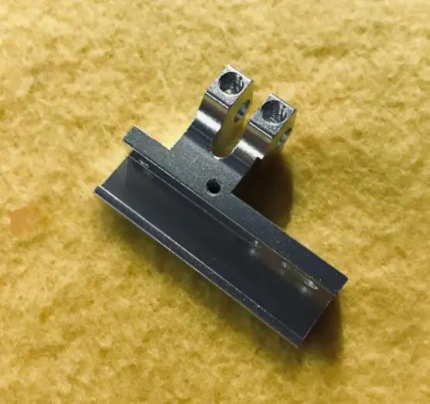 Barudan HT230290 Needle Bar Driver Fixing Base Block for BEAT, BEVT...$ 28.09View part →
 SFRM72-FU USB Floppy Emulator for Tajima, Barudan, Happy, ZSK, Brot...$ 65.09View part →
 Gotek SFRM72-FU SFRM72-FU-EG Floppy Drive Emulator for Tajima TMFX ...$ 113.99View part →
 Barudan SFRM72-DU26 Gotek USB Floppy Drive Emulator for BENS, BEAT,...$ 68.49View part →
 E831 Display Driver Board for Tajima TME TFMX TMAR, Barudan BEAT BE...$ 71.29View part →
 Hirose HSH-7.94ATR(MTQ) KHS12-RYP Rotary Hook for Tajima, Barudan, ...$ 18.09View part →
All Barudan BEAT parts → Floppy, USB & Memory → Needles & Needle Bars → Thread Path & Tension →
3. Machine Freezing or Unresponsive Display medium likelihood
How to tell
The machine stops responding to input, the display freezes on a screen, or the display shows garbled characters or no image at all. Sometimes the machine may power on but fail to boot correctly.
Fix
- Power cycle the machine (turn off, wait 30 seconds, turn on).
- Check all cable connections to the display and control board for looseness or damage.
- Inspect the display driver board for any visible signs of damage, burnt components, or loose connections.
- If the display remains unresponsive or garbled after checking connections, the display driver board may need replacement.
The E831 Display Driver Board for Tajima TME TFMX TMAR, Barudan BEAT BEDY BENS, Brother PR BAS Embroidery Machines is a common replacement part for display issues.
Parts involved: Control panels & displays → Circuit boards & electronics → Cables & wiring →
4. Poor Stitch Quality (Loopy, Uneven, Puckering) medium likelihood
How to tell
Stitches appear loose, uneven, or fabric puckers around the embroidery. This can manifest as bird's nesting on the underside or irregular top stitching.
Fix
- Verify correct hooping tension; fabric should be taut but not stretched.
- Adjust top thread tension and bobbin tension. Perform a tension test if unsure.
- Ensure the correct needle size and type are used for the fabric and thread.
- Check for burrs or rough spots in the thread path, including the needle eye, tension discs, and thread guides.
- Clean the bobbin case and rotary hook area thoroughly, removing any lint or thread scraps.
- Inspect the presser foot for proper height and ensure it's not pressing too hard or too lightly on the fabric.
Parts involved: Thread path & tension → Needles & needle bars → Rotary hooks & bobbin cases → Hoops & frames → Presser feet & sewing parts →
5. Machine Stops Mid-Design or Won't Start low likelihood
How to tell
The machine abruptly stops during embroidery, often with an error message, or refuses to start a design. This can sometimes be accompanied by unusual noises or a lack of movement from the embroidery head.
Fix
- Check for any error codes displayed on the control panel and consult your machine manual.
- Inspect for physical obstructions in the sewing area, such as tangled thread or fabric.
- Verify that all safety sensors (e.g., hoop sensor, thread break sensors) are clean and functioning correctly.
- Check for loose electrical connections to motors or sensors.
- Ensure the machine is properly lubricated according to the manufacturer's schedule, as seized parts can prevent movement.
- If the machine stops with a 'Main Motor Error' or similar, it could indicate an issue with the motor or its driver board.
Parts involved: Sensors & switches → Motors & drivers → Cables & wiring → Lubrication & maintenance → Circuit boards & electronics →
Maintenance schedule
| When | What to do | Why |
|---|---|---|
| Daily/Every 8 hours of operation | Clean rotary hook area and needle plate. | Prevents lint buildup that can cause thread breaks and poor stitch quality. |
| Daily/Every 8 hours of operation | Oil specified lubrication points (e.g., needle bars, presser feet). | Reduces friction and wear, ensuring smooth operation of moving parts. |
| Weekly/Every 40 hours of operation | Clean entire thread path, including tension discs and thread guides. | Removes wax and debris that can affect thread tension and cause breakage. |
| Monthly/Every 160 hours of operation | Inspect and clean under the machine head covers. | Removes accumulated dust and lint from gears and linkages, preventing overheating and wear. |
| Monthly/Every 160 hours of operation | Check and tighten all accessible screws and fasteners. | Prevents parts from loosening due to vibration, which can lead to misalignment and damage. |
Stop and call a technician if
- If you are unsure about performing any repair steps, especially those involving electrical components or complex mechanical adjustments.
- If the machine displays persistent error codes that you cannot resolve with basic troubleshooting.
- If you suspect a major component failure (e.g., main motor, main circuit board) that requires specialized diagnostic tools or expertise.
- If after following all troubleshooting steps, the problem persists.
Prevent it coming back
- Perform daily cleaning of the rotary hook area, thread path, and needle plate to remove lint and thread debris.
- Follow the manufacturer's lubrication schedule diligently, using recommended oils and greases.
- Regularly inspect needles for damage and replace them proactively, especially when changing thread types or after a certain number of stitches.
- Ensure proper thread tension is maintained for both top and bobbin threads to prevent stitch quality issues and undue stress on machine components.
- Use high-quality threads and backings appropriate for your designs and fabrics.
- Keep your workspace clean and free of dust and debris that can enter machine components.
Frequently asked questions
Why is my Barudan BEAT machine not reading my floppy disks?
This is a very common issue with older machines. The floppy drive mechanism can wear out, or the read/write heads can become dirty or misaligned. Upgrading to a USB floppy emulator is the most reliable long-term solution, as it replaces the mechanical drive with solid-state USB storage.
How often should I lubricate my Barudan BEAT embroidery machine?
General lubrication points should be oiled daily or every 8-10 hours of operation. More intensive lubrication, like greasing specific gears or bearings, should be done weekly or monthly. Always refer to your Barudan BEAT operator's manual for precise lubrication points, types of lubricants, and intervals.
My Barudan BEAT display is blank. What should I check first?
First, power cycle the machine. Then, check all cables connecting the display to the main control board for secure connections. If the problem persists, the display driver board (such as the E831) is a common component to fail and may need replacement.
Can I use any USB stick with a floppy emulator on my Barudan BEAT?
Most USB floppy emulators require USB sticks to be formatted as FAT32. Some older emulators might have size limitations (e.g., 4GB or 8GB max). Ensure your design files are in a format compatible with your Barudan BEAT machine (e.g., .U01, .FDR) and placed in the root directory or specific folders as required by the emulator.
From the Barudan BEVT-Z1501CII parts book
The assemblies involved in this problem, as the manufacturer lists them. Open a section to see every part number, which ones we stock, and get a price on the rest.
- 01a Head Bed A36 parts · 4 in stock
- Head Bed A30 parts · 4 in stock
- 01 A Head Bed A30 parts · 4 in stock
- 02c Thread Cut C22 parts · 4 in stock
- 04b Needle Bar B35 parts · 3 in stock
- 10g Pantograph Drive G38 parts · 1 in stock
Reference book: Barudan BEVT-Z1501CII. Part numbers differ by model - search yours below and we will confirm fit.
Did this guide fix your machine?
Rate it - it helps other operators find the right fix.
Not sure which part is failing?
Need the logo stitched too?
Get your logo digitized by the people who know this machine
Upload the artwork, see the stitch count and the exact price in 10 seconds, then order with a free sew-out preview. $1 per 1,000 stitches, $10 minimum, 24-hour delivery. Vector conversion from $12.
After the fix
Fixed it? Keep the rest of the shop moving.
OS 360 is the shop software from the team behind this parts store. Every job keeps its status, deadline and owner while a BEAT head is down, restock alerts fire for needles, hooks and bobbins before you run dry, and quotes, invoices and payment live in one place.
- Jobs with status, deadline and owner - nothing slips during downtime
- Inventory with restock alerts, this store one click away
- Instant quotes, invoices and one place to collect payment





